
Tiny Sheet: Easy Spreadsheet
Aggiornata
Versione corrente
1.0.10
Offerta da

Non devi più preoccuparti dei sovraccarichi durante l'utilizzo di Tiny Sheet: Easy Spreadsheet sul tuo cellulare, liberati dal piccolo schermo e goditi dell'App su uno schermo molto più grande. D'ora in poi, sperimenta la tua App a schermo intero con tastiera e mouse. MEmu ti offre tutte le sorprendenti funzioni che ti aspettavi: installazione rapida e impostazione semplice, controlli intuitivi, niente più limitazioni di batteria, dati mobili e chiamate fastidiose. Il MEmu 9 nuovo di zecca è la prima scelta per utilizzare Tiny Sheet: Easy Spreadsheet sul tuo computer. Codificato con il nostro assorbimento, il gestore multi-istanza consente di aprire 2 o più account contemporaneamente. E soprattutto, il nostro esclusivo motore di emulazione può sbloccare il pieno potenziale del tuo PC, rendendo tutto liscio e piacevole.
Mostra altro
Goditi un'esperienza straordinaria con Tiny Sheet: Easy Spreadsheet su PC con MEmu Play. È un potente emulatore Android gratuito che ti offre migliaia di app Android per la versione desktop. Divertiti a connetterti con gli amici e a perfezionare il tuo lavoro con maggiore efficienza! TinySheet ist eine schnelle, schlanke und auf Datenschutz ausgerichtete Tabellenkalkulations-App für Mobilgeräte – ideal für schnelle Aufgaben im Alltag, die persönliche Budgetplanung oder die Organisation zu Hause.
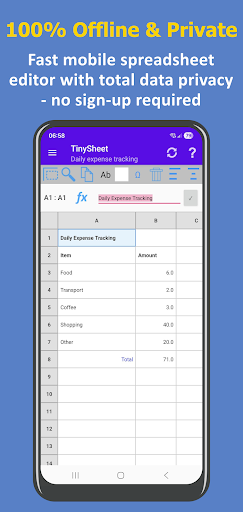
TinySheet ist eine schnelle, schlanke und auf Datenschutz ausgerichtete Tabellenkalkulations-App für Mobilgeräte – ideal für schnelle Aufgaben im Alltag, die persönliche Budgetplanung oder die Organisation zu Hause. Sie funktioniert komplett offline und ist absolut unkompliziert.
Hauptfunktionen
100 % offline & privat (kein Login erforderlich)
Genießen Sie maximalen Datenschutz und sofortigen Zugriff. Es sind weder Benutzerkonten noch eine Cloud-Anbindung oder Registrierung erforderlich.
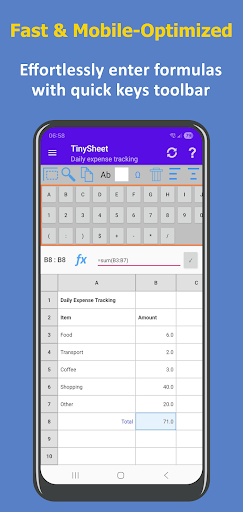
Schnelle, für Mobilgeräte optimierte Tabelle (26 × 512)
Speziell für mobile Bildschirme entwickelt: blitzschnelle Performance und flüssige Navigation – ganz ohne unnötigen Ballast.
Unterstützung für grundlegende Formeln
Erledigen Sie Berechnungen mühelos mit den wichtigsten Funktionen, darunter SUMME, DURCHSCHNITT, ANZAHL, MIN und MAX.
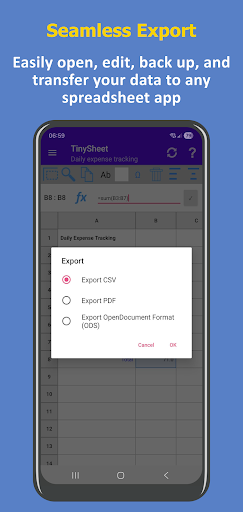
Nahtloser CSV-Import & -Export
Öffnen, sichern und übertragen Sie Ihre Daten ganz einfach – kompatibel mit gängigen Tabellenkalkulationsprogrammen.
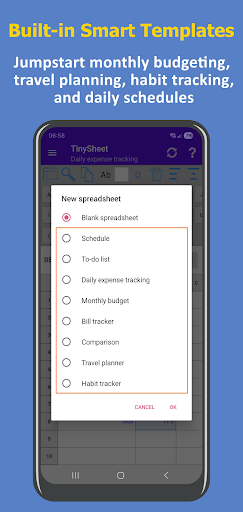
Integrierte, intelligente Vorlagen
Starten Sie sofort durch – mit praktischen Vorlagen für monatliche Budgets, Reiseplanung, Gewohnheitsverfolgung, Tagespläne und mehr.
Premium-Funktionen (via In-App-Kauf)
AES-Passwortschutz
Schützen Sie Ihre sensiblen Dateien und persönlichen Finanzdaten durch eine robuste AES-Verschlüsselung.
Export- & Druckfunktionen freischalten
Steigern Sie Ihre Produktivität mit erweiterten Export- und Freigabeoptionen:
OpenDocument-Tabellenkalkulation (.ODS-Export): Exportieren Sie Dateien, die mit LibreOffice, OpenOffice und Google Sheets kompatibel sind.
PDF-Export: Wandeln Sie Ihre Tabellen in übersichtliche, druckfertige PDF-Dokumente um.
Direktdruck: Drucken Sie Ihre Tabellen direkt von Ihrem Android-Gerät aus.
Markenhinweise
Excel, Google Sheets, LibreOffice und OpenOffice sind Marken oder eingetragene Marken ihrer jeweiligen Inhaber. TinySheet ist eine unabhängige Anwendung und steht in keiner Verbindung zu diesen Unternehmen; sie wird von diesen weder unterstützt noch gesponsert.
Mostra altro

1. Scarica il programma di installazione di MEmu e completa l'installazione

2. Avvia il Memu e apri il Google Play sulla homepage

3. Cerca Tiny Sheet: Easy Spreadsheet in Google Play
Install
4. Scarica e installa Tiny Sheet: Easy Spreadsheet
5. Al termine dell'installazione, fai clic sull'icona per avviar

6. Divertiti giocando a Tiny Sheet: Easy Spreadsheet su PC con MEmu
MEmu App Player è il miglior emulatore Android gratuito, utilizzato da 50 milioni di persone per ottenere un'esperienza di gioco Android superba. La tecnilogia di virtualizzazione MEmu ti permette di giocare a migliaia di giochi Android con semplicità sul tuo computer, anche i giochi con la grafica più esigente.
Schermo più grande con una grafica migliore; Lunga durata, senza limitazione di batteria o dati mobili.
Supporto completo per mappa di tastiera per un controllo preciso di tastiera e mouse o gamepad.
Multipli account di gioco o attività su un singolo PC contemporaneamente con il gestore di multi istanza.
Use Tiny Sheet: Easy Spreadsheet on PC by following steps: