ToneASAP: Adapt Guitar Tone
Aggiornata
Versione corrente
5.6.10
Offerta da

Non devi più preoccuparti dei sovraccarichi durante l'utilizzo di ToneASAP: Adapt Guitar Tone sul tuo cellulare, liberati dal piccolo schermo e goditi dell'App su uno schermo molto più grande. D'ora in poi, sperimenta la tua App a schermo intero con tastiera e mouse. MEmu ti offre tutte le sorprendenti funzioni che ti aspettavi: installazione rapida e impostazione semplice, controlli intuitivi, niente più limitazioni di batteria, dati mobili e chiamate fastidiose. Il MEmu 9 nuovo di zecca è la prima scelta per utilizzare ToneASAP: Adapt Guitar Tone sul tuo computer. Codificato con il nostro assorbimento, il gestore multi-istanza consente di aprire 2 o più account contemporaneamente. E soprattutto, il nostro esclusivo motore di emulazione può sbloccare il pieno potenziale del tuo PC, rendendo tutto liscio e piacevole.
Mostra altro
Goditi un'esperienza straordinaria con ToneASAP: Adapt Guitar Tone su PC con MEmu Play. È un potente emulatore Android gratuito che ti offre migliaia di app Android per la versione desktop. Divertiti a connetterti con gli amici e a perfezionare il tuo lavoro con maggiore efficienza! THE TONEASAP DIFFERENCE.
THE TONEASAP DIFFERENCE
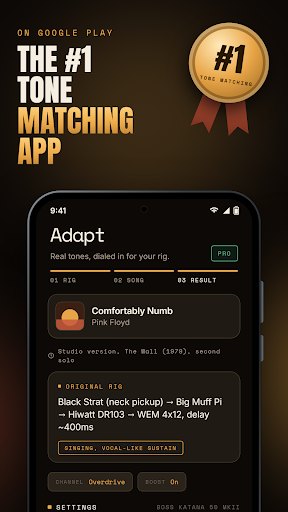
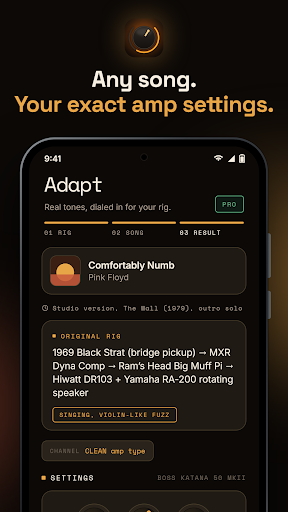
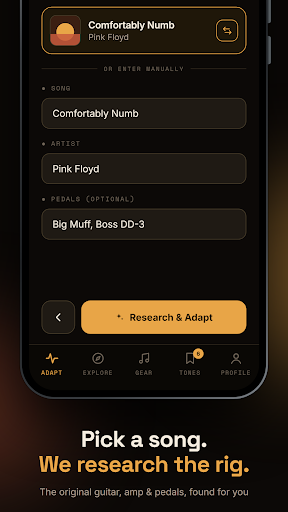
Most tone guides just copy the original artist's rig settings. That is completely useless if you don't own their multi-thousand-dollar setup. ToneASAP works as a guitar tone adapter — it analyzes the target tone and dynamically recalculates the exact knob positions required to replicate it on your specific amplifier, guitar, and pedals.
POWERED BY LIVE WEB SEARCH
Unlike basic apps built on fixed, outdated databases, ToneASAP utilizes a live search engine before generating a match. It instantly scans rig rundowns, expert forums, and artist interviews to find authentic source data, giving you transparent, current insights for every single match.
PRO-LEVEL DIAL-IN DATA
With every ToneASAP match, you get a complete, tailored blueprint:
• Precise Amp Settings: Exact positions for Gain, Bass, Mid, Treble, Presence, Reverb, and Master.
• Guitar Optimization: Recommended pickup selections (Bridge, Neck, Middle) and coil configurations.
• Signal Chain Mapping: Exact pedal configurations and the optimal ordering for your effects.
• The "Why" Factor: Clear, brief explanations of why these specific settings were chosen for your rig.
• Play Along: A direct link to tabs and chords for the song.
UNIVERSAL GEAR COMPATIBILITY
The ToneASAP engine is engineered to calculate highly accurate configurations across an immense variety of gear styles, modeling platforms, and physical setups:
• Amplifier Formats: Deep compatibility with modeling, solid-state, and tube styles (optimized for configurations found in Boss Katana, Fender, Marshall, Line 6, Vox, Orange, and Blackstar systems).
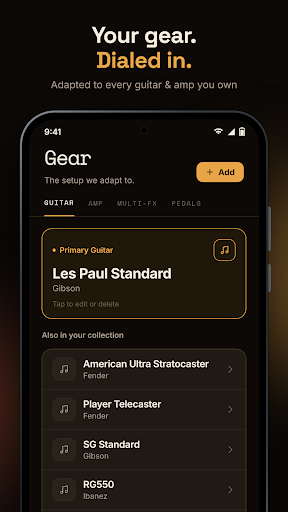
• Guitar Layouts: Tailored profiles for single-coil, humbucker, and P90 instruments (perfect for Stratocaster, Telecaster, Les Paul, and SG style builds).
• Multi-FX & Digital Rigs: Advanced parameters for modern modelers like Helix, HX Stomp, Kemper, Quad Cortex, and Pod Go.
ANY ERA, ANY GENRE
From vintage blues and classic rock to modern metal, pop, jazz, and indie deep cuts, ToneASAP delivers precise tracking for both electric guitar and bass tones.
BUILT FOR ANDROID
Built for Android from the ground up: fast, simple, and focused on getting you playing.
ELEVATE YOUR PLAYING
• Bedroom Guitarists: Sound exactly like your favorite records on your everyday practice rig.
• Cover Bands: Nail the record-accurate tones your audience expects during live sets.
• Gear Enthusiasts: Unlock the absolute hidden potential of budget or modeling gear.
• Tone Chasers: Adapt your tone to match any song, any era, on the gear you already own.
BUILD YOUR PERSONAL TONE LIBRARY
Save your perfect matches, sort them by song or artist, and quickly share dial-in sheets with your bandmates or students.
Start adapting your tone today with 1 free match.
Upgrade to Pro for unlimited tone adaptations.
---
Disclaimer: ToneASAP is developed and published independently by OVRN and is not affiliated with, endorsed by, or connected to any other app, company, or website. All product names, logos, brands, trademarks, and registered trademarks are property of their respective owners. All company, product, and service names used in this description are for identification and compatibility illustration purposes only. Use of these names, trademarks, and brands does not imply endorsement or affiliation.
Mostra altro

1. Scarica il programma di installazione di MEmu e completa l'installazione

2. Avvia il Memu e apri il Google Play sulla homepage

3. Cerca ToneASAP: Adapt Guitar Tone in Google Play
Install
4. Scarica e installa ToneASAP: Adapt Guitar Tone
5. Al termine dell'installazione, fai clic sull'icona per avviar

6. Divertiti giocando a ToneASAP: Adapt Guitar Tone su PC con MEmu
MEmu App Player è il miglior emulatore Android gratuito, utilizzato da 50 milioni di persone per ottenere un'esperienza di gioco Android superba. La tecnilogia di virtualizzazione MEmu ti permette di giocare a migliaia di giochi Android con semplicità sul tuo computer, anche i giochi con la grafica più esigente.
Schermo più grande con una grafica migliore; Lunga durata, senza limitazione di batteria o dati mobili.
Supporto completo per mappa di tastiera per un controllo preciso di tastiera e mouse o gamepad.
Multipli account di gioco o attività su un singolo PC contemporaneamente con il gestore di multi istanza.
Use ToneASAP: Adapt Guitar Tone on PC by following steps: