荒野の生存
更新日
現在のバージョン
2.4.4
提供元

スマホ不要!プロ選手のようにキーボードとマウスで操作しよう。MEmuエミュはあなたにすべての期待を与える。電池が切れてしまうとか画面が小さいとかの問題を心配する必要がなくて、存分荒野の生存を楽しんでください。新しいMEmuエミュ7はPCで荒野の生存をプレイするのに最適!完璧なキーマッピングシステムにより、まるでパソコンゲームみたい。マルチインスタンスで複数のゲームやアプリを同時に実行!唯一無二な仮想化エンジンがパソコンの可能性を最大限になる。遊べるだけでなく、より楽しめる!
もっと見る
荒野の生存をPCでダウンロード!大画面でより楽しむ。電源が落ちてしまうとか通信料が足りないとかの問題を心配する必要がなく、PCの大画面でより快適にゲームを楽しましょう! Telegram Chat: @MAROONEDGAME.
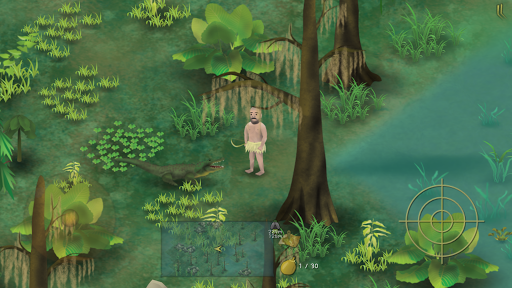
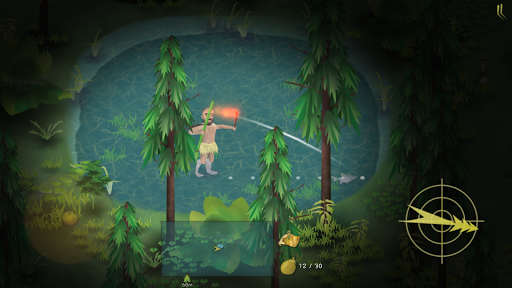
Telegram Chat: @MAROONEDGAME
Reddit BBS: https://www.reddit.com/r/MaroonedGamer/
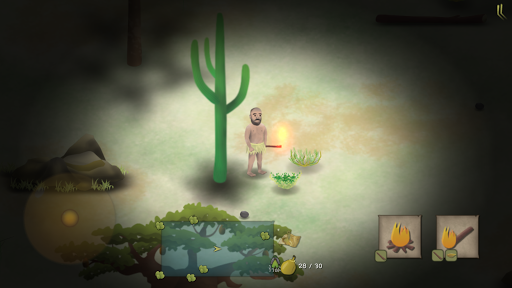
In the game,Players play role of Ed and survive in different enviornment of the world,such as Thailand Jungle, Philippine island,African Plain and etc. You will have no tools,no clothes,no food,no water,and not even a knife.Despite such condition,dogged Ed can still overcome the harsh environment and live well.
【Game Features】
->So large area
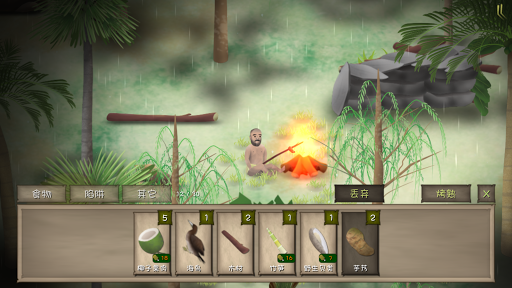
The area is very large in each scene.You can set up a camp and make a campfire anywhere.You can put traps where you think it is easy to catch animals. When raining,you can use containers to hold water.When you can see nothing in the dark night,you can use torch to help you.
->Search secret tasks in the game
There are two secret missions in each scene. You need to find it by yourself .Sometimes it will appear under specical conditions.You will get special gifts after completing the main task and hidden tasks.
->Catch and hunt is skilled work
There are many throwing tools in the game,such as stones,bamboo forks,and bows and arrows.Sometimes you will run into preys ,such as the rabbits on grassland,the fishes in the pond and etc. You need to use different tools to catch them.
->How to do when you face a large dangerous animial?
When you survive several days,sometimes you will run into some large dangerous animials,such as the wolfs in the Thailand Jungle,the hyenas on African Grassland,and the crocodiles in the Marshland. If you have throwing tools ,you can hit them.Otherwise ,you ‘d better run as fast as you can.
->Temptation of food
You can cook in each scene. You need to collect different kinds of food first. The long you survived , more dishes you must need to improve your health.
もっと見る

1. MEmuインストーラーをダウンロードしてセットアップを完了する

2. MEmuを起動し、デスクトップでのPlayストアを開く

3. Playストアで荒野の生存を検索する
Install
4. 荒野の生存をダウンロードしてインストールする
5. インストールが完了したら、アイコンをクリックしてスタート

6. MEmuを使用してPCで荒野の生存を楽しむ
MEmu App Playerは最高の無料で提供されるAndroidエミュレータで、5,000万人がすでに優れたAndroidゲーム体験を楽しんでいます。 MEmuの仮想化技術は、あなたのPCで何千ものAndroidゲームを快適にプレイすることを可能にします。
大画面でより精細;無限の待機、電池とドラフィックの極限を超え
キーボード・マウス・コントローラーを全力でサポート、より快適
マルチインスタンスで複数のゲームを同時に実行
Play 荒野の生存 on PC by following steps: