Playtime Chapter 5
更新日
現在のバージョン
提供元

スマホ不要!プロ選手のようにキーボードとマウスで操作しよう。MEmuエミュはあなたにすべての期待を与える。電池が切れてしまうとか画面が小さいとかの問題を心配する必要がなくて、存分Playtime Chapter 5を楽しんでください。新しいMEmuエミュ7はPCでPlaytime Chapter 5をプレイするのに最適!完璧なキーマッピングシステムにより、まるでパソコンゲームみたい。マルチインスタンスで複数のゲームやアプリを同時に実行!唯一無二な仮想化エンジンがパソコンの可能性を最大限になる。遊べるだけでなく、より楽しめる!
もっと見る
Playtime Chapter 5をPCでダウンロード!大画面でより楽しむ。電源が落ちてしまうとか通信料が足りないとかの問題を心配する必要がなく、PCの大画面でより快適にゲームを楽しましょう! Step into the next chapter of fear and mystery with Chapter 5, where every corner hides danger and every clue brings you closer to the truth.



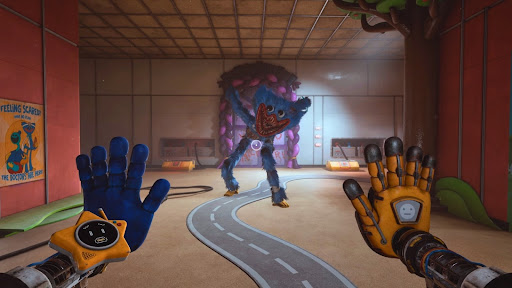
Step into the next chapter of fear and mystery with Chapter 5, where every corner hides danger and every clue brings you closer to the truth. This installment expands the experience with a larger, more interactive world, deeper puzzles, and an even darker storyline. Prepare yourself—this is not just a game, it’s a test of survival.
Key Features:
Explore a Living Sandbox
Roam freely through a massive, open environment filled with interactive elements. Search every corner, uncover secrets, and use your surroundings wisely to escape the unknown.
Challenging Puzzles
Put your mind to the test with advanced puzzles that demand logic, attention, and creativity. Each solution reveals more about the hidden story.
Deep Storyline
Experience a gripping narrative packed with unexpected twists. Your decisions shape the journey as you uncover the secrets buried within this haunting world.
Stunning Visuals
Enjoy detailed environments, realistic lighting, and eerie atmospheres that pull you deeper into the horror experience.
New Characters
Encounter mysterious allies and terrifying enemies, each adding new layers to the unfolding story.
Intense Gameplay
Navigate through hidden paths, secret rooms, and unpredictable challenges that keep you constantly on edge.
Why This Chapter Stands Out:
Immersive Storytelling
The tension rises as the story unfolds, delivering a deeper and more engaging experience than ever before.
Freedom to Play Your Way
The sandbox design allows for multiple strategies, encouraging exploration and creative problem-solving.
Dark and Atmospheric World
Every sound and shadow is designed to keep you alert, making each moment feel intense and unpredictable.
The mystery grows darker, and the stakes are higher than ever. Will you uncover the truth, or become part of the nightmare?
What’s New:
Expanded Locations
Discover new, larger areas filled with secrets, interactions, and hidden details.
Enhanced Puzzle Mechanics
Face more dynamic and varied challenges that require strategy and quick thinking.
Improved Controls
Enjoy smoother gameplay with optimized controls designed for a better mobile experience.
Get ready to dive into a world of fear, mystery, and survival. The question is—can you escape before it’s too late?
もっと見る

1. MEmuインストーラーをダウンロードしてセットアップを完了する

2. MEmuを起動し、デスクトップでのPlayストアを開く

3. PlayストアでPlaytime Chapter 5を検索する
Install
4. Playtime Chapter 5をダウンロードしてインストールする
5. インストールが完了したら、アイコンをクリックしてスタート

6. MEmuを使用してPCでPlaytime Chapter 5を楽しむ
MEmu App Playerは最高の無料で提供されるAndroidエミュレータで、5,000万人がすでに優れたAndroidゲーム体験を楽しんでいます。 MEmuの仮想化技術は、あなたのPCで何千ものAndroidゲームを快適にプレイすることを可能にします。
大画面でより精細;無限の待機、電池とドラフィックの極限を超え
キーボード・マウス・コントローラーを全力でサポート、より快適
マルチインスタンスで複数のゲームを同時に実行
Play Playtime Chapter 5 on PC by following steps: