
Web / Lan Poker 8 - Cross Os
更新日
現在のバージョン
2.8.8
提供元

スマホ不要!プロ選手のようにキーボードとマウスで操作しよう。MEmuエミュはあなたにすべての期待を与える。電池が切れてしまうとか画面が小さいとかの問題を心配する必要がなくて、存分Web / Lan Poker 8 - Cross Osを楽しんでください。新しいMEmuエミュ7はPCでWeb / Lan Poker 8 - Cross Osをプレイするのに最適!完璧なキーマッピングシステムにより、まるでパソコンゲームみたい。マルチインスタンスで複数のゲームやアプリを同時に実行!唯一無二な仮想化エンジンがパソコンの可能性を最大限になる。遊べるだけでなく、より楽しめる!
もっと見る
Web / Lan Poker 8 - Cross OsをPCでダウンロード!大画面でより楽しむ。電源が落ちてしまうとか通信料が足りないとかの問題を心配する必要がなく、PCの大画面でより快適にゲームを楽しましょう! Web Poker 8 (Texas Holdem).
Web Poker 8 (Texas Holdem)
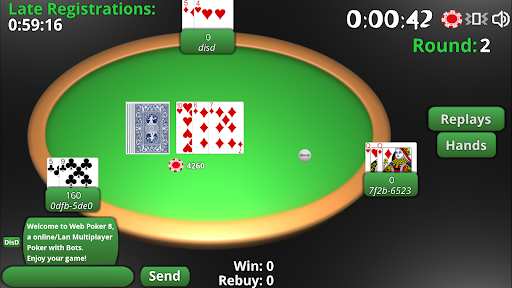
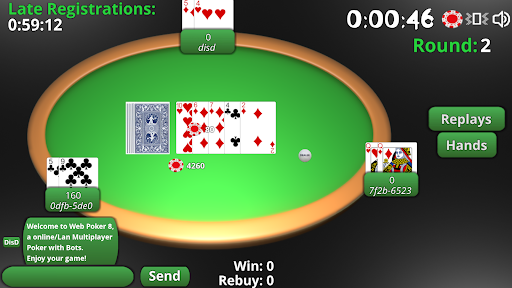
Web Poker 8 is an engaging multiplayer Texas Holdem game that allows up to 8 players to join from their Android smartphones or computers running Linux, macOS, or Windows. Experience the thrill of poker with friends or challenge computer bots in a seamless and interactive environment.
Features:
Multiplayer Gameplay: Play with up to 8 players in a single game session.
Cross-Platform Compatibility: Available on Android smartphones and computers (Linux, macOS, Windows).
AI Opponents: Play against computer bots when friends are not available.
How to Play:
Via Local Network (wLAN):
Host Setup:
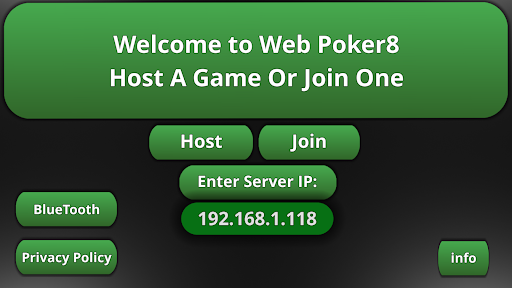
One player acts as the server. Click the "Host" button on their device.
Share the local device IP displayed in the top-left corner (e.g., "192.168..") with other players.
Client Setup:
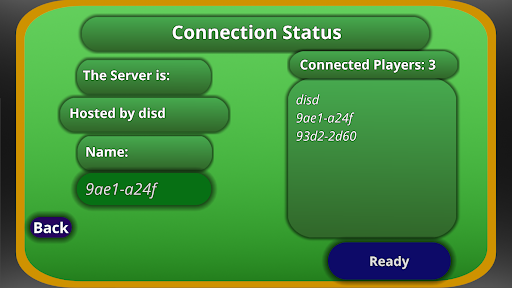
Other players enter the shared IP address in the "Enter Server IP:" field to join the game.
Via Internet:
Server Setup:
The host player, who must be behind a router with uPnP enabled, clicks the "Host" button.
Obtain the public IP address by searching "my IP" on Google or checking router configurations.
Share the public IP address with other players.
Client Setup:
Other players enter the shared public IP address in the "Enter Server IP:" field to join the game.
Additional Features:
Game Continuity: At the end of each game, you'll see if you’ve won or not. Players can disconnect and reconnect as needed.
Session Management: If you pause the game or switch to another app, you’ll be disconnected, but can reconnect by restarting the app.
Troubleshooting:
If the game doesn’t work on the first try, close the app and restart it.
Download:
PC Versions (Linux, macOS, Windows)
Acknowledgments:
Icon: Created by Midjourney.
Special Thanks: Mathias (Ron), Uidas, all testers, and the Godot Team.
We welcome your feedback and suggestions to improve Web Poker 8. Enjoy the game and may the best hand win!
もっと見る

1. MEmuインストーラーをダウンロードしてセットアップを完了する

2. MEmuを起動し、デスクトップでのPlayストアを開く

3. PlayストアでWeb / Lan Poker 8 - Cross Osを検索する
Install
4. Web / Lan Poker 8 - Cross Osをダウンロードしてインストールする
5. インストールが完了したら、アイコンをクリックしてスタート

6. MEmuを使用してPCでWeb / Lan Poker 8 - Cross Osを楽しむ
MEmu App Playerは最高の無料で提供されるAndroidエミュレータで、5,000万人がすでに優れたAndroidゲーム体験を楽しんでいます。 MEmuの仮想化技術は、あなたのPCで何千ものAndroidゲームを快適にプレイすることを可能にします。
大画面でより精細;無限の待機、電池とドラフィックの極限を超え
キーボード・マウス・コントローラーを全力でサポート、より快適
マルチインスタンスで複数のゲームを同時に実行
Play Web / Lan Poker 8 - Cross Os on PC by following steps: