Web / Lan Poker 8 - Cross Os
Actualizada
Versión actual
2.8.8
Ofrecida por

Con toda tu pasión para jugar Web / Lan Poker 8 - Cross Os, no se supone que tus manos estén limitadas en una pequeña pantalla de tu teléfono. Juega como un profesional y obtén el control total de tu juego con el teclado y el mouse. MEmu le ofrece todas las cosas que espera. Descargar y jugar Web / Lan Poker 8 - Cross Os en PC. Juega todo el tiempo que quieras, sin más limitaciones de batería, datos móviles y llamadas molestas. El nuevo MEmu 9 es la mejor opción para jugar Web / Lan Poker 8 - Cross Os en PC. Preparado con nuestra experiencia, el exquisito sistema de keymapping preestablecido convierte a Web / Lan Poker 8 - Cross Os en un verdadero juego de PC. Codificado con nuestra absorción, el administrador de instancias múltiples hace posible jugar 2 o más cuentas en el mismo dispositivo. Y lo más importante, nuestro exclusivo motor de emulación puede liberar todo el potencial de su PC, hacer que todo sea más fluido. Nos importa no solo cómo juegas, sino también todo el proceso de disfrutar de la felicidad de los juegos.
Más detalles
Descargar Web / Lan Poker 8 - Cross Os en PC con MEmu Android Emulador. Disfruta jugando en la pentalla grande. Web Poker 8 (Texas Holdem).
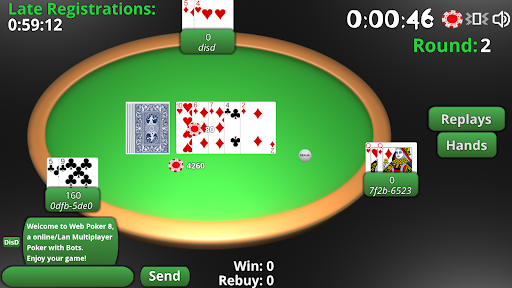
Web Poker 8 (Texas Holdem)
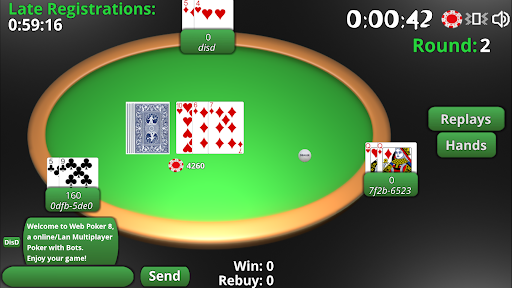
Web Poker 8 is an engaging multiplayer Texas Holdem game that allows up to 8 players to join from their Android smartphones or computers running Linux, macOS, or Windows. Experience the thrill of poker with friends or challenge computer bots in a seamless and interactive environment.
Features:
Multiplayer Gameplay: Play with up to 8 players in a single game session.
Cross-Platform Compatibility: Available on Android smartphones and computers (Linux, macOS, Windows).
AI Opponents: Play against computer bots when friends are not available.
How to Play:
Via Local Network (wLAN):
Host Setup:
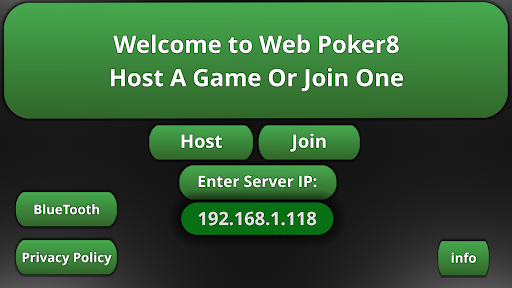
One player acts as the server. Click the "Host" button on their device.
Share the local device IP displayed in the top-left corner (e.g., "192.168..") with other players.
Client Setup:
Other players enter the shared IP address in the "Enter Server IP:" field to join the game.
Via Internet:
Server Setup:
The host player, who must be behind a router with uPnP enabled, clicks the "Host" button.
Obtain the public IP address by searching "my IP" on Google or checking router configurations.
Share the public IP address with other players.
Client Setup:
Other players enter the shared public IP address in the "Enter Server IP:" field to join the game.
Additional Features:
Game Continuity: At the end of each game, you'll see if you’ve won or not. Players can disconnect and reconnect as needed.
Session Management: If you pause the game or switch to another app, you’ll be disconnected, but can reconnect by restarting the app.
Troubleshooting:
If the game doesn’t work on the first try, close the app and restart it.
Download:
PC Versions (Linux, macOS, Windows)
Acknowledgments:
Icon: Created by Midjourney.
Special Thanks: Mathias (Ron), Uidas, all testers, and the Godot Team.
We welcome your feedback and suggestions to improve Web Poker 8. Enjoy the game and may the best hand win!
Más detalles

1. Descargar el instalador de MEmu y finalice la instalación

2. Iniciar MEmu y abrir Google Play en la página de inicio

3. Buscar Web / Lan Poker 8 - Cross Os en Google Play
Install
4. Descargar y instalar Web / Lan Poker 8 - Cross Os
5. Hacer click al icono para iniciar

6. Disfruta jugando Web / Lan Poker 8 - Cross Os en PC con MEmu
MEmu App Player es el mejor emulador de Android gratuito y 50 millones de personas ya están disfrutando su magnífica experiencia jugando en Android. La tecnología de virtualización de MEmu te permite jugar a miles de juegos Android suavemente en tu PC, incluso los más intensivos gráficamente.
Pantalla más grande con mejores gráficos; Larga duración, sin limitación de batería o datos móviles.
Soporte completo de keymapping para un control preciso del teclado y el mouse o gamepad.
Múltiples cuentas de juegos o tareas en una sola PC a la vez con el administrador de instancias múltiples.
Play Web / Lan Poker 8 - Cross Os on PC by following steps: