All Audio Converter - MP3,MP4
更新日
現在のバージョン
3.1.1
提供元

スマートフォンは不要!パソコンと同じようにキーボードとマウスで操作できます。MEmu Playは、あなたが待ち望んでいたすべての楽しみをお届けします。バッテリー残量や小さな画面を気にすることなく、All Audio Converter - MP3,MP4をご利用ください。最新のMEmu 9は、All Audio Converter - MP3,MP4をPCで体験するのに最適です!完璧なキーマッピングシステムにより、PCのようなスムーズな操作性を実現します。マルチインスタンス機能により、複数のアプリケーションを同時に実行できます。独自の仮想化エンジンがPCのパフォーマンスを最大限に引き出します。アプリを使用するだけでなく、高品質な体験を得ることができます。
もっと見る
MEmu Playを使えば、PCでAll Audio Converter - MP3,MP4を快適に楽しめます。何千ものAndroidアプリをデスクトップ版で利用できる、パワフルな無料Androidエミュレーターです。友達とつながり、より効率的に作品を磨き上げましょう! Audio Converter & Editor is the all-in-one audio toolkit for Android — convert, compress, cut, merge, enhance, analyze, and play almost any audio format.
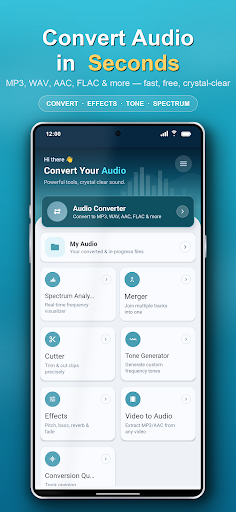
Audio Converter & Editor is the all-in-one audio toolkit for Android — convert, compress, cut, merge, enhance, analyze, and play almost any audio format. Extract audio from video, split songs into separate stems, fix problem files with an AI audio doctor, generate tones, and set custom ringtones — all in one fast, free, and easy-to-use app.
Need to turn a song into a ringtone, change M4A to MP3, shrink a large file, or pull the audio out of a video? Do it all in one app, with a clean interface anyone can use.
SUPPORTED FORMATS
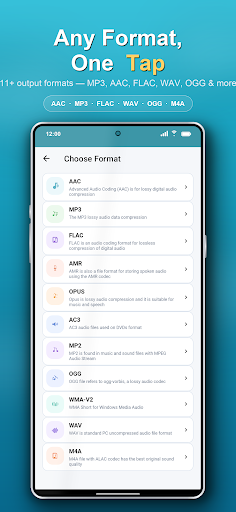
MP3, AAC, M4A, OGG, WAV, WMA, AC3, FLAC, OPUS, AMR, MP2 and many more — convert between virtually any audio format with high quality and minimal loss.
KEY FEATURES
▸ Audio Converter
Convert audio to MP3, AAC, M4A, WAV, FLAC, OGG and other formats in seconds. Perfect for making files compatible with any device or player.
▸ Audio Compressor
Reduce file size to save storage and share faster — control bitrate to balance quality and size exactly how you want.
▸ Audio Cutter & Trimmer
Cut, trim, and crop audio with precision. Keep only the part you need and create the perfect ringtone or clip.
▸ Audio Merger / Joiner
Combine multiple songs or clips into one seamless file. Merge unlimited tracks in any format.
▸ Video to Audio (Video to MP3)
Extract audio from video and save it as MP3 or any format — ideal for music, podcasts, lectures, and voice notes.
▸ Audio Effects
Enhance your sound with real-time audio effects and preview changes before you save.
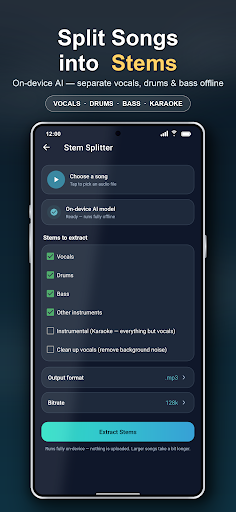
▸ AI Stem Splitter
Separate any song into individual stems — vocals, drums, bass, and other instruments — using on-device AI. Runs fully offline, no upload required. Great for remixes, karaoke tracks, practice, and sampling.
▸ AI Audio Doctor
Automatically diagnose audio problems — corrupted files, wrong sample rates, playback errors — and fix them in one tap. Recover, remux, resample, or re-encode damaged audio with no technical know-how.
▸ Tone & Frequency Generator
Generate pure tones, test frequencies, sweeps, sirens, and waveforms (sine, square, triangle, sawtooth) — great for sound tests, tuning, and experiments.
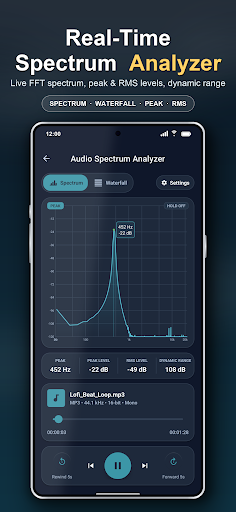
▸ Audio Spectrum Analyzer
Visualize the frequency spectrum of your audio in real time for accurate editing and analysis.
▸ Built-in Audio Player
Play almost any audio file directly in the app, with wide codec and format support.
▸ Ringtone, Alarm & Notification Maker
Set any converted or trimmed file as your ringtone, alarm, or notification tone in one tap.
▸ Advanced Customization
Fine-tune bitrate, sample rate (frequency), channels, volume, speed, and metadata tags while converting for the best possible result.
▸ Batch Processing & Conversion Queue
Convert, cut, and merge multiple files at once and track everything in a simple queue — saving you time and effort.
▸ Detailed Audio Info
View full file details including format, bitrate, sample rate, channels, and duration.
WHY CHOOSE AUDIO CONVERTER & EDITOR?
• AI-powered audio tools: stem splitter, audio doctor & smart optimizer
• Clean, modern, beginner-friendly interface
• High-speed conversion with quality preservation
• No complicated settings — yet powerful when you need control
• Light & dark theme support
PERFECT FOR
• Making custom ringtones from your favorite songs
• Converting M4A, WAV, or FLAC to MP3 (and back)
• Extracting MP3 audio from videos
• Compressing audio to share on WhatsApp, email, or social apps
• Trimming podcasts, lectures, voice recordings, and music
• Merging tracks into mixes, mashups, or audiobooks
Whether you're a music lover, content creator, podcaster, student, or just want to manage audio on your phone, Audio Converter & Editor gives you everything in one lightweight app.
Download Audio Converter & Editor now and take full control of your audio — convert, edit, and personalize your sound the easy way!
We'd love your feedback. If you enjoy the app, please rate us ⭐⭐⭐⭐⭐ and share your suggestions to help us improve.
もっと見る

1. MEmuインストーラーをダウンロードしてセットアップを完了する

2. MEmuを起動し、デスクトップでのPlayストアを開く

3. PlayストアでAll Audio Converter - MP3,MP4を検索する
Install
4. All Audio Converter - MP3,MP4をダウンロードしてインストールする
5. インストールが完了したら、アイコンをクリックしてスタート

6. MEmuを使ってパソコンでAll Audio Converter - MP3,MP4を体験する
MEmu Playは現在、最高の無料Androidエミュレーターであり、5,000万人のユーザーが優れたAndroidアプリ体験を楽しんでいます。MEmuの仮想化テクノロジーにより、数千ものAndroidアプリをコンピューターでスムーズに実行できます。
大画面でより精細;無限の待機、電池とドラフィックの極限を超え
キーボード・マウス・コントローラーを全力でサポート、より快適
マルチインスタンスで複数のゲームを同時に実行
Use All Audio Converter - MP3,MP4 on PC by following steps: