Anime Slayer
更新日
現在のバージョン
1.0
提供元

スマートフォンは不要!パソコンと同じようにキーボードとマウスで操作できます。MEmu Playは、あなたが待ち望んでいたすべての楽しみをお届けします。バッテリー残量や小さな画面を気にすることなく、Anime Slayerをご利用ください。最新のMEmu 9は、Anime SlayerをPCで体験するのに最適です!完璧なキーマッピングシステムにより、PCのようなスムーズな操作性を実現します。マルチインスタンス機能により、複数のアプリケーションを同時に実行できます。独自の仮想化エンジンがPCのパフォーマンスを最大限に引き出します。アプリを使用するだけでなく、高品質な体験を得ることができます。
もっと見る
Anime SlayerをPCでダウンロード!大画面でより楽しむ。電源が落ちてしまうとか通信料が足りないとかの問題を心配する必要がなく、PCの大画面でより快適にゲームを楽しましょう! ntroducing Anime Slayer, your ultimate companion for immersing yourself in the captivating world of anime!

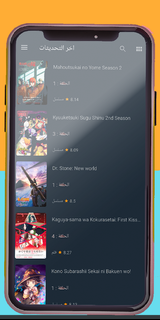
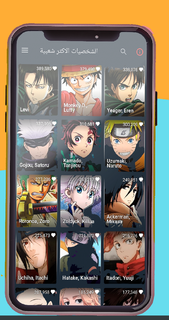
ntroducing Anime Slayer, your ultimate companion for immersing yourself in the captivating world of anime! Immerse yourself in a vast library of exhilarating animated series and movies, accessible right at your fingertips.Explore a boundless collection of the hottest anime slayer titles, spanning various genres and themes. From action-packed adventures and heartwarming romances to thrilling mysteries and epic fantasies, Anime Slayer has it all. Lose yourself in the gripping storylines, beautifully animated visuals, and unforgettable characters that have captured the hearts of millions worldwide.Stay up-to-date with the latest releases and never miss a beat. Anime Slayer offers a seamless and user-friendly interface, ensuring a smooth and enjoyable experience while you indulge in your favorite shows. Dive into an immersive world where your favorite characters come to life, making each moment a thrilling and unforgettable experience.Anime Slayer provides high-quality streaming, delivering crisp visuals and crystal-clear audio to enhance your viewing pleasure. Whether you're watching on your phone, tablet, or casting to your TV, the app adapts seamlessly to your preferred viewing platform. the anime you love anytime, anywhere.Find your next obsession with Anime Slayer's intuitive search and recommendation features. Discover new series based on your preferences, explore trending titles, or dive into classics that have stood the test of time. The app's comprehensive library ensures there's always something new and exciting to explore .Enhance your anime-watching experience by creating personalized playlists and keeping track of your progress. Easily bookmark your favorite moments, mark completed episodes, and receive notifications for new episodes of your followed series. Anime Slayer is designed to make your journey through the anime world effortless and enjoyable.Download Anime Slayer now and unlock a universe of captivating storytelling, stunning visuals, and unforgettable characters. Immerse yourself in the magic of anime and embark on an adventure that will keep you coming back for more. Start your anime journey today with Anime Slayer – the ultimate anime-watching companion!
もっと見る

1. MEmuインストーラーをダウンロードしてセットアップを完了する

2. MEmuを起動し、デスクトップでのPlayストアを開く

3. PlayストアでAnime Slayerを検索する
Install
4. Anime Slayerをダウンロードしてインストールする
5. インストールが完了したら、アイコンをクリックしてスタート

6. MEmuを使ってパソコンでAnime Slayerを体験する
MEmu Playは現在、最高の無料Androidエミュレーターであり、5,000万人のユーザーが優れたAndroidアプリ体験を楽しんでいます。MEmuの仮想化テクノロジーにより、数千ものAndroidアプリをコンピューターでスムーズに実行できます。
大画面でより精細;無限の待機、電池とドラフィックの極限を超え
キーボード・マウス・コントローラーを全力でサポート、より快適
マルチインスタンスで複数のゲームを同時に実行
Use Anime Slayer on PC by following steps: