
Ave.ai - Web3 Trading Wallet
更新日
現在のバージョン
2.2.08
提供元

スマートフォンは不要!パソコンと同じようにキーボードとマウスで操作できます。MEmu Playは、あなたが待ち望んでいたすべての楽しみをお届けします。バッテリー残量や小さな画面を気にすることなく、Ave.ai - Web3 Trading Walletをご利用ください。最新のMEmu 9は、Ave.ai - Web3 Trading WalletをPCで体験するのに最適です!完璧なキーマッピングシステムにより、PCのようなスムーズな操作性を実現します。マルチインスタンス機能により、複数のアプリケーションを同時に実行できます。独自の仮想化エンジンがPCのパフォーマンスを最大限に引き出します。アプリを使用するだけでなく、高品質な体験を得ることができます。
もっと見る
Ave.ai - Web3 Trading WalletをPCでダウンロード!大画面でより楽しむ。電源が落ちてしまうとか通信料が足りないとかの問題を心配する必要がなく、PCの大画面でより快適にゲームを楽しましょう! Ave.
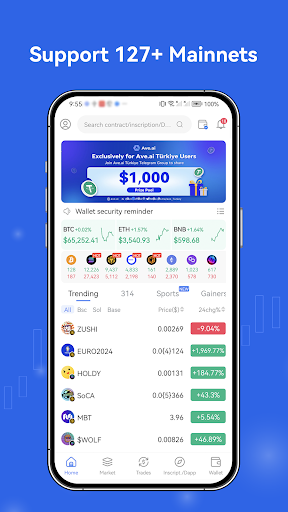
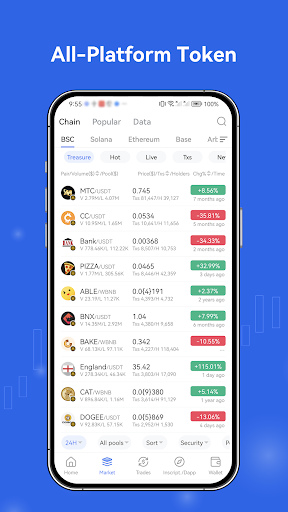
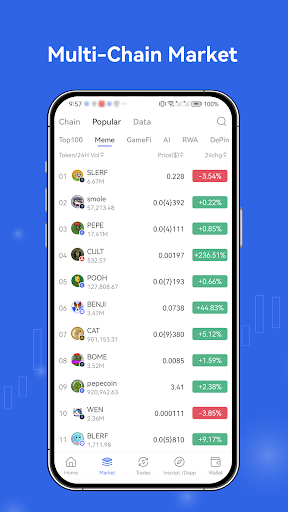
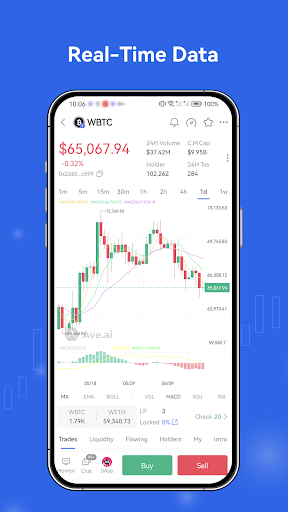
Ave.ai offers a cutting-edge Web3 crypto trading wallet, designed to help crypto traders quickly discover the latest meme coins, trending tokens, and other popular assets. Our wallet provides comprehensive trading data analysis, including on-chain address profiling, smart money insights, and AI-powered trading signals. Additionally, it features real-time data push notifications, price alerts, address monitoring, and advanced on-chain trading functionalities.
Real-Time DEX Data: Stay updated with instant data feeds and real-time notifications. With our superior speed, Ave.ai outpaces platforms like DexScreener and DEXTools, delivering up-to-the-minute meme coin activity directly from the blockchain.
Advanced Data Analytics: Dive deep into DEX address profiling, with features that detect insider trading, identify meme coin creators (DEVs), track smart wallets, influencer (KOL) wallets, bot addresses, and more.
AI-Powered Trading Signals: Get valuable insights from AI-driven signals, including smart money capital flows, DEV activity history, and whale purchasing events, enabling you to make more informed trading decisions.
Comprehensive On-Chain Data: Ave.ai offers a richer data experience than blockchain explorers like Etherscan, Solscan, and Bscscan. Users can track any wallet's transaction history, analyze asset performance, and explore detailed token operations, such as identifying DEV behaviors, helping traders make smarter decisions and efficiently track wallet activities.
Advanced Trading Features: Execute trades on any meme coin with support for order placement, take profit and stop loss settings, MEV protection, and more. Our upcoming Bot integration will introduce advanced trading strategies, including sniping, copy trading, and RugPull protection.
Support for 130+ Networks: Including Ethereum, Solana, BNB Chain, Bitcoin, TON, Base, TRON, Polygon, Optimism, Arbitrum, Linea, Avalanche, and many others.
Access to 300+ DEX Markets: Aggregating markets from Uniswap, Raydium, PancakeSwap, Pump.fun, SunPump, SushiSwap, Orca, and over 300 other DEXes.
Support for Multiple Asset Protocols: Including NFTs, BRC20, Runes, ARC20, Inscriptions, and more.
もっと見る

1. MEmuインストーラーをダウンロードしてセットアップを完了する

2. MEmuを起動し、デスクトップでのPlayストアを開く

3. PlayストアでAve.ai - Web3 Trading Walletを検索する
Install
4. Ave.ai - Web3 Trading Walletをダウンロードしてインストールする
5. インストールが完了したら、アイコンをクリックしてスタート

6. MEmuを使ってパソコンでAve.ai - Web3 Trading Walletを体験する
MEmu Playは現在、最高の無料Androidエミュレーターであり、5,000万人のユーザーが優れたAndroidアプリ体験を楽しんでいます。MEmuの仮想化テクノロジーにより、数千ものAndroidアプリをコンピューターでスムーズに実行できます。
大画面でより精細;無限の待機、電池とドラフィックの極限を超え
キーボード・マウス・コントローラーを全力でサポート、より快適
マルチインスタンスで複数のゲームを同時に実行
Use Ave.ai - Web3 Trading Wallet on PC by following steps: