Avee Music Player (Pro)
更新日
現在のバージョン
1.2.227
提供元

スマートフォンは不要!パソコンと同じようにキーボードとマウスで操作できます。MEmu Playは、あなたが待ち望んでいたすべての楽しみをお届けします。バッテリー残量や小さな画面を気にすることなく、Avee Music Player (Pro)をご利用ください。最新のMEmu 9は、Avee Music Player (Pro)をPCで体験するのに最適です!完璧なキーマッピングシステムにより、PCのようなスムーズな操作性を実現します。マルチインスタンス機能により、複数のアプリケーションを同時に実行できます。独自の仮想化エンジンがPCのパフォーマンスを最大限に引き出します。アプリを使用するだけでなく、高品質な体験を得ることができます。
もっと見る
Avee Music Player (Pro)をPCでダウンロード!大画面でより楽しむ。電源が落ちてしまうとか通信料が足りないとかの問題を心配する必要がなく、PCの大画面でより快適にゲームを楽しましょう! Are you a music enthusiast, music producer, or a social media music video channel maker?
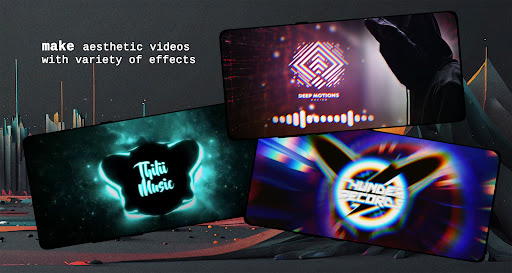
Are you a music enthusiast, music producer, or a social media music video channel maker?
You should definitely try out Avee Music Player app!
This is a kind of music player that gives you the option to listen and visualize all your favorite music beats with its built-in spectrum visualizer templates and, even more, you can edit and personalize music in video maker section to export your creations as unique musical video clips to share with friends and on social media like YouTube, TikTok, Facebook, Instagram, etc.
Explore Avee Music Player FEATURES:
For everyday users:
• Choose this lightweight music player for everyday use
• Enjoy its video player to view recorded content
• Use it to playback most popular formats, such as .mp4, .mp3, .wav, etc.
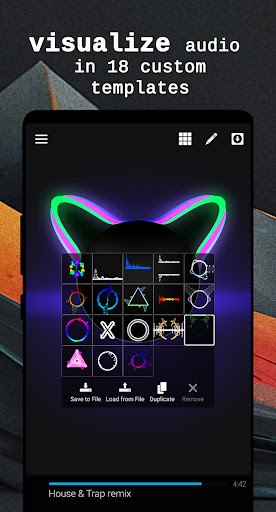
• Visualize audio beats in default spectrum visualizer templates
• Play music in the background while multitasking
• Directly browse content from device folders
• Customize folder shortcuts for fast music access
• Create and save playlists
• Search library, queue, files
• Create and save favorite music in playlists
• Enjoy the benefits of having an equalizer
• Lock screen orientation
• Use sleep timer for bedtime musical journey
• Use media and blue-tooth controls
• Listen to audio streams like internet radio, etc.
For creators:
• Customize or create and save your own visualizer templates
• Export music together with a visualizer to share music videos on YouTube, TikTok, etc.
• Use variable resolutions, such as SD, HD, or up to 4K* video files
• Use variable framerates, such as 25, 30, 50, and 60 FPS
• Use variable aspect ratios, such as 4:3, 16:9, 21:10
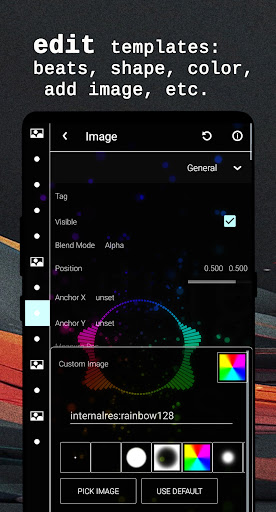
• Add image or animation files, such as .jpg, .png, .gif
• Tweak audio frequencies for desirable movement
• Add multiple art layers
* depends on the device
Unleash your creativity with customizable audio visualizers!
When watching music videos on YouTube, you will see music waves moving up and down to the beat of the music with beautiful colors. Have you ever thought of how to create them? Using this application you can easily create a music video for your favorite song right on your mobile phone or tablet.
These audio visualizers are extensively customizable, allowing you to tweak its color, shape, size, and audio reaction. You can even put your picture or animated .gif file. What is more, you can make your own templates or import the ones shared online. You can also export the present templates for future use.
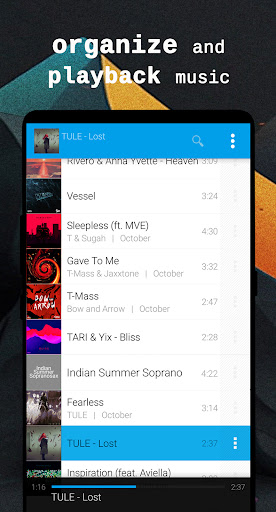
The app’s library has various music browsing options, it also organizes your music into various categories, such as Albums, Artists, and Genres. You can also create your playlist or view songs in folders.
Go PREMIUM*, get freedom!
Unlock more creative Avee Music Player features in editing your personalized content:
• Enjoy full video export settings
• Enjoy full customizing options
• Hide app logo
• Create your own visualizer
• Disable ads
*Premium subscriptions will be automatically renewed at the same price and period unless you cancel it through Google Play.
You are welcome to share your feedback at support@aveeplayer.com with suggestions about its improvement.
Wish you an enjoyable experience of music thrill, video making, spectrum visualizing and much more using the app!
With best regards,
Your Avee Music Player
Note when exporting files: some video codecs are phone specific and for the best user experience start by using “omx.google.h264” video codec.
Special note about Microphone permission:
While this app asks for Microphone permission, it does not access the microphone itself to listen for audio from the device but rather uses this permission to access the global audio stream at the software level. It is used by Native playback engine and is currently kept only for compatibility reasons.
Music used in app promo video:
Song: Curbi - What You Like [NCS10 Release]
Music provided by NoCopyrightSounds
Free Download/Stream: http://NCS.io/WhatYouLike
Watch: http://youtu.be/YQM6Gpyo6U8
もっと見る

1. MEmuインストーラーをダウンロードしてセットアップを完了する

2. MEmuを起動し、デスクトップでのPlayストアを開く

3. PlayストアでAvee Music Player (Pro)を検索する
Install
4. Avee Music Player (Pro)をダウンロードしてインストールする
5. インストールが完了したら、アイコンをクリックしてスタート

6. MEmuを使ってパソコンでAvee Music Player (Pro)を体験する
MEmu Playは現在、最高の無料Androidエミュレーターであり、5,000万人のユーザーが優れたAndroidアプリ体験を楽しんでいます。MEmuの仮想化テクノロジーにより、数千ものAndroidアプリをコンピューターでスムーズに実行できます。
大画面でより精細;無限の待機、電池とドラフィックの極限を超え
キーボード・マウス・コントローラーを全力でサポート、より快適
マルチインスタンスで複数のゲームを同時に実行
Use Avee Music Player (Pro) on PC by following steps: