Brewfather
更新日
現在のバージョン
2.11.5
提供元

スマートフォンは不要!パソコンと同じようにキーボードとマウスで操作できます。MEmu Playは、あなたが待ち望んでいたすべての楽しみをお届けします。バッテリー残量や小さな画面を気にすることなく、Brewfatherをご利用ください。最新のMEmu 9は、BrewfatherをPCで体験するのに最適です!完璧なキーマッピングシステムにより、PCのようなスムーズな操作性を実現します。マルチインスタンス機能により、複数のアプリケーションを同時に実行できます。独自の仮想化エンジンがPCのパフォーマンスを最大限に引き出します。アプリを使用するだけでなく、高品質な体験を得ることができます。
もっと見る
BrewfatherをPCでダウンロード!大画面でより楽しむ。電源が落ちてしまうとか通信料が足りないとかの問題を心配する必要がなく、PCの大画面でより快適にゲームを楽しましょう! Powerful and easy to use tool for your brewing needs.
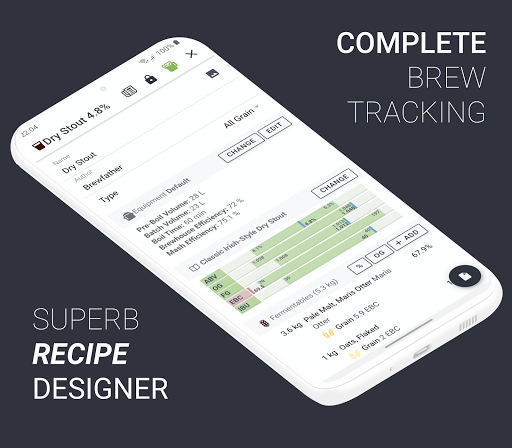
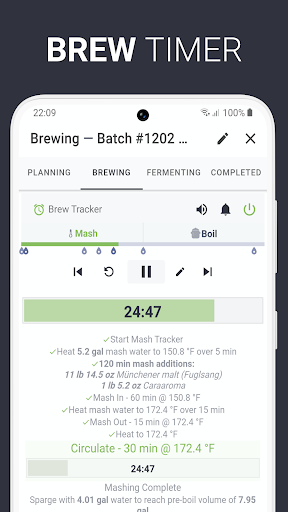
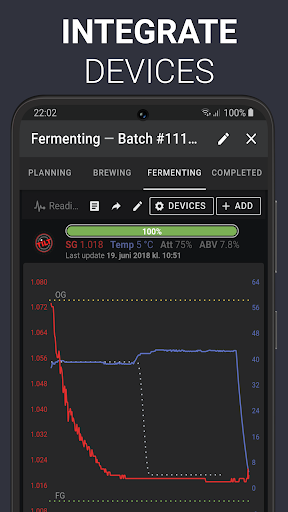
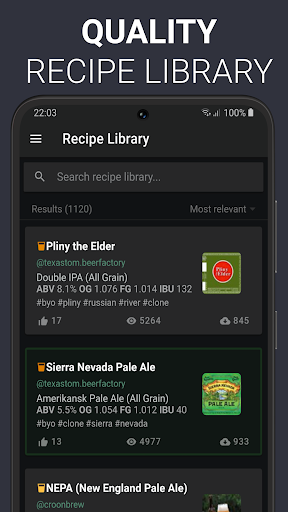
Powerful and easy to use tool for your brewing needs. Easily create and manage your recipes. Keep track of all the details in your batches and your ingredients inventory.
Brewfather is made from the ground up to give you the best recipe design and brewing experience on both desktop and mobile devices. With a modern design that is easy to use. Get your recipes done in no time! With automatic synchronization between all your devices and offline support.
Combining a powerful recipe designer with intuitive batch tracking and inventory management to make your brew-day easier. Integrated with many popular devices to aid your brewing. Explore the recipe library with hundreds of quality recipes.
Features:
* Powerful, intuitive and easy to use interface with dark mode support
* Multi-device support - one app everywhere - always!
* Offline support, auto-saving, and automatic synchronization
* Fully-featured and easy to use recipe designer
* Complete batch tracking - log every step of your brew
* Fermentation chart
* Recipe library with hundreds of quality recipes available for you
* Brew timer with alarms and notifications for your brew day!
* Profiles for your equipment, mash schedule, fermentation steps, and water
* Highly customizable equipment profile to suit any brewing system
* Large customizable ingredients database with thousands of ingredients
* Inventory stock & cost tracking
* Multiple style guidelines (BJCP, Brewers Association, Norbrygg, SHBF, DØDL)
* Supports custom style guidelines
* Print your recipe or batch to PDF
* Import and export BeerXML, easily import all your recipes from BeerSmith or any other brewing software
* Metric and US/Imperial units
* Scale recipes up/down
* Easily share recipes
* Estimate your Final Gravity based on many variables
* Calculate every important detail of your recipes and batches
* Easy to use yeast amount and yeast starter calculator
* Integrated water adjustment calculator with mash pH
* Strike temperature calculation
* Proper calculation of hop-stand bitterness
And many more tools and features to help your brewing.
Integrations:
* Remote logging from Tilt, iSpindel, Brewpiless, MyBrewbot, Plaato Airlock, Plaato Keg and Custom Stream
* Webhook support
* Full SmartPID two-way integration, for brew-day and fermentation control
Equipment profiles: Advanced profile setup available to match any system, included pre-built profiles for all Brewtools, Grainfather G30 and G70, Brewzilla 35L and 65L, Brewie, Brewster, Camurri, PicoBrew Z, Speidel 10L/20L/50L and many more.
Happy brewing!
---
Brewfather is free to use, with an optional Premium subscription to unlock premium features and unlimited recipes/batches.
New accounts get 30 days of free Premium access.
Brewfather Premium:
* Unlimited number of recipes
* Unlimited number of batches
* Import and export features
* Integrate with devices
* Create your public profile and add recipes to the recipe library
* Ingredient cost tracking
* Custom style guidelines
* Ability to restore deleted recipes and batches
* Add manual readings for fermentation chart
Your payment will be charged to your Google Play Account once you confirm your purchase.
Your Google Play account will be charged again when your subscription automatically renews at the end of your current subscription period unless auto-renew is turned off at least 24 hours prior to end of the current period. Any unused portion of a trial period, if offered, will be forfeited when you purchase a subscription.
You can manage or turn off auto-renew in your Google Play Subscription account settings any time after purchase.
---
Privacy Policy: https://docs.brewfather.app/legal/privacy-policy
Terms of Service: https://docs.brewfather.app/legal/tos
Got any questions? Get in touch at hello@brewfather.app
もっと見る

1. MEmuインストーラーをダウンロードしてセットアップを完了する

2. MEmuを起動し、デスクトップでのPlayストアを開く

3. PlayストアでBrewfatherを検索する
Install
4. Brewfatherをダウンロードしてインストールする
5. インストールが完了したら、アイコンをクリックしてスタート

6. MEmuを使ってパソコンでBrewfatherを体験する
MEmu Playは現在、最高の無料Androidエミュレーターであり、5,000万人のユーザーが優れたAndroidアプリ体験を楽しんでいます。MEmuの仮想化テクノロジーにより、数千ものAndroidアプリをコンピューターでスムーズに実行できます。
大画面でより精細;無限の待機、電池とドラフィックの極限を超え
キーボード・マウス・コントローラーを全力でサポート、より快適
マルチインスタンスで複数のゲームを同時に実行
Use Brewfather on PC by following steps: