ColorOS 16 Icon pack
更新日
現在のバージョン
10.9.3
提供元

スマートフォンは不要!パソコンと同じようにキーボードとマウスで操作できます。MEmu Playは、あなたが待ち望んでいたすべての楽しみをお届けします。バッテリー残量や小さな画面を気にすることなく、ColorOS 16 Icon packをご利用ください。最新のMEmu 9は、ColorOS 16 Icon packをPCで体験するのに最適です!完璧なキーマッピングシステムにより、PCのようなスムーズな操作性を実現します。マルチインスタンス機能により、複数のアプリケーションを同時に実行できます。独自の仮想化エンジンがPCのパフォーマンスを最大限に引き出します。アプリを使用するだけでなく、高品質な体験を得ることができます。
もっと見る
MEmu Playを使えば、PCでColorOS 16 Icon packを快適に楽しめます。何千ものAndroidアプリをデスクトップ版で利用できる、パワフルな無料Androidエミュレーターです。友達とつながり、より効率的に作品を磨き上げましょう! Inspired by the ColorOS, these Adaptive icons have been created in the style of ColorOS Design.
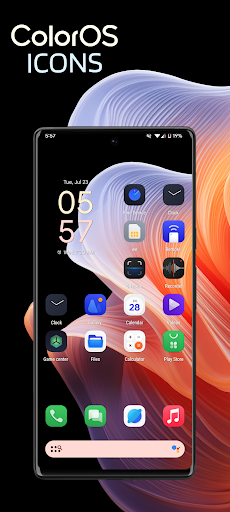
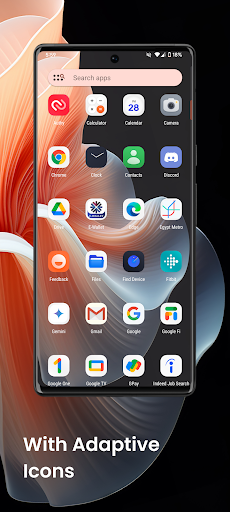
Inspired by the ColorOS, these Adaptive icons have been created in the style of ColorOS Design. They have a linear icon and different color backgrounds.
Did you know?
The average user checks their devices more than 50 times a day. Make every time a real pleasure with this icon pack.
There is always something new:
Why choose ColorOS Icon Pack over other packages?
• Frequent updates
• Perfect masking system
• Lots of alternative icons
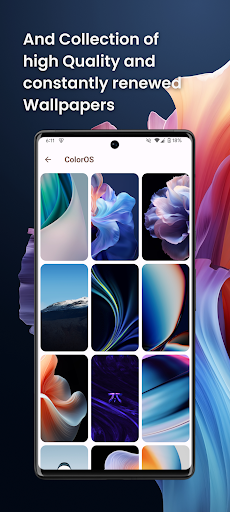
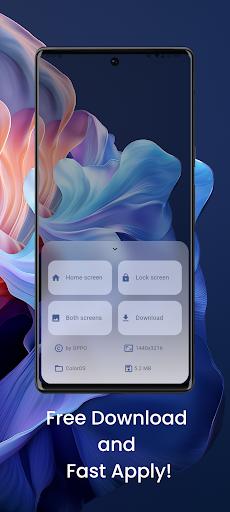
• A collection of high quality and constantly renewed wallpapers
Recommended personal settings
• Launcher: Nova launcher
• Adjust icon normalization from Nova Launcher settings
• Icon size
> If you like small icons, set the size to 85%
> If you like big icons, set the size to 100% - 120%
Other Features
• Icon preview
• Dynamic calendar
• Material panel.
• Custom folder icons
• Category based icons
• Custom app drawer icons.
How to use this icon pack?
The first step: Install the supported launcher
Step 2: Open the icon pack, go to the apply section of the icon pack and select your launcher
If your launcher is not in the list, make sure to apply it from the settings of the launcher itself
support
• If you have any problems while using the icon pack. Just email me at akbon.business@gmail.com
Recommendations
• A supported launcher is required to use this icon pack!
• FAQ section in the app, which answers a lot of questions you might have. Please read it before emailing your question.
Supported launchers in icon pack
• Apus • Action Launcher • ADW Launcher • Apex • Atom • Aviate • LineageOS Theme Engine • GO • Holo Launcher • Holo HD • LG Home • Lucid • M Launcher • Mini • Next Launcher • Nougat Launcher • Nova Launcher (recommended) • Smart Launcher (recommended) • Solo Launcher • V Launcher • ZenUI • Zero • ABC Launcher • Evie • L Launcher • Lawnchair (recommended) • XOS Launcher • HiOS Launcher • Poco Launcher
Supported launchers are included in the icon pack, but do not require manual installation
• Arrow Launcher • ASAP Launcher • Cobo Launcher • Line Launcher • Mesh Launcher • Peek Launcher • Z Launcher Quixey Launcher • iTop Launcher • KK Launcher • MN Launcher • S Launcher • Open Launcher • Flick Launcher
This icon pack has been tested and works with these launchers. However, it may also work for others. In case the launcher is not in the application section of the icon pack. You can apply the icon pack from the launcher settings.
Additional notes
• The icon pack needs a launcher to work.
• Icon missing? Feel free to send me an icon request and I'll try to update this package with your requests.
credits
• AKBON (Ibrahim Fathelbab)
• ColorOS Team
もっと見る

1. MEmuインストーラーをダウンロードしてセットアップを完了する

2. MEmuを起動し、デスクトップでのPlayストアを開く

3. PlayストアでColorOS 16 Icon packを検索する
Install
4. ColorOS 16 Icon packをダウンロードしてインストールする
5. インストールが完了したら、アイコンをクリックしてスタート

6. MEmuを使ってパソコンでColorOS 16 Icon packを体験する
MEmu Playは現在、最高の無料Androidエミュレーターであり、5,000万人のユーザーが優れたAndroidアプリ体験を楽しんでいます。MEmuの仮想化テクノロジーにより、数千ものAndroidアプリをコンピューターでスムーズに実行できます。
大画面でより精細;無限の待機、電池とドラフィックの極限を超え
キーボード・マウス・コントローラーを全力でサポート、より快適
マルチインスタンスで複数のゲームを同時に実行
Use ColorOS 16 Icon pack on PC by following steps: