
Guru Maps 地図とナビゲーションオフライン
更新日
現在のバージョン
5.6.4
提供元

スマートフォンは不要!パソコンと同じようにキーボードとマウスで操作できます。MEmu Playは、あなたが待ち望んでいたすべての楽しみをお届けします。バッテリー残量や小さな画面を気にすることなく、Guru Maps 地図とナビゲーションオフラインをご利用ください。最新のMEmu 9は、Guru Maps 地図とナビゲーションオフラインをPCで体験するのに最適です!完璧なキーマッピングシステムにより、PCのようなスムーズな操作性を実現します。マルチインスタンス機能により、複数のアプリケーションを同時に実行できます。独自の仮想化エンジンがPCのパフォーマンスを最大限に引き出します。アプリを使用するだけでなく、高品質な体験を得ることができます。
もっと見る
Guru Maps 地図とナビゲーションオフラインをPCでダウンロード!大画面でより楽しむ。電源が落ちてしまうとか通信料が足りないとかの問題を心配する必要がなく、PCの大画面でより快適にゲームを楽しましょう! Guru Maps helps you find the best trail and spend some time enjoying the great outdoors like traveling, hiking, biking or off-roading.
Guru Maps helps you find the best trail and spend some time enjoying the great outdoors like traveling, hiking, biking or off-roading. With detailed maps covering the entire world, offline navigation, and real time GPS tracking, you'll have everything you need to plan and organize your adventures.
Offline Maps
• High-resolution & based on OpenStreetMap (OSM) data.
• Updated monthly with the most-recent fixes and additions.
• Adjustable font size of the labels for better readability.
• Multiple custom map layers can be shown above the base one (GeoJSON support).
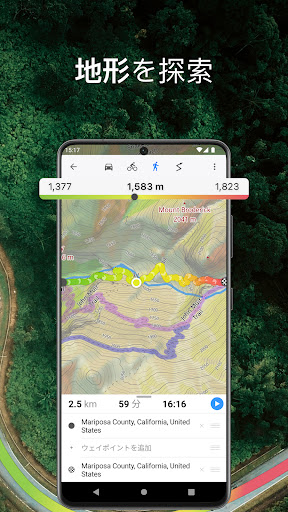
• Hillshade, contour lines and slope overlays for relief visualisation.
Offline Navigation
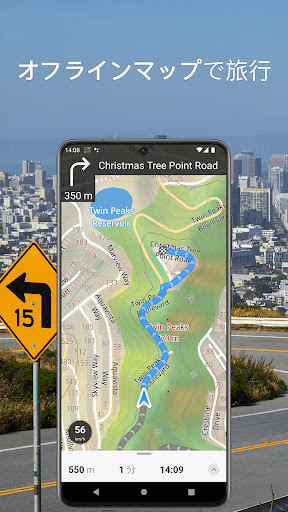
• Turn-by-turn voice-guided driving directions with alternate ways.
• Multi-stop navigation with the route optimization feature (circuit route planner).
• Voice instructions while navigating available in 9 languages.
• Routes for Driving/Cycling/Walking/Shortest Distance.
• Automatic rerouting gets you back along your way, even offline.
Drive Offroad• There is an option for choosing the type of bike to build the perfect route, given the pavement (road surface): road, city, touring, mountain (MTB), trekking or gravel bikes.
• Plan an off-road overland trip in your 4x4 vehicle (quad, ATV, UTV, SUV, jeep) or moto, relying on topographic data in order to avoid trickier terrain. Find trails, campsites, adequate gas stations and other destinations along the route, even during an offline mode.
• The trip monitor shows the orientation (compass), accurate speed in mph, km/h or knots units (speedometer), distance (odometer), bearing line and azimuth during the trip. The app collects data from multiple satellites orbiting the Earth.
Synchronization
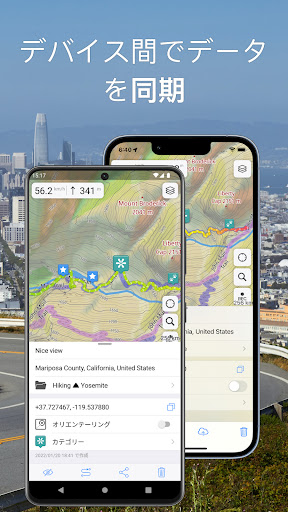
• Seamless sync your data across multiple iOS/Android devices as long as they are authorized with the same account.
• All the data such as saved places, recorded GPS tracks and created routes will be synced on all your devices on both OS platforms.
GPS Tracker
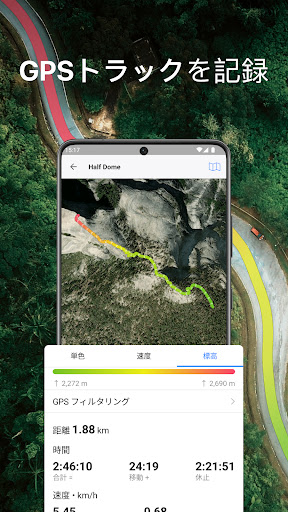
• Track the exact location of your phone & tablet real time.
• Record your footpath even when the app is in the background.
• Monitor detailed statistics of your ride: current speed, distance, time traveled, altitude.
• Choose from seven solid track colors, or altitude and speed gradients.
Offline Search
• Incredibly fast – results appear instantly as you type.
• Searches simultaneously in multiple languages, making searching easier than ever.
• Search in a variety of ways – by address, object name, category, or even by GPS coordinates. Supported coordinates formats: MGRS, UTM, Plus codes, DMS, latitude & longitude (decimal degrees (DD), degrees and decimal minutes, sexagesimal degree).
Online Maps
• Pre-installed online map sources: OpenCycleMap, HikeBikeMap, OpenBusMap, Wikimapia, CyclOSM, Mobile Atlas, HERE Hybrid (satellite), USGS - Topo, USGS - Satellite.
• Even more sources available for adding: OpenSeaMap, OpenTopoMap, ArcGIS, Google Maps, Bing, USGS etc from here: https://ms.gurumaps.app.
Supported File Formats
Support for a variety of file formats, including:
.GPX, .KML, .KMZ - for GPS-tracks, markers, routes or whole travel collections,
.MS, .XML - for custom map sources,
.SQLiteDB, .MBTiles - for offline raster maps,
.GeoJSON - for overlays.
PRO Subscription
• With a pro subscription, you'll have access to unlimited markers, GPS tracks, and offline map downloads, as well as additional sources and file formats.
• Without subscription it’s possible to create up to 15 pinned places, record up to 15 tracks and have only 3 vector countries (regions) downloaded on your device.
• Choose from monthly, yearly, or one-time purchase (aka lifetime license) options.
もっと見る

1. MEmuインストーラーをダウンロードしてセットアップを完了する

2. MEmuを起動し、デスクトップでのPlayストアを開く

3. PlayストアでGuru Maps 地図とナビゲーションオフラインを検索する
Install
4. Guru Maps 地図とナビゲーションオフラインをダウンロードしてインストールする
5. インストールが完了したら、アイコンをクリックしてスタート

6. MEmuを使ってパソコンでGuru Maps 地図とナビゲーションオフラインを体験する
MEmu Playは現在、最高の無料Androidエミュレーターであり、5,000万人のユーザーが優れたAndroidアプリ体験を楽しんでいます。MEmuの仮想化テクノロジーにより、数千ものAndroidアプリをコンピューターでスムーズに実行できます。
大画面でより精細;無限の待機、電池とドラフィックの極限を超え
キーボード・マウス・コントローラーを全力でサポート、より快適
マルチインスタンスで複数のゲームを同時に実行
Use Guru Maps 地図とナビゲーションオフライン on PC by following steps: