
@Voice Aloud Reader (TTS)
更新日
現在のバージョン
32.8.0
提供元

スマートフォンは不要!パソコンと同じようにキーボードとマウスで操作できます。MEmu Playは、あなたが待ち望んでいたすべての楽しみをお届けします。バッテリー残量や小さな画面を気にすることなく、@Voice Aloud Reader (TTS)をご利用ください。最新のMEmu 9は、@Voice Aloud Reader (TTS)をPCで体験するのに最適です!完璧なキーマッピングシステムにより、PCのようなスムーズな操作性を実現します。マルチインスタンス機能により、複数のアプリケーションを同時に実行できます。独自の仮想化エンジンがPCのパフォーマンスを最大限に引き出します。アプリを使用するだけでなく、高品質な体験を得ることができます。
もっと見る
@Voice Aloud Reader (TTS)をPCでダウンロード!大画面でより楽しむ。電源が落ちてしまうとか通信料が足りないとかの問題を心配する必要がなく、PCの大画面でより快適にゲームを楽しましょう! Discover the ultimate app for multitaskers: @Voice Aloud Reader, designed to read aloud web pages, news articles, lengthy emails, TXT, PDF, DOC, DOCX, RTF, OpenOffice documents, EPUB, MOBI, PRC, AZW, and FB2 eBooks.
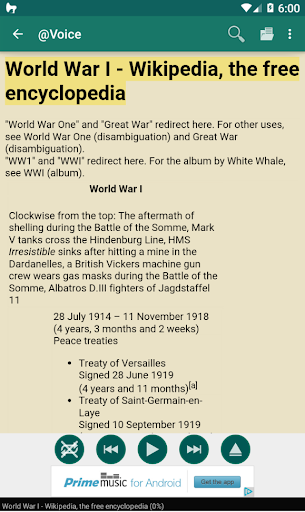
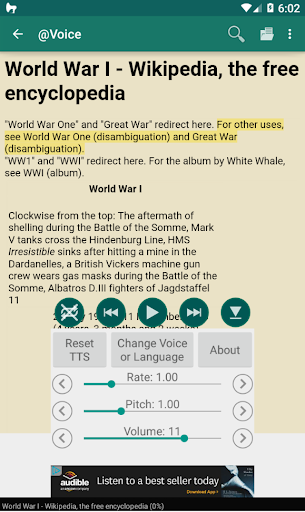
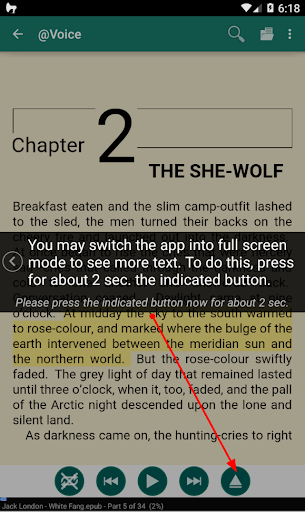

Discover the ultimate app for multitaskers: @Voice Aloud Reader, designed to read aloud web pages, news articles, lengthy emails, TXT, PDF, DOC, DOCX, RTF, OpenOffice documents, EPUB, MOBI, PRC, AZW, and FB2 eBooks. Whether you want to read on-screen or listen when your eyes are occupied, this versatile app caters to your every need.
Top Features:
• Read and listen to web pages and various local files, including text, PDF, DOC, DOCX, RTF, OpenOffice documents, and HTML files.
• Enjoy clutter-free web pages, with menus, navigation, ads, and other distractions removed.
• Create and customize listening lists with multiple articles for continuous, uninterrupted playback.
• Synchronize between devices the reading positions of ebooks or other long texts, bookmarks, and use optional "@Voice Add to List" extension for desktop browsers to easily add the articles you browse on your computer to @Voice's reading list.
• OCR (Optical Character Recognition) extracts text from PDFs where standard text extraction fails.
• Effortlessly share content from other apps or copy and paste text into @Voice Aloud Reader for seamless listening.
• Export and listen to WhatsApp chats.
• Experience eBooks with original formatting and images, either on-screen or by listening with headphones.
• Supports Chinese and Japanese vertical text (right-to-left mode) and horizontal mode.
• Easily import saved Pocket articles to your @Voice reading list.
• Record spoken articles as sound files in WAV (uncompressed) or OGG (compressed) formats.
• Access dictionaries, translations, Wikipedia, and web search with a long-press on any word or phrase.
• Enhance speech with TTS correction, including optional use of Regular Expressions (RegEx).
• Adjust speech generator volume, pitch, and speech rate to your preference.
• Conveniently pause, resume, or skip through content using wired or Bluetooth headset buttons.
Advanced Features
• Detects articles or long stories split into multiple pages, offers to download all parts/chapters of the story into one EPUB file by following "Next" links.
• Automatically translates text with Google Translate
• Optionally shows and reads both original and translated text with appropriate native language voices, ideal for language learning
• Automatic voice changes for dialogs in books or web novels, with unique voices for narrators and characters
• Swap voices with a single tap on screen or headphones button, if you find out that e.g. its reading female character phrases with male voice or vice versa.
Upgrade your reading and listening experience with @Voice Aloud Reader – the all-in-one solution for busy individuals on the go. Download now and unlock the full potential of multitasking!
もっと見る

1. MEmuインストーラーをダウンロードしてセットアップを完了する

2. MEmuを起動し、デスクトップでのPlayストアを開く

3. Playストアで@Voice Aloud Reader (TTS)を検索する
Install
4. @Voice Aloud Reader (TTS)をダウンロードしてインストールする
5. インストールが完了したら、アイコンをクリックしてスタート

6. MEmuを使ってパソコンで@Voice Aloud Reader (TTS)を体験する
MEmu Playは現在、最高の無料Androidエミュレーターであり、5,000万人のユーザーが優れたAndroidアプリ体験を楽しんでいます。MEmuの仮想化テクノロジーにより、数千ものAndroidアプリをコンピューターでスムーズに実行できます。
大画面でより精細;無限の待機、電池とドラフィックの極限を超え
キーボード・マウス・コントローラーを全力でサポート、より快適
マルチインスタンスで複数のゲームを同時に実行
Use @Voice Aloud Reader (TTS) on PC by following steps: