
Japanese Kanji Study - 漢字学習
更新日
現在のバージョン
6.8.1
提供元

スマートフォンは不要!パソコンと同じようにキーボードとマウスで操作できます。MEmu Playは、あなたが待ち望んでいたすべての楽しみをお届けします。バッテリー残量や小さな画面を気にすることなく、Japanese Kanji Study - 漢字学習をご利用ください。最新のMEmu 9は、Japanese Kanji Study - 漢字学習をPCで体験するのに最適です!完璧なキーマッピングシステムにより、PCのようなスムーズな操作性を実現します。マルチインスタンス機能により、複数のアプリケーションを同時に実行できます。独自の仮想化エンジンがPCのパフォーマンスを最大限に引き出します。アプリを使用するだけでなく、高品質な体験を得ることができます。
もっと見る
Japanese Kanji Study - 漢字学習をPCでダウンロード!大画面でより楽しむ。電源が落ちてしまうとか通信料が足りないとかの問題を心配する必要がなく、PCの大画面でより快適にゲームを楽しましょう! Kanji Study aims to be a helpful and easy-to-use tool for learning Japanese kanji.
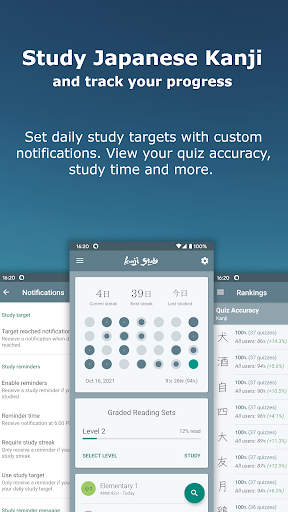
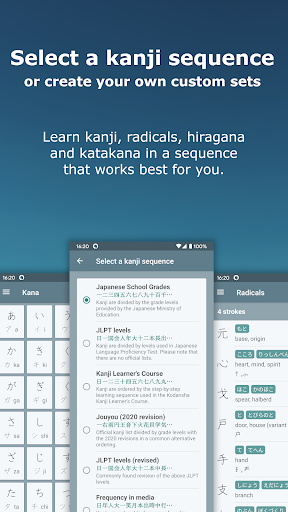
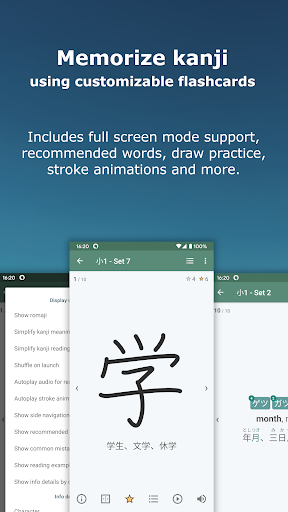
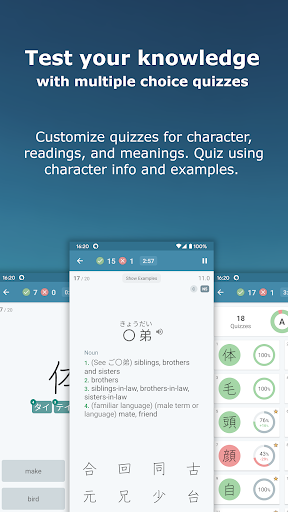
Kanji Study aims to be a helpful and easy-to-use tool for learning Japanese kanji. The app includes SRS, flashcards, multiple choice quizzes, writing challenges, kanji and word search, custom sets and much more. Kanji Study hopes to be your essential companion for mastering kanji.
The app is not entirely free; however, the free version has no ads and offers unlimited study of beginner kanji, radicals, hiragana and katakana. The dictionary and all info screens are also free and unrestricted. The one-time upgrade unlocks the remaining kanji levels and allows you to create your own custom sets. It also supports the continued development of this project.
Main Features
★ Flashcard study
• Rote memorize kanji in manageable sized sets.
• View stroke animations, readings, meanings and examples.
• Customize theme, layout, displayed actions and swipe behavior.
• Assign study ratings to filter kanji out as you learn them.
★ Multiple-choice quizzes
• Customize quizzes to show readings, meanings, example words or sentences.
• Example words can be selected from JLPT, common vocab and favorites.
• Quiz times and distractors adapt based on your results.
• Further customize to repeat wrong answers, auto-play audio, pause after answering and more.
★ Writing challenges
• Improve your kanji recognition by challenging yourself to recall and write kanji.
• Learn the correct stroke order using a finely-tuned stroke detection algorithm.
• Correct strokes will snap into place and hints will appear if you are struggling.
• Detect accuracy stroke by stroke or use the self-assessment mode.
★ Quick kanji and word search
• Search over 6k kanji using readings, radicals, stroke counts, levels and more all in one text field.
• Search over 180k words by kanji, kana, romaji or translation language in the same one text field.
• Combine any number of criteria and see them highlighted in the results.
• Completely offline and very optimized for quick searching.
★ Detailed info screens
• View animated strokes, readings and meanings as well as your study time and quiz stats.
• See a breakdown of the radicals found within each kanji.
• Check out example words (grouped by the kanji readings), sentences and names.
• Explore the kanji used within each of the examples and use the breadcrumbs to navigate back.
Additional Features
★ Study kanji in various sequences including JLPT and Japanese school grades.
★ Notify yourself with custom study reminders when you haven't studied.
★ Read Japanese text with over 8k native audio files and text-to-speech support.
★ Add shortcuts to your home screen to study a particular set.
★ Use the rankings screen to make custom sets based on study stats.
★ Favorite kanji, radicals and examples for referencing later.
★ Save progress using Google Drive or local storage.
★ Customize MANY additional settings.
Add-ons
★ Guided Study
Continue the kanji study journey with unlimited use of the SRS module that tracks kanji and schedules them for review, optimizing your learning efficiency.
★ Graded Reading Sets
Learn kanji through reading. Adds 30k+ mini reading exercises graded kanji-by-kanji in the Kanji Learner's Course sequence.
★ Outlier Kanji Dictionary
Understand the underlying logic behind the Japanese writing system by learning how kanji actually work.
Permissions (optional)
- In-app Purchase (purchase upgrade)
- External Drive (store backup files)
- Install Shortcuts (add home screen shortcuts)
- Run at startup (reschedule notifications)
- Full network access (send analytics)
Translations
There is a volunteer translation project with contributions to over 30 languages. If you would like to help, please send me an email.
もっと見る

1. MEmuインストーラーをダウンロードしてセットアップを完了する

2. MEmuを起動し、デスクトップでのPlayストアを開く

3. PlayストアでJapanese Kanji Study - 漢字学習を検索する
Install
4. Japanese Kanji Study - 漢字学習をダウンロードしてインストールする
5. インストールが完了したら、アイコンをクリックしてスタート

6. MEmuを使ってパソコンでJapanese Kanji Study - 漢字学習を体験する
MEmu Playは現在、最高の無料Androidエミュレーターであり、5,000万人のユーザーが優れたAndroidアプリ体験を楽しんでいます。MEmuの仮想化テクノロジーにより、数千ものAndroidアプリをコンピューターでスムーズに実行できます。
大画面でより精細;無限の待機、電池とドラフィックの極限を超え
キーボード・マウス・コントローラーを全力でサポート、より快適
マルチインスタンスで複数のゲームを同時に実行
Use Japanese Kanji Study - 漢字学習 on PC by following steps: