Calorie Counter・Planner・EatFit
更新日
現在のバージョン
1.10.5
提供元

スマートフォンは不要!パソコンと同じようにキーボードとマウスで操作できます。MEmu Playは、あなたが待ち望んでいたすべての楽しみをお届けします。バッテリー残量や小さな画面を気にすることなく、Calorie Counter・Planner・EatFitをご利用ください。最新のMEmu 9は、Calorie Counter・Planner・EatFitをPCで体験するのに最適です!完璧なキーマッピングシステムにより、PCのようなスムーズな操作性を実現します。マルチインスタンス機能により、複数のアプリケーションを同時に実行できます。独自の仮想化エンジンがPCのパフォーマンスを最大限に引き出します。アプリを使用するだけでなく、高品質な体験を得ることができます。
もっと見る
Calorie Counter・Planner・EatFitをPCでダウンロード!大画面でより楽しむ。電源が落ちてしまうとか通信料が足りないとかの問題を心配する必要がなく、PCの大画面でより快適にゲームを楽しましょう! Track your progress toward nutrition, macros, water, fitness, and weight loss goals.
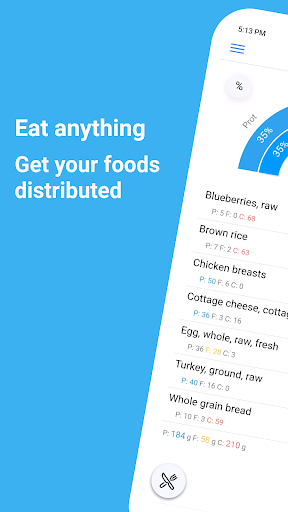
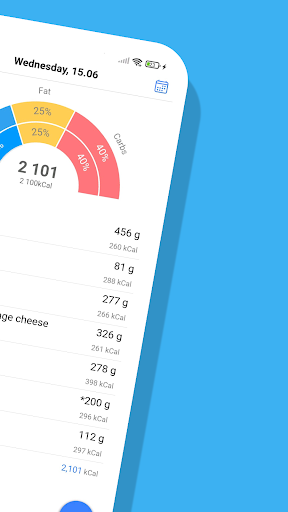
Track your progress toward nutrition, macros, water, fitness, and weight loss goals. EatFit is more than just a calorie or food tracker and health app. Besides counting calories, you can plan meals for the next day or a week. You will stay as close as possible to your calories, macros, and nutrition. Want to know how many grams of protein, fat, and carbohydrates per kg of weight you eat (g/kg)? The app can calculate that. Grams per lb (g/lb)? No problem.
EatFit is not another app about teaching you what to eat. Eat what you want. The app will help you adjust the amount of food so that you fit in your planned macros, calories, and other goals.
As a nutrition tracker, EatFit will tell you how to fit in your macros. Macros proportion is almost as important as total calorie intake.
As a water tracker, it will help you to drink enough water and remind you when it is time to sip some water.
Got 500 calories left at the end of the day? Add some food and see how much of it you should consume.
Here is a closer look at the features and benefits:
* Distribution of food by weight - You add food, and the app tells you how much of it to consume
* Calorie Tracker - Know how many calories you ate
* Macro Tracker - See how much protein, fat, and carbohydrates you consumed
* Fast and Easy Food Tracker Tools - Foods from history, type to search, add from favorites
* Meal planner - Create a meal plan for tomorrow or any other day
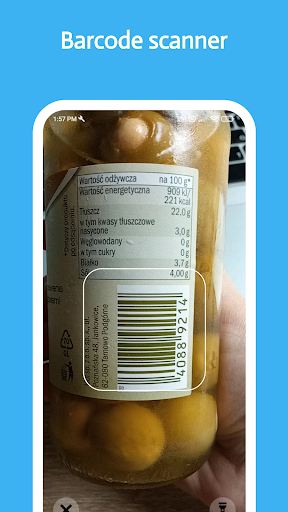
* Bar Code Scanner - Scan and add foods using your phone's camera
* Weight Tracker - Log your everyday weight. See stats and how fast you approach your goals
* Water Tracker - Track water and get notified when it is time to drink some
* Copy plan - Most people eat the same food from day to day. Copy-pasting will make calorie tracking even easier
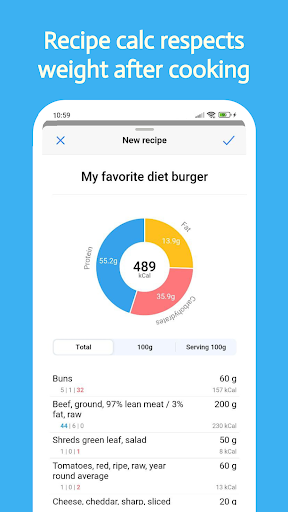
* Add Your Own Foods/Recipe Tracker - Save recipes and take weight after cooking into account
* Analyze Nutrition and Macros - See how many calories and nutrients you ate per any time period
How many times have you tried to stay accurate about your nutrition? And here again, it is 6 p.m. you are hungry, all of the calories you planned for the day are eaten, and even worse - you are 50g of protein undereaten.
That is what happens when you track calories after you've eaten them.
But what if you've planned your meals ahead? How to stay accurate with macros?
The answer is PLANNING AHEAD!
For example:
You need 2000 calories, 30% of calories from protein, 30% from fat, and 40% from carbs.
Got chicken breasts, oats, rice, eggs, bread, and avocado in the fridge.
How much of each food should you consume to meet the macro goals?
The app will show you.
Just add all the food you plan to eat for the day and it will be distributed by weight.
Perfect for almost any diet!
Want a keto? Set your goal to low carb and you're all set! You don't have to use a separate app specifically for tracking carbohydrates or following a keto diet.
What differs EatFit Calorie Counter from any other calorie tracker app:
1. Calorie tracker with distribution
* Distribution of your food by weight
* Easy-to-use calorie tracker
* % of proteins, fats, carbs
* g/kg, g/lb of proteins, fats, or carbs
* Built-in barcode scanner
2. Meal planner, also with distribution
* No limit to the number of your meals
* Equal distribution of food between meals
* Manual adjustment
3. Recipe calculator
* Takes into account weight after cooking
* Configure servings
EatFit is free to download and use. I constantly improve the app and hope you'll love it.
もっと見る

1. MEmuインストーラーをダウンロードしてセットアップを完了する

2. MEmuを起動し、デスクトップでのPlayストアを開く

3. PlayストアでCalorie Counter・Planner・EatFitを検索する
Install
4. Calorie Counter・Planner・EatFitをダウンロードしてインストールする
5. インストールが完了したら、アイコンをクリックしてスタート

6. MEmuを使ってパソコンでCalorie Counter・Planner・EatFitを体験する
MEmu Playは現在、最高の無料Androidエミュレーターであり、5,000万人のユーザーが優れたAndroidアプリ体験を楽しんでいます。MEmuの仮想化テクノロジーにより、数千ものAndroidアプリをコンピューターでスムーズに実行できます。
大画面でより精細;無限の待機、電池とドラフィックの極限を超え
キーボード・マウス・コントローラーを全力でサポート、より快適
マルチインスタンスで複数のゲームを同時に実行
Use Calorie Counter・Planner・EatFit on PC by following steps: