Yomiwa - カメラか手書きで英訳アプリ
更新日
現在のバージョン
4.3.7
提供元

スマートフォンは不要!パソコンと同じようにキーボードとマウスで操作できます。MEmu Playは、あなたが待ち望んでいたすべての楽しみをお届けします。バッテリー残量や小さな画面を気にすることなく、Yomiwa - カメラか手書きで英訳アプリをご利用ください。最新のMEmu 9は、Yomiwa - カメラか手書きで英訳アプリをPCで体験するのに最適です!完璧なキーマッピングシステムにより、PCのようなスムーズな操作性を実現します。マルチインスタンス機能により、複数のアプリケーションを同時に実行できます。独自の仮想化エンジンがPCのパフォーマンスを最大限に引き出します。アプリを使用するだけでなく、高品質な体験を得ることができます。
もっと見る
Yomiwa - カメラか手書きで英訳アプリをPCでダウンロード!大画面でより楽しむ。電源が落ちてしまうとか通信料が足りないとかの問題を心配する必要がなく、PCの大画面でより快適にゲームを楽しましょう! Yomiwa is a fast and complete offline Japanese dictionary, including all modern features.
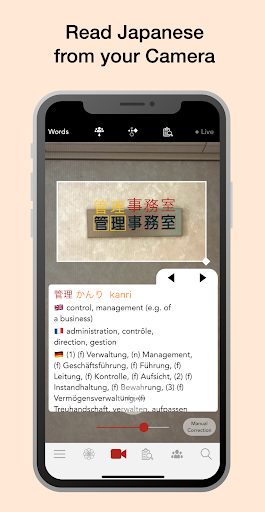
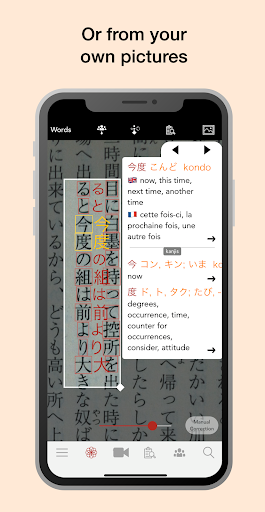
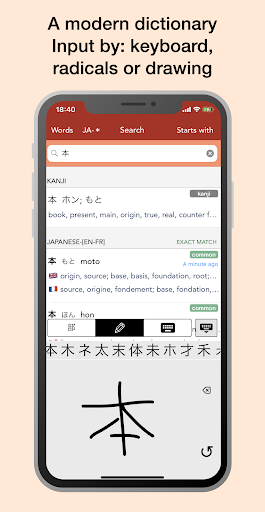
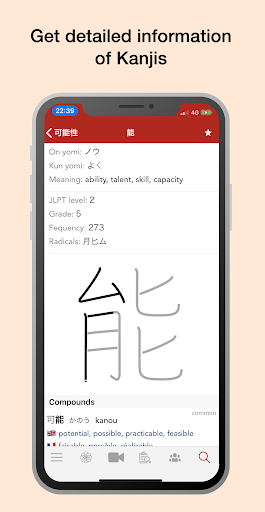
Yomiwa is a fast and complete offline Japanese dictionary, including all modern features. Yomiwa also comes with powerful Optical Character Recognition (OCR) technology which lets you recognize over 4000 Japanese characters (Kanjis, Hiraganas and Katakanas) providing Japanese translations and detailed word informations into many target languages. The app displays a pop-up with translations and definitions of words and kanjis as soon as you point to Japanese characters with your smartphone or tablet. You can also take a picture or pick one from your library and navigate it to translate chosen characters. Yomiwa also has a built-in drawing feature for you to draw and translate Japanese characters on your touch-screen with very high accuracy.
Optical Character Recognition (OCR) algorithms have been developed in-house and continuously improved over the past 6 years in order to run efficiently on most Android devices without requiring an internet connection.
Features:
• A complete and powerful built-in dictionary with full informations about words, kanjis (on-yomi, kun-yomi, meaning, stroke order etc.) and example sentences.
• Several target languages available: English, French, German, Spanish, Russian, Hungarian, Dutch, Slovene, Swedish and Hungarian.
• Search definitions from any kind of alphabet: Kanjis / Hiraganas / Katakanas / Romajis. You can search from Japanese words or from foreign words.
• Input characters by: Drawing / Radical search / Keyboard
• A powerful Optical Character Recognition (OCR) engine which lets you translate Japanese characters with your camera or from your camera roll pictures ($ / one week free. Only need to pay once.)
• A proper names database (such as people names, places, locations...)
• Japanese pronunciation of words in roman letters (romaji) or hiragana / katakana.
• Draw characters on the screen to translate them and practice writing Japanese
• Read either horizontal or vertical Japanese text
• Build vocabulary lists of Japanese words and Kanjis (which you can share as files or text in may ways!)
• Get help from the user community by sharing pictures on the Yomiwa Wall
Yomiwa is perfect for:
• Use as a dictionary
• Read and understand Japanese text (newspaper, manga, books,...)
• Learn and study Japanese Kanjis (meaning, reading, drawing, writing)
• Translate Japanese words in everyday life situations
• Instant on-the-go translation when travelling in Japan
• Overcome the language barrier!
Don't hesitate to contact the developers at android.devteam@yomiwa.net
Twitter: twitter.com/YomiwaApp
Facebook: www.facebook.com/yomiwaapp
Instagram: instagram.com/yomiwa
Yomiwaは、日々の生活や旅行中に日本語を読むことを手助けするアプリです。iPhoneのカメラを、漢字一文字や、単語にかざすと、英語で意味がポップアップ表示されます。また、スクリーンに漢字を手書き入力して意味を調べることもできます。
Yomiwaは、インターネット接続なしの環境下でもリアルタイムに漢字認識が可能です。このアプリは、iPhone4以降のバージョンに対応しています。
Features :
- 漢字、ひらがな、カタカナ問わず英語に翻訳します
- 自分で撮った写真に写った日本語も訳します
- アプリ内で手書きの文字を翻訳できます
- 縦書き、横書きどちらも対応しています
- ピンチでズームやiPhoneの基本操作で静止画を動かせます
- 認識した文字(漢字とひらがな)をロングタップでコピーできます
もっと見る

1. MEmuインストーラーをダウンロードしてセットアップを完了する

2. MEmuを起動し、デスクトップでのPlayストアを開く

3. PlayストアでYomiwa - カメラか手書きで英訳アプリを検索する
Install
4. Yomiwa - カメラか手書きで英訳アプリをダウンロードしてインストールする
5. インストールが完了したら、アイコンをクリックしてスタート

6. MEmuを使ってパソコンでYomiwa - カメラか手書きで英訳アプリを体験する
MEmu Playは現在、最高の無料Androidエミュレーターであり、5,000万人のユーザーが優れたAndroidアプリ体験を楽しんでいます。MEmuの仮想化テクノロジーにより、数千ものAndroidアプリをコンピューターでスムーズに実行できます。
大画面でより精細;無限の待機、電池とドラフィックの極限を超え
キーボード・マウス・コントローラーを全力でサポート、より快適
マルチインスタンスで複数のゲームを同時に実行
Use Yomiwa - カメラか手書きで英訳アプリ on PC by following steps: