Crossdressing Singles
更新日
現在のバージョン
4.53.0
提供元

スマートフォンは不要!パソコンと同じようにキーボードとマウスで操作できます。MEmu Playは、あなたが待ち望んでいたすべての楽しみをお届けします。バッテリー残量や小さな画面を気にすることなく、Crossdressing Singlesをご利用ください。最新のMEmu 9は、Crossdressing SinglesをPCで体験するのに最適です!完璧なキーマッピングシステムにより、PCのようなスムーズな操作性を実現します。マルチインスタンス機能により、複数のアプリケーションを同時に実行できます。独自の仮想化エンジンがPCのパフォーマンスを最大限に引き出します。アプリを使用するだけでなく、高品質な体験を得ることができます。
もっと見る
Crossdressing SinglesをPCでダウンロード!大画面でより楽しむ。電源が落ちてしまうとか通信料が足りないとかの問題を心配する必要がなく、PCの大画面でより快適にゲームを楽しましょう! Meet interesting singles around you, anywhere you go!
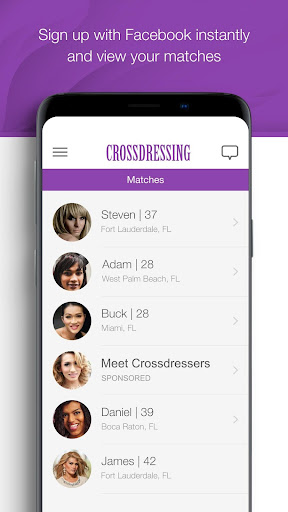
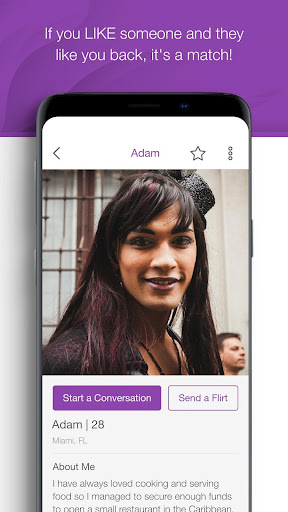
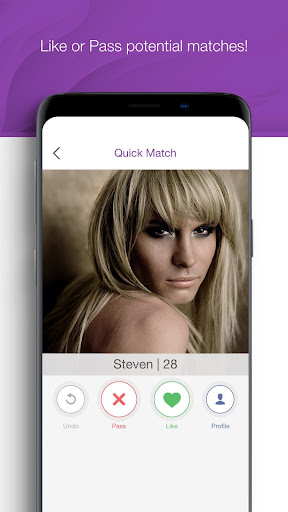
Meet interesting singles around you, anywhere you go!
Crossdressing Singles is the fastest way to meet CD singles near you. Go from sign up... to real dates within seconds. You can then start meeting new people immediately!
How Crossdressing Singles works:
1. Create an account by logging in with Apple or using your email address
2. Complete your profile for a higher chance of finding your match
3. Start browsing members on Matches screen
4. Select Quick Match and simple Pass or Like other members.
5. Check who liked you, who did you like and mutual likes on Likes page.
6. Check who is online near you on “Who’s Online” Page
7. Send a Flirt from the profile page and show other member that you like him or her.
The app is free to use, but you can enhance your experience by upgrading to our premium VIP membership.
VIP Membership Features:
* Likes Me: see who likes you
* More Flirts: 30 flirts per 24 hrs for more chances of a match
* Un-do matches or mis-swipes
* Ability to go private
* Send unlimited Flirts
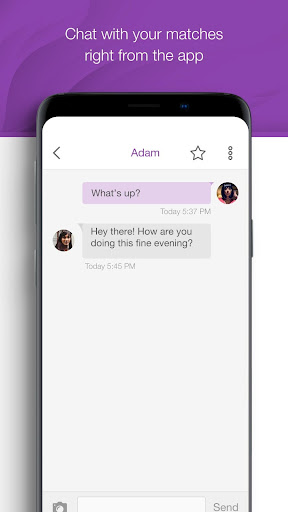
* Chat with other members
* And much more coming soon.
Crossdressing Singles VIP Membership Pricing:
* 1 week for 7.69 USD
* 1 month for 32.99 USD
* 3 months for 43.99 USD
Important VIP membership information:
* Payment will be charged to Google Play account at confirmation of purchase.
* Subscription automatically renews unless auto-renew is turned off at least 24-hours before the end of the current week, current month, or three-month VIP membership period.
* Account will be charged for renewal within 24 hours prior to the end of the current week, current month, or three-month VIP membership period.
* Auto-renewal may be turned off by going to the user's Google Play account Settings after purchase.
* No cancellation of the current subscription is allowed during the active subscription period.
Privacy Policy and Terms of Service information:
* The Crossdressing Singles privacy policy can be found here: https://www.crossdressing.singles/privacy-policy
* The Crossdressing Singles terms of use can be found here: https://www.crossdressing.singles/terms-of-service
You must be at least 18 years old to use Crossdressing Singles.
もっと見る

1. MEmuインストーラーをダウンロードしてセットアップを完了する

2. MEmuを起動し、デスクトップでのPlayストアを開く

3. PlayストアでCrossdressing Singlesを検索する
Install
4. Crossdressing Singlesをダウンロードしてインストールする
5. インストールが完了したら、アイコンをクリックしてスタート

6. MEmuを使ってパソコンでCrossdressing Singlesを体験する
MEmu Playは現在、最高の無料Androidエミュレーターであり、5,000万人のユーザーが優れたAndroidアプリ体験を楽しんでいます。MEmuの仮想化テクノロジーにより、数千ものAndroidアプリをコンピューターでスムーズに実行できます。
大画面でより精細;無限の待機、電池とドラフィックの極限を超え
キーボード・マウス・コントローラーを全力でサポート、より快適
マルチインスタンスで複数のゲームを同時に実行
Use Crossdressing Singles on PC by following steps: