Defunc
更新日
現在のバージョン
1.0.14
提供元

スマートフォンは不要!パソコンと同じようにキーボードとマウスで操作できます。MEmu Playは、あなたが待ち望んでいたすべての楽しみをお届けします。バッテリー残量や小さな画面を気にすることなく、Defuncをご利用ください。最新のMEmu 9は、DefuncをPCで体験するのに最適です!完璧なキーマッピングシステムにより、PCのようなスムーズな操作性を実現します。マルチインスタンス機能により、複数のアプリケーションを同時に実行できます。独自の仮想化エンジンがPCのパフォーマンスを最大限に引き出します。アプリを使用するだけでなく、高品質な体験を得ることができます。
もっと見る
MEmu Playを使えば、PCでDefuncを快適に楽しめます。何千ものAndroidアプリをデスクトップ版で利用できる、パワフルな無料Androidエミュレーターです。友達とつながり、より効率的に作品を磨き上げましょう! With your personal user account, you can create a completely personalized sound experience for your Defunc product.
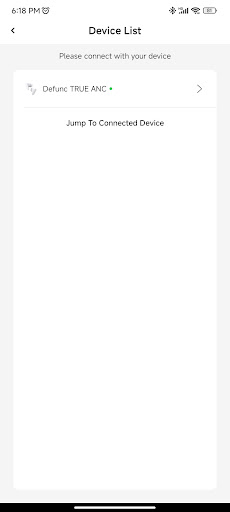
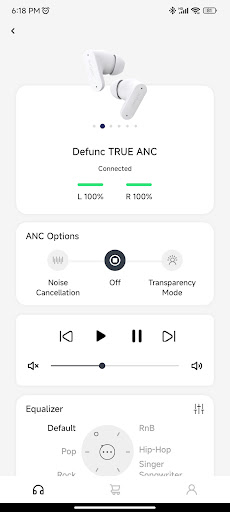

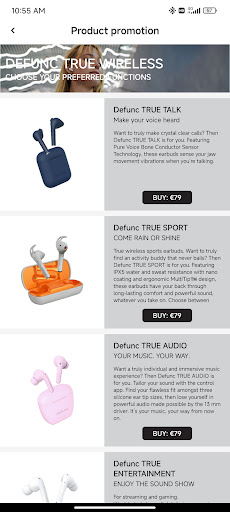
With your personal user account, you can create a completely personalized sound experience for your Defunc product. You can of course switch between preset sounds per genre and your completely personalized settings for those of you who have high quality requirements for your favorite music.
FAQ
We have of course collected all frequently asked questions and answers for a smooth user experience without hassle. You’ll always be able to get your questions answered on the go for a listening experience without interruptions.
SHOP
As a Defunc user, you will always have the opportunity to buy other Defunc products at attractive prices through shop-links for products relevant for your love of music and other streaming experiences.
YOUR SOUND – YOUR WAY
For customizing your sound settings in the app, simply go to settings and tap EQ settings, and use preset settings for pop, rock or whichever genre you love. If you are a true sound fan, tap customize settings instead for a completely personalized listening experience instead.
MANUAL
No need to look for the manual in your original packaging – you´ll always find the newest and updated user manuals directly in the app.
LOST & FOUND
Lost your earbuds? Not to worry – you’ll be able to see where they are by seing their location in the app.
もっと見る

1. MEmuインストーラーをダウンロードしてセットアップを完了する

2. MEmuを起動し、デスクトップでのPlayストアを開く

3. PlayストアでDefuncを検索する
Install
4. Defuncをダウンロードしてインストールする
5. インストールが完了したら、アイコンをクリックしてスタート

6. MEmuを使ってパソコンでDefuncを体験する
MEmu Playは現在、最高の無料Androidエミュレーターであり、5,000万人のユーザーが優れたAndroidアプリ体験を楽しんでいます。MEmuの仮想化テクノロジーにより、数千ものAndroidアプリをコンピューターでスムーズに実行できます。
大画面でより精細;無限の待機、電池とドラフィックの極限を超え
キーボード・マウス・コントローラーを全力でサポート、より快適
マルチインスタンスで複数のゲームを同時に実行
Use Defunc on PC by following steps: