Driefcase ABHA, Health Records
更新日
現在のバージョン
4.38
提供元

スマートフォンは不要!パソコンと同じようにキーボードとマウスで操作できます。MEmu Playは、あなたが待ち望んでいたすべての楽しみをお届けします。バッテリー残量や小さな画面を気にすることなく、Driefcase ABHA, Health Recordsをご利用ください。最新のMEmu 9は、Driefcase ABHA, Health RecordsをPCで体験するのに最適です!完璧なキーマッピングシステムにより、PCのようなスムーズな操作性を実現します。マルチインスタンス機能により、複数のアプリケーションを同時に実行できます。独自の仮想化エンジンがPCのパフォーマンスを最大限に引き出します。アプリを使用するだけでなく、高品質な体験を得ることができます。
もっと見る
Driefcase ABHA, Health RecordsをPCでダウンロード!大画面でより楽しむ。電源が落ちてしまうとか通信料が足りないとかの問題を心配する必要がなく、PCの大画面でより快適にゲームを楽しましょう! We always organize our important documents, but our medical records are generally all over the place.
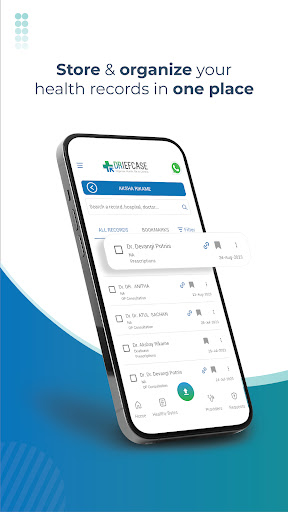
We always organize our important documents, but our medical records are generally all over the place. Driefcase helps you manage all your health records by digitally storing and organizing them so that you can quickly and easily access and share them anytime, anywhere, in under 10 seconds!
Driefcase is India’s 1st smart health locker and PHR (Personal Health Records) app approved by ABDM (Ayushman Bharat Digital Mission) that supports quick retrieval and sharing of digital health records.
With the Driefcase PHR app you can:
1. Retrieve medical records anytime, anywhere: Ensure that the next time the doctor asks you something about your medical history, you are able to empower him with that information in a timely manner. With Driefcase, you will never have to worry about damaging, losing, forgetting, or finding your medical records when required.
2. Organize medical records: Automatically arrange, index, and tag all your medical records on the basis of categories such as doctor’s name, type of health record, date, hospital/clinic name, etc. to retrieve any medical record in less than 10 seconds.
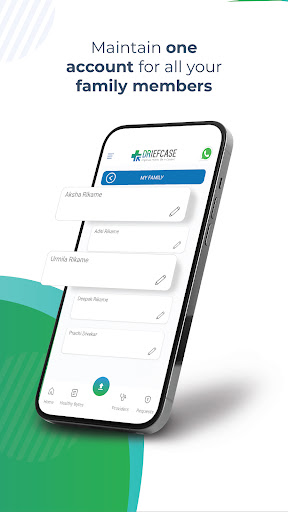
3. Manage your family’s health documents: Create profiles of all family members within a single account to manage and keep track of family’s health documents and health history using Driefcase App.
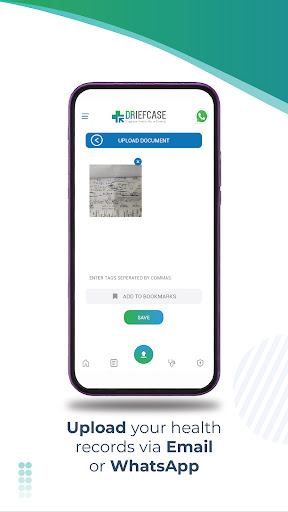
4. Conveniently upload medical documents via Whatsapp or email: Directly upload your health records in your account by sending them on Driefcase’s WhatsApp number +91-8080802509 or by mailing them on the dedicated email address given to each user.
5. Share medical documents: Easily share your digital health documents with doctors, hospitals/clinics, diagnostic labs, TPAs, and health insurers anytime, and anywhere, and avoid carrying them around with you.
6. Build medical history: Upload any type of medical documents, including prescriptions, test reports, and even X-Ray files to build a consistent and complete medical history.
7. Add reminders: Set reminders for important health events such as a visit to doctor, refilling medicines, vaccination appointment, etc.
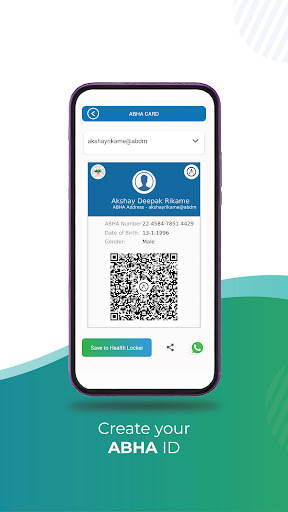
8. Become a part of ABDM (Ayushman Bharat Digital Mission): Join ABDM, India’s digital healthcare ecosystem, by creating your ABHA (Ayushman Bharat Health Account) under ABDM, and link all your medical records to your ABHA (previously known as Health ID) to access healthcare benefits ranging from public health programmes to insurance schemes.
9. Manage document sharing consent over ABDM: Give consent to movement of health data linked with your ABHA (previously known as Health ID) amongst healthcare providers.
Driefcase is free to download and gives you unlimited storage on the cloud. There are no hidden charges. We only charge for our Premium Services.
For more information and terms of use, visit us at www.driefcase.com
Download the Driefcase app to organize your health records and take control of your health.
もっと見る

1. MEmuインストーラーをダウンロードしてセットアップを完了する

2. MEmuを起動し、デスクトップでのPlayストアを開く

3. PlayストアでDriefcase ABHA, Health Recordsを検索する
Install
4. Driefcase ABHA, Health Recordsをダウンロードしてインストールする
5. インストールが完了したら、アイコンをクリックしてスタート

6. MEmuを使ってパソコンでDriefcase ABHA, Health Recordsを体験する
MEmu Playは現在、最高の無料Androidエミュレーターであり、5,000万人のユーザーが優れたAndroidアプリ体験を楽しんでいます。MEmuの仮想化テクノロジーにより、数千ものAndroidアプリをコンピューターでスムーズに実行できます。
大画面でより精細;無限の待機、電池とドラフィックの極限を超え
キーボード・マウス・コントローラーを全力でサポート、より快適
マルチインスタンスで複数のゲームを同時に実行
Use Driefcase ABHA, Health Records on PC by following steps: