Feven
更新日
現在のバージョン
1.3.2
提供元

スマートフォンは不要!パソコンと同じようにキーボードとマウスで操作できます。MEmu Playは、あなたが待ち望んでいたすべての楽しみをお届けします。バッテリー残量や小さな画面を気にすることなく、Fevenをご利用ください。最新のMEmu 9は、FevenをPCで体験するのに最適です!完璧なキーマッピングシステムにより、PCのようなスムーズな操作性を実現します。マルチインスタンス機能により、複数のアプリケーションを同時に実行できます。独自の仮想化エンジンがPCのパフォーマンスを最大限に引き出します。アプリを使用するだけでなく、高品質な体験を得ることができます。
もっと見る
FevenをPCでダウンロード!大画面でより楽しむ。電源が落ちてしまうとか通信料が足りないとかの問題を心配する必要がなく、PCの大画面でより快適にゲームを楽しましょう! ASK FOR A BETTER DATING.


ASK FOR A BETTER DATING
Compulsive swipes, tedious conversations, wasted time, ghosting...
all this with FEVEN will be just a bad memory!
We aim for high quality dating, not based on appearances but on finding an emotional affinity.
Find someone to share your passions and life with.
Why should you choose FEVEN?
PHYSICAL APPEARANCE TAKES A BACK SEAT
In other dating apps too much importance is placed on personal images, which encourages compulsive swiping and searching for a partner based on appearance and physical appearance.
With us, on the other hand, affinity matters more than anything else.
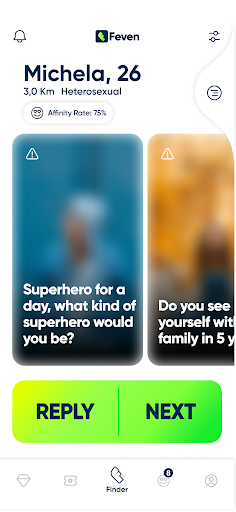
On FEVEN, photographs play a secondary role and are blurry, while the 4 personal questions you will have to write to complete your profile are crucial.
By answering other users' questions correctly you will be able to see their pictures in focus, but in order to start a conversation you will have to reach their Affinity Rate!
NO GHOSTING.
High Quality Dating also means offering you a safe environment in which to have a pleasant experience, which is why we have come up with an Anti-Ghosting policy.
If you don't want to continue the acquaintance of a user remove the compatibility, otherwise the other user will be alerted of your ghosting.
After 4 Alerts you will be blocked some features that you can only reactivate by responding to pending chats or removing Affinity with those you are no longer interested in.
EXCLUSIVE SINGLES EVENTS
By signing up and completing your profile you can have the opportunity to participate in exclusive events where you can meet in person with other specially selected users who share the same passions as you!
A 100% CUSTOMIZABLE EXPERIENCE
On FEVEN everything is in your hands!
You decide what to ask or what to let people know about you....
You are the one who chooses which users to try to build affinity with...
You are always the one who sets your Affinity Rate and decides how compatible other users must be with you in order to start an acquaintance...
もっと見る

1. MEmuインストーラーをダウンロードしてセットアップを完了する

2. MEmuを起動し、デスクトップでのPlayストアを開く

3. PlayストアでFevenを検索する
Install
4. Fevenをダウンロードしてインストールする
5. インストールが完了したら、アイコンをクリックしてスタート

6. MEmuを使ってパソコンでFevenを体験する
MEmu Playは現在、最高の無料Androidエミュレーターであり、5,000万人のユーザーが優れたAndroidアプリ体験を楽しんでいます。MEmuの仮想化テクノロジーにより、数千ものAndroidアプリをコンピューターでスムーズに実行できます。
大画面でより精細;無限の待機、電池とドラフィックの極限を超え
キーボード・マウス・コントローラーを全力でサポート、より快適
マルチインスタンスで複数のゲームを同時に実行
Use Feven on PC by following steps: