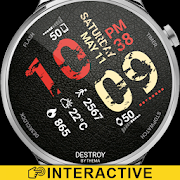
Destroy Watch Face
更新日
現在のバージョン
デバイスにより異なります
提供元

スマートフォンは不要!パソコンと同じようにキーボードとマウスで操作できます。MEmu Playは、あなたが待ち望んでいたすべての楽しみをお届けします。バッテリー残量や小さな画面を気にすることなく、Destroy Watch Faceをご利用ください。最新のMEmu 9は、Destroy Watch FaceをPCで体験するのに最適です!完璧なキーマッピングシステムにより、PCのようなスムーズな操作性を実現します。マルチインスタンス機能により、複数のアプリケーションを同時に実行できます。独自の仮想化エンジンがPCのパフォーマンスを最大限に引き出します。アプリを使用するだけでなく、高品質な体験を得ることができます。
もっと見る
Destroy Watch FaceをPCでダウンロード!大画面でより楽しむ。電源が落ちてしまうとか通信料が足りないとかの問題を心配する必要がなく、PCの大画面でより快適にゲームを楽しましょう! Destroy Watch Face for Wear OS!
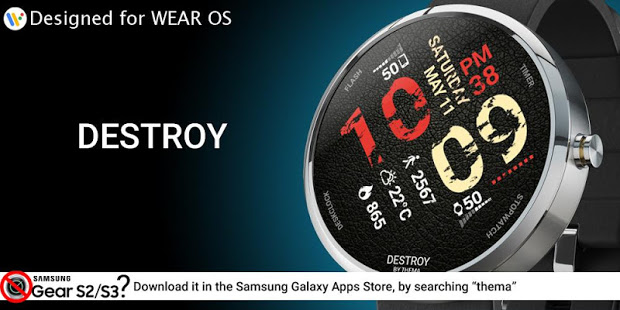
Destroy Watch Face for Wear OS!
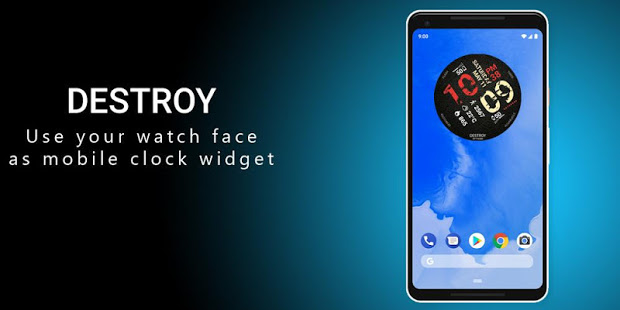
Don't have a Wear OS watch? You can still use this watch face as a clock widget on your mobile!
⛔️NOT FOR SAMSUNG GEAR S2 / GEAR S3 / GALAXY WATCH !! (running Tizen OS)⛔️
If you have one, do not install this application.
To find support and compatible applications with your watch, please go to http://www.themaapps.com/watch_on_tizen_os
★ Features of Destroy Watch Face ★
- Clock Widget (No second hand due to battery consumption)
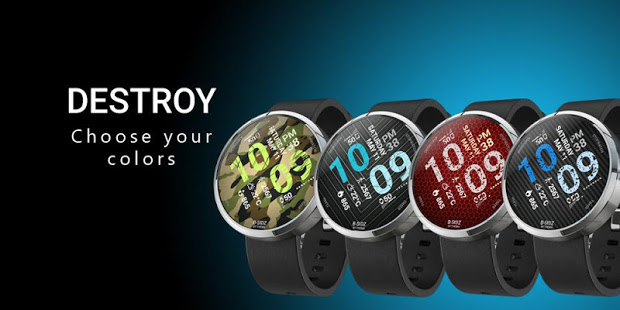
- Choose design colors
- Define a secondary timezone for digital display
- Day & Month
- Watch battery
- Mobile battery
- Weather
- Daily step count
- Heartbeat frequency
- Unread SMS
- Unread Email from Gmail
- Missed calls
- Presets
- Complication (wear 2.0)
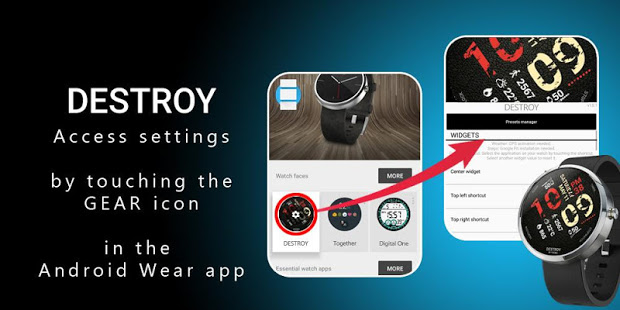
The settings of the watch face are located in the "Wear OS" app of your mobile.
Just hit the gear icon over the watch face preview and the settings screen will show up!
★ FREE Settings ★
- Choose design colors on watch & mobile
- Define heartbeat frequency refresh rate
- Define weather refresh rate
- Weather unit
- 12 / 24 hours mode
- Define interactive mode duration
- Choose to switch between small/big/translucent/opaque cards
- Choose the ambient mode b&w and eco luminosity
- Choose between 2 weather providers (Yr & OpenWeatherMap)
- Choose to display a leading zero on hours
- Display brand name or not
- Choose to display or not the seconds dots
★ PREMIUM Settings ★
- Choose your own title in place of "DESTROY"
- Switch between éco / simple b&w / full ambient mode
- Choose background among different styles
- Blend background with colors
- Define a secondary timezone for digital display
- Data:
+ Change the indicator to display on the 3 positions
+ Choose between up to 8 indicators
+ Complication (wear 2.0)
- Interactivity
+ Access to detailed data by touching a widget
+ Switch the displayed data by touching a widget
+ Change the shortcut to execute on the 4 positions
+ Choose your shortcut among all applications installed on your watch!
+ Choose to display the interactive areas
- Presets manager:
+ Save your preset with all its options (colors, backgrounds, data, features. EVERYTHING is saved!)
+ Load / delete one of your previously saved preset
+ Share / Import presets
- Define manual or automatic location
★ Installation ★
Watch Face
Wear OS 1.X
This watch face will be installed automatically from your phone paired.
If it doesn't show up please go to the Wear OS App > Settings and Resync all apps.
Wear OS 2.X
A notification will be displayed on your watch, right after your mobile installation. You just have to hit it to start the installation process of the watch face.
If the notification did not display for some reason, you can still install the watch face by using the Google Play Store available on your watch: just search the watch face by its name.
Mobile clock widget
Just long press on your launcher, then select the application widget to drop it on your home screen of your mobile.
Customize the widget settings with the application.
★ More watch faces
Visit my watch faces collection for Wear OS on the Play Store at https://goo.gl/CRzXbS
** If you have any issues or questions, fill free to contact me by email (English or French language) before giving a bad rating. Thanks!
Website: http://www.themaapps.com/
Youtube: https://youtube.com/ThomasHemetri
Twitter: https://twitter.com/ThomasHemetri
G+: https://plus.google.com/+ThomasHemetri
Instagram: https://www.instagram.com/thema_watchfaces
もっと見る

1. MEmuインストーラーをダウンロードしてセットアップを完了する

2. MEmuを起動し、デスクトップでのPlayストアを開く

3. PlayストアでDestroy Watch Faceを検索する
Install
4. Destroy Watch Faceをダウンロードしてインストールする
5. インストールが完了したら、アイコンをクリックしてスタート

6. MEmuを使ってパソコンでDestroy Watch Faceを体験する
MEmu Playは現在、最高の無料Androidエミュレーターであり、5,000万人のユーザーが優れたAndroidアプリ体験を楽しんでいます。MEmuの仮想化テクノロジーにより、数千ものAndroidアプリをコンピューターでスムーズに実行できます。
大画面でより精細;無限の待機、電池とドラフィックの極限を超え
キーボード・マウス・コントローラーを全力でサポート、より快適
マルチインスタンスで複数のゲームを同時に実行
Use Destroy Watch Face on PC by following steps: