
GAuthenticator: Auth App
更新日
現在のバージョン
1.8
提供元

スマートフォンは不要!パソコンと同じようにキーボードとマウスで操作できます。MEmu Playは、あなたが待ち望んでいたすべての楽しみをお届けします。バッテリー残量や小さな画面を気にすることなく、GAuthenticator: Auth Appをご利用ください。最新のMEmu 9は、GAuthenticator: Auth AppをPCで体験するのに最適です!完璧なキーマッピングシステムにより、PCのようなスムーズな操作性を実現します。マルチインスタンス機能により、複数のアプリケーションを同時に実行できます。独自の仮想化エンジンがPCのパフォーマンスを最大限に引き出します。アプリを使用するだけでなく、高品質な体験を得ることができます。
もっと見る
GAuthenticator: Auth AppをPCでダウンロード!大画面でより楽しむ。電源が落ちてしまうとか通信料が足りないとかの問題を心配する必要がなく、PCの大画面でより快適にゲームを楽しましょう! Authenticator 2FA app store and generate secure 2FA (two-factor auth) tokens for your online accounts on your device.
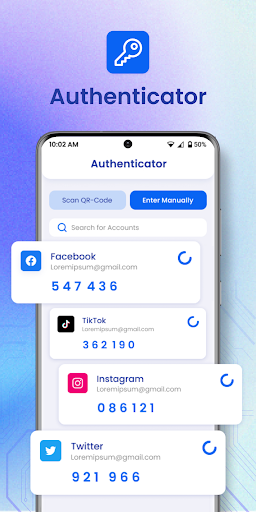
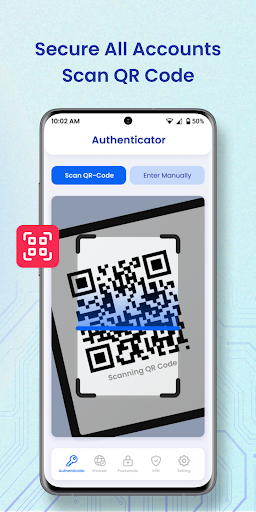
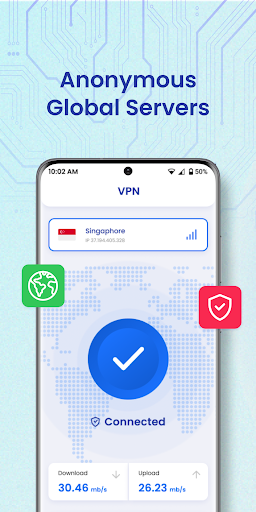
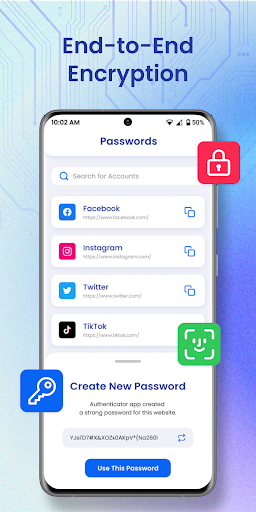
Authenticator 2FA app store and generate secure 2FA (two-factor auth) tokens for your online accounts on your device. Best 2FA Authenticator App is a simple and free application for Two Factor Authentication (2FA) which generates Time-based One-time Passwords (TOTP). MFA Authenticator app tool helps you protect your account from hackers by adding an additional layer of security. With the 2FA Backup system, you can store all your keys in the cloud and access them when needed. In case you lose or damage your phone, you simply install Authenticator apps on your new device to get access to your Keys. For your convenience, you can either use a QR Code or enter your secret key manually.
Authenticator is the easiest way to enable two-factor authentication (or multi-factor authentication) to verify your identity and securely log in to accounts to keep your personal data and passwords protected from cyber threats — all from one app, 100% free!
The world’s most secure, private, and simple 2FA app.
Secure:
Easily restore your tokens with backups.
Add app protection with your passcode or biometrics.
2FAS is open-source, transparent, and community-driven.
Private:
2FAS syncs across your mobile devices.
An interface designed for simplicity.
One-tap authentication with 2FAS Browser Extensions.
Multi-language support.
Quick guides for setup and support. (COMING SOON)
Simple:
2FAS works offline.
2FAS doesn't store any passwords or metadata.
100% anonymous use, no account required.
Authenticator app features:
- Secure & Private Authy Authenticare
All data stored in Authenticator is always encrypted, even when it's stored in Google cloud to ensure that you are the only one who can access your data 2step authorization.
- Encrypted Backup:
In multi 2 step duo Authenticator, you can always make a secure encrypted backup, in case you lose your device or switch to a new one.
- Synchronization Across all Devices:
With Autentifikator all your tokens will automatically synchronize across all devices
-Two Factor Authentification
Authenticate 2FA doubles the account's security by requiring a regular password and a Time-based One-time Password (TOTP). Authenticator App generates TOTP on the user’s device.
-2FAS Backup
We are developing a remote backup service function that will allow you to store service keys in a secure Authenticator Backup based on a cloud and recover it if you lose your phone. This feature will also allow you to generate codes on different devices (cross-device sharing).
-Authorize with Touch ID or Biometric ID
Confirm your identity with the application using Touch ID or Face ID and generate one time tokens required to log in to your online accounts.
-Sync across Android devices
Once configured with an online web account, the application works efficiently on various mobile devices and allows you to log in from several devices at once and verify authpoint.
-No password stored
The application generates single Time-based One-time Passwords (TOTP), stored on the user's phone without internet access. This solution dramatically increases login security.
- All Popular Accounts:
We support verification (but not associated with) the most popular services including Facebook, Google Chrome, Coinbase, Binance Playstation, Steam, Amazon, Paypal, Gmail, MS Microsoft, Instagram, Discord, Epic Roblox and thousands of other providers. We also support 8 digit tokens.
- Other features included:
Totp, multifactor login 2fas, otpauth, lastpass protocol, basic phonefactor login, runescape, salesforce, game 2factor, wow, safenet, autentifikator encryption signature, etoken, oauth, enable2fa, verifier
Privacy Policy: https://duystudio.blogspot.com/2023/11/privacypolicy.html
もっと見る

1. MEmuインストーラーをダウンロードしてセットアップを完了する

2. MEmuを起動し、デスクトップでのPlayストアを開く

3. PlayストアでGAuthenticator: Auth Appを検索する
Install
4. GAuthenticator: Auth Appをダウンロードしてインストールする
5. インストールが完了したら、アイコンをクリックしてスタート

6. MEmuを使ってパソコンでGAuthenticator: Auth Appを体験する
MEmu Playは現在、最高の無料Androidエミュレーターであり、5,000万人のユーザーが優れたAndroidアプリ体験を楽しんでいます。MEmuの仮想化テクノロジーにより、数千ものAndroidアプリをコンピューターでスムーズに実行できます。
大画面でより精細;無限の待機、電池とドラフィックの極限を超え
キーボード・マウス・コントローラーを全力でサポート、より快適
マルチインスタンスで複数のゲームを同時に実行
Use GAuthenticator: Auth App on PC by following steps: