Gesture Control
更新日
現在のバージョン
1.3.8
提供元

スマートフォンは不要!パソコンと同じようにキーボードとマウスで操作できます。MEmu Playは、あなたが待ち望んでいたすべての楽しみをお届けします。バッテリー残量や小さな画面を気にすることなく、Gesture Controlをご利用ください。最新のMEmu 9は、Gesture ControlをPCで体験するのに最適です!完璧なキーマッピングシステムにより、PCのようなスムーズな操作性を実現します。マルチインスタンス機能により、複数のアプリケーションを同時に実行できます。独自の仮想化エンジンがPCのパフォーマンスを最大限に引き出します。アプリを使用するだけでなく、高品質な体験を得ることができます。
もっと見る
Gesture ControlをPCでダウンロード!大画面でより楽しむ。電源が落ちてしまうとか通信料が足りないとかの問題を心配する必要がなく、PCの大画面でより快適にゲームを楽しましょう! あなたのAndroidデバイスを最大限に活用しよう!
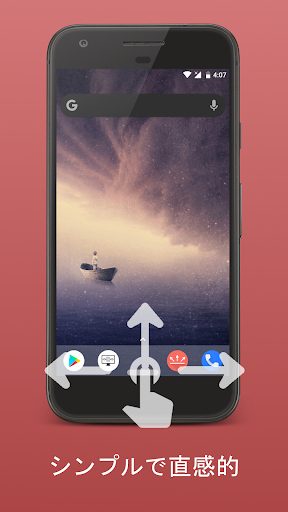

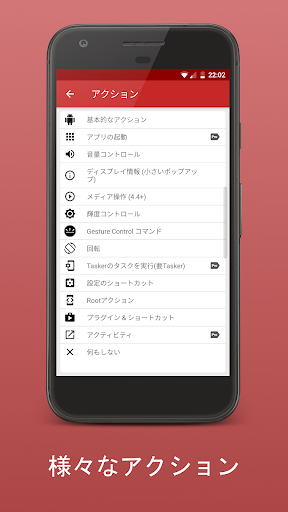

あなたのAndroidデバイスを最大限に活用しよう!
ナビゲーションバーを取り除き、ジェスチャベースのナビゲーションを体感しましょう!
これまでにない、より直感的な操作性。次世代のナビバーを使ってみてください!
Who can benefit from this application?
▶ Tech freaks, which want to have the latest features on their device
▶ People with small hands or huge smartphones, it is much easier to expand navigation bar from bottom of screen, than from the top.
▶ People with broken hardware buttons
▶ People who use their smartphone with gloves or have problems touching the normal soft keys. The sensor area of this app is customizable, so everyone can find the perfect size.
Currently these gestures are available:
▶ Swipe up/left/right/down
▶ Swipe up/left/right/down and hold
▶ Short Swipe up
▶ Short Swipe up and hold
▶ Double/triple tap (Donation/Pro version)
▶ Long tap (Donation/Pro version)
▶ Double/triple tap and hold (Donation/Pro version)
▶ Click + Swipe up/left/right/down (Donation/Pro version)
Currently you can invoke these actions with gestures:
▶ Back, Home, Recent Apps
▶ Notifications
▶ Quick Settings
▶ Screen off
▶ Most recent app
▶ Power Dialog (Power off, reboot on some devices, etc.)
▶ Multiwindow (Android 7+)
▶ Lock device on app switch
▶ Google assistant (if installed)
▶ Execute Tasker tasks (Pro, requires Tasker)
▶ Volume actions (Partially Pro required)
▶ Show information (Partially Pro required )
▶ Media control (Partially Pro required)
▶ Brightness control (Partially Pro required)
▶ Launch other apps(Pro required)
▶ Torch (Android 6+, Pro required)
▶ Take screenshot (Android 9+, Pro required)
▶ Internal actions (Hide Bar for specific period, hide bar until app switch, etc. - Partially Pro required)
▶ Power off options, Take screenshot, etc. (Root, Partially Pro required)
▶ Numerous other actions
These features set Gesture Control apart from the competition:
▶ Possibility to create an infinite number of sensor bars
▶ Possibility to disable individual sensor bars in certain apps
▶ Possibility to activate individual sensor bars only in certain apps
▶ Configurable gesture detection
▶ Sensor bar color configurable per app (Pro)
▶ Possibility to start other apps per action (Pro)
▶ Possibility to split sensor bars into up to five parts (freely configurable, Pro)
▶ Unique stability and reliability
▶ 100% offline, no internet permission, highest possible data protection
In order to provide the above-mentioned functions, the applications uses accessibility services features.
To make the visibility and appearance of the sensor bars in individual apps customizable, and to display and launch installed apps, the app needs access to the list of installed apps.
Privacy is important to me. This application will not send any personal data to the developer or anyone else.
If you like my app, I would be very happy if you have a look at the donation/pro version (https://play.google.com/store/apps/details?id=com.conena.navigation.gesture.control.pro).
Translation credits:
Chinese - Zhao Peng
Czech - Tomáš Tihlařík
French - Julien Jaegy
Japanese - TUVIn5f0
Portuguese - Adalberto Fontenele
Russian - Игорь Иринин
Spanish - Fher Mosqueira
Turkish - Y. Eren Bektaş
Vietnamese - Alienz
If you have any questions or want to translate the app into your language, feel free to contact me: info@conena.com.
もっと見る

1. MEmuインストーラーをダウンロードしてセットアップを完了する

2. MEmuを起動し、デスクトップでのPlayストアを開く

3. PlayストアでGesture Controlを検索する
Install
4. Gesture Controlをダウンロードしてインストールする
5. インストールが完了したら、アイコンをクリックしてスタート

6. MEmuを使ってパソコンでGesture Controlを体験する
MEmu Playは現在、最高の無料Androidエミュレーターであり、5,000万人のユーザーが優れたAndroidアプリ体験を楽しんでいます。MEmuの仮想化テクノロジーにより、数千ものAndroidアプリをコンピューターでスムーズに実行できます。
大画面でより精細;無限の待機、電池とドラフィックの極限を超え
キーボード・マウス・コントローラーを全力でサポート、より快適
マルチインスタンスで複数のゲームを同時に実行
Use Gesture Control on PC by following steps: