Glimpse Notifications
更新日
現在のバージョン
5.0.18
提供元

スマートフォンは不要!パソコンと同じようにキーボードとマウスで操作できます。MEmu Playは、あなたが待ち望んでいたすべての楽しみをお届けします。バッテリー残量や小さな画面を気にすることなく、Glimpse Notificationsをご利用ください。最新のMEmu 9は、Glimpse NotificationsをPCで体験するのに最適です!完璧なキーマッピングシステムにより、PCのようなスムーズな操作性を実現します。マルチインスタンス機能により、複数のアプリケーションを同時に実行できます。独自の仮想化エンジンがPCのパフォーマンスを最大限に引き出します。アプリを使用するだけでなく、高品質な体験を得ることができます。
もっと見る
Glimpse NotificationsをPCでダウンロード!大画面でより楽しむ。電源が落ちてしまうとか通信料が足りないとかの問題を心配する必要がなく、PCの大画面でより快適にゲームを楽しましょう! Tired of having to press the power button to see new notifications?
Tired of having to press the power button to see new notifications?
Ex-iPhone user and cannot believe your Android doesn't offer such a basic function?
Your new phone doesn't have LED notification anymore?
Want to pull your phone out of your bag or pocket and immediately have it enabled?
Like to get repeated reminders for pending notifications?
Then this app is for you!
FEATURES
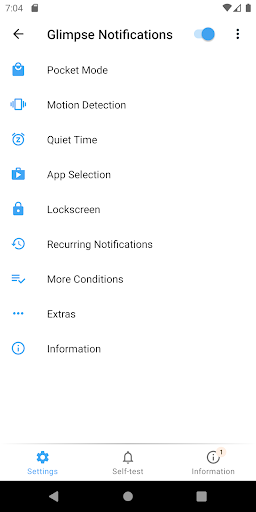
• Keeps using the secure system lock screen
• Control how long the lock screen is shown
• Choose which apps whose notifications should turn on the screen
• Quiet Times to prevent the screen from turning on at a bad time
• Supports System Do Not Disturb (DnD) modes
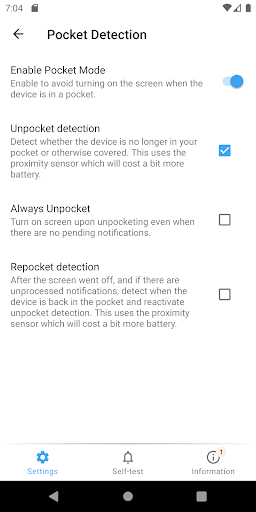
• Extensive pocket mode to prevent the screen from turning on in your pocket
• Double-tap to lock on the lock screen (only < Oreo)
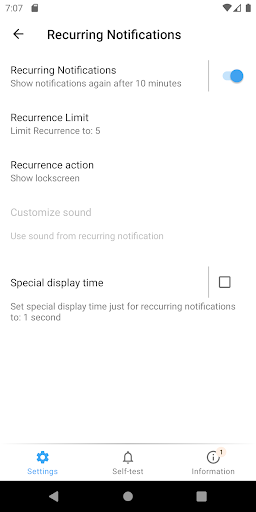
• Recurring notifications
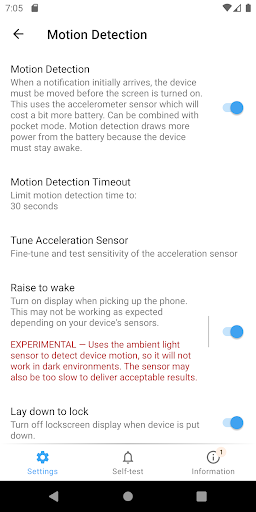
• Motion detection notices when you picket up the phone to check a new notification
• App is as energy efficient as possible
• This is a private pet project - so it's free! No data is being collected!
MEDIA REVIEWS
XDA: http://www.xda-developers.com/an-updated-look-at-glimpse-notifications/
Lifehacker: http://lifehacker.com/glimpse-automatically-turns-your-screen-on-to-see-your-1700901832
Caschys Blog (German): http://stadt-bremerhaven.de/app-tipp-glimpse-notifications/
RESOURCES
Website: https://sites.google.com/view/glimpse-notifications
XDA Development Thread: http://forum.xda-developers.com/android/apps-games/app-glimpse-notifications-t3090575
FINGERPRINT SENSORS AND SMARTLOCKS
Depending on your configuration, this app may need the Device Administrator permission.
To implement several (optional) features, Glimpse Notifications may need to turn off the screen. By default no special permissions are needed for this. To improve security or for a better user experience you may give the app device administrator or accessibility service permissions.
PROBLEMS ON SOME DEVICES
Android devices are quite diverse and not all functions work equally well everywhere. The FAQ (English) contains a lot of hints how to configure this app for devices by Sasmung, Huawei, Xiaomi, OnePlus, ...
HUAWEI, Xiaomi (MIUI)
Glimpse Notifications only shows the lock screen, it doesn't render the notifications. To see notifications from, for instance, your texting app, your need to open system settings and allow the texting app to show notifications on the lock screen.
SAMSUNG EDGE LIGHTING
To avoid conflicts, it is recommended to disable Edge lighting or at least remove Glimpse Notifications from Edge lighting.
REQUIRED PERMISSIONS
• BIND_NOTIFICATION_LISTENER_SERVICE: Core permission to have the app being informed about new notifications.
• WAKE_LOCK: needed to turn on the screen
OPTIONAL PERMISSIONS
• BIND_DEVICE_ADMIN: to close and lock the screen
• BIND_ACCESSIBILITY_SERVICE: can be given to close the screen with perfect user experience (only Android 9+)
• READ_EXTERNAL_STORAGE: to determine the duration of custom notification sounds.
• SYSTEM_ALERT_WINDOW: implement double-tap to lock (only until Android 7)
• VIBRATE: recurring notifications can be indicated using a vibration pattern
EXCLUSION OF LIABILITY
Nullgrad Apps cannot be held responsible for damages happening by using this app. This includes, but is not limited to, notifications being missed or misinterpreted due some function of Glimpse Notifications.
もっと見る

1. MEmuインストーラーをダウンロードしてセットアップを完了する

2. MEmuを起動し、デスクトップでのPlayストアを開く

3. PlayストアでGlimpse Notificationsを検索する
Install
4. Glimpse Notificationsをダウンロードしてインストールする
5. インストールが完了したら、アイコンをクリックしてスタート

6. MEmuを使ってパソコンでGlimpse Notificationsを体験する
MEmu Playは現在、最高の無料Androidエミュレーターであり、5,000万人のユーザーが優れたAndroidアプリ体験を楽しんでいます。MEmuの仮想化テクノロジーにより、数千ものAndroidアプリをコンピューターでスムーズに実行できます。
大画面でより精細;無限の待機、電池とドラフィックの極限を超え
キーボード・マウス・コントローラーを全力でサポート、より快適
マルチインスタンスで複数のゲームを同時に実行
Use Glimpse Notifications on PC by following steps: