HeyWeather: Forecast & Widgets
更新日
現在のバージョン
2.0.1
提供元

スマートフォンは不要!パソコンと同じようにキーボードとマウスで操作できます。MEmu Playは、あなたが待ち望んでいたすべての楽しみをお届けします。バッテリー残量や小さな画面を気にすることなく、HeyWeather: Forecast & Widgetsをご利用ください。最新のMEmu 9は、HeyWeather: Forecast & WidgetsをPCで体験するのに最適です!完璧なキーマッピングシステムにより、PCのようなスムーズな操作性を実現します。マルチインスタンス機能により、複数のアプリケーションを同時に実行できます。独自の仮想化エンジンがPCのパフォーマンスを最大限に引き出します。アプリを使用するだけでなく、高品質な体験を得ることができます。
もっと見る
HeyWeather: Forecast & WidgetsをPCでダウンロード!大画面でより楽しむ。電源が落ちてしまうとか通信料が足りないとかの問題を心配する必要がなく、PCの大画面でより快適にゲームを楽しましょう! Introducing HeyWeather, the weather app you've been waiting for!

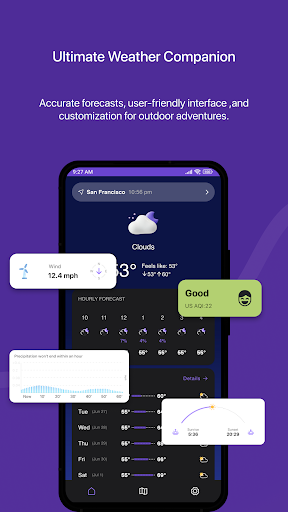
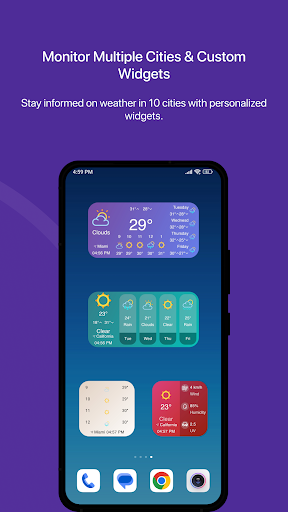
Introducing HeyWeather, the weather app you've been waiting for! It has a modern, simple design that's easy to understand. With comprehensive features and more, it's everything you'd expect from a great weather app.
- Extended Forecasts
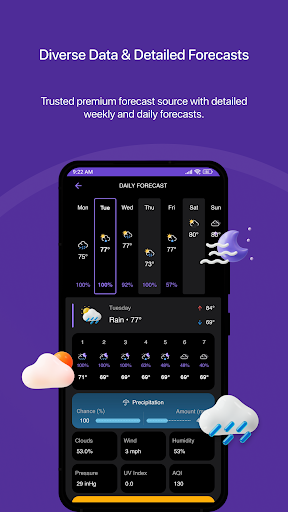
Get up to 16 days of daily forecasts and up to 336 hours (some locations up to 400 hours) of hourly forecasts for your location. You'll find detailed information like temperature, real feel, precipitation probability and amount, humidity, precipitation, cloudiness, UV index, wind speed, pressure, AQI, visibility and more! HeyWeather makes it simple to know when it will rain, snow, or be too hot or cold. You can even check rain intensity within the app.
- Customizable Widgets
HeyWeather offers unlimited widget customization options in the app and on the widgets. With each update, you'll get even more widgets to choose from. Customize your Forecast widgets by long pressing on them.
- Air Quality Index
Stay informed about air quality with current and up to 7 days forecast for air quality index.
- Multiple forecast sources*
HeyWeather offers multiple premium forecast sources to suit your location. Choose the one that works best for you and enjoy accurate weather information.
- Sunrise, Sunset, and Moon Phases
Discover sunrise, sunset, moon phases, and other astronomical information up to 28 days ahead, all presented in a beautiful design.
- Radar and Maps
Explore temperature, rain possibility, rain intensity, cloud coverage, pressure, and humidity on a large area using maps for the current and future hours.
- Beautiful Animations
Enjoy a visually appealing experience with beautiful animations that accompany all the app's features.
- Parlez-vous français?
- ¿Tú hablas español?
- Tu parli italiano?
- Du sprichst Deutsch?
- 你会说中文吗?
- 日本語を話せますか
- 당신은 한국어를 말합니까?
HeyWeather supports more than 14 languages, so you can use it in your preferred language.
- Multiple Cities at a Glance
Planning a vacation or curious about weather conditions in other cities or countries? Simply add them to your city list in HeyWeather. You can even have them displayed on your widgets for quick access. Stay informed about weather conditions wherever you go or wherever your loved ones are. Easy and convenient!
- Privacy-Focused
Your data is secure, and you have the option to choose not to share your location. Your location is never stored on our servers unless you opt for notifications. We prioritize your privacy and do not store any personal information.
- No ads, EVER!
Say goodbye to annoying ads in weather apps! HeyWeather is completely ad-free, and it will always remain that way, even in the free version.
- Help Us Improve HeyWeather!
We Value Your Feedback! To report bugs, share issues, or provide suggestions for enhancing the app, please reach out to us via the "Contact Us" section in the "Settings" tab. You can also email us at hello@heyweatherapp.com. We appreciate your input and strive to make the app even better based on your valuable feedback!
*Subscription required for some features such as premium forecast sources.
もっと見る

1. MEmuインストーラーをダウンロードしてセットアップを完了する

2. MEmuを起動し、デスクトップでのPlayストアを開く

3. PlayストアでHeyWeather: Forecast & Widgetsを検索する
Install
4. HeyWeather: Forecast & Widgetsをダウンロードしてインストールする
5. インストールが完了したら、アイコンをクリックしてスタート

6. MEmuを使ってパソコンでHeyWeather: Forecast & Widgetsを体験する
MEmu Playは現在、最高の無料Androidエミュレーターであり、5,000万人のユーザーが優れたAndroidアプリ体験を楽しんでいます。MEmuの仮想化テクノロジーにより、数千ものAndroidアプリをコンピューターでスムーズに実行できます。
大画面でより精細;無限の待機、電池とドラフィックの極限を超え
キーボード・マウス・コントローラーを全力でサポート、より快適
マルチインスタンスで複数のゲームを同時に実行
Use HeyWeather: Forecast & Widgets on PC by following steps: