IP Camera
更新日
現在のバージョン
28.8.6
提供元

スマートフォンは不要!パソコンと同じようにキーボードとマウスで操作できます。MEmu Playは、あなたが待ち望んでいたすべての楽しみをお届けします。バッテリー残量や小さな画面を気にすることなく、IP Cameraをご利用ください。最新のMEmu 9は、IP CameraをPCで体験するのに最適です!完璧なキーマッピングシステムにより、PCのようなスムーズな操作性を実現します。マルチインスタンス機能により、複数のアプリケーションを同時に実行できます。独自の仮想化エンジンがPCのパフォーマンスを最大限に引き出します。アプリを使用するだけでなく、高品質な体験を得ることができます。
もっと見る
IP CameraをPCでダウンロード!大画面でより楽しむ。電源が落ちてしまうとか通信料が足りないとかの問題を心配する必要がなく、PCの大画面でより快適にゲームを楽しましょう! *** The Pro version provides some extra features (e.
*** The Pro version provides some extra features (e.g. 'Picture In Picture') and without ads ***
ONVIF Support https://youtu.be/QsKXdkAywfI
Picture In Picture https://youtu.be/ejLWQSZ5b_k
"IP Camera" can turn your device into a wireless IP Camera via build-in RTSP and HTTP Server for security monitoring WITH Bi-directional audio support, you can use your browser to view, of course, include "IP Camera". It support auto video recording which based on Motion Detection and the video record can be uploaded to FTP server automatically and notify you via Email!
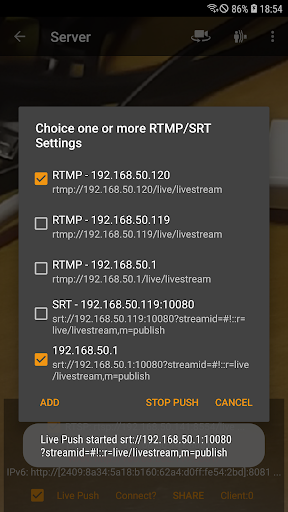
"IP Camera" can push the video and audio to RTMP/SRT live media server and use for network live broadcast. It supports the rtmps security protocol and SRT protocol and it can also push the media to multiple media server at the same time. It also supports HEVC/AV1 over RTMP and can be used for YouTube Live currently. You can turn it on from IP Camera Server.
IP Camera Server supports Picture In Picture on Android 8.0 and above which means you can do other things when IP Camera Server running.(Pro ONLY)
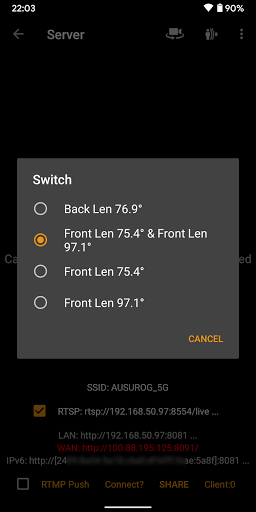
It supports multi-lens selection on Android 9 and above. It supports output video up to 4K UHD resolution and up to 60FPS and also supports opening two cameras simultaneously for streaming (The maximum resolution and frame rate and camera combination are based on your Android devices).
It supports UPnP port forwarding. If you can access your gateway via WAN, and the UPnP on your gateway is opened, you can also use WAN Url from WAN to visit IP Camera Server. It also supports user name and password authentication, default username and password are admin, you can modify from the Settings.
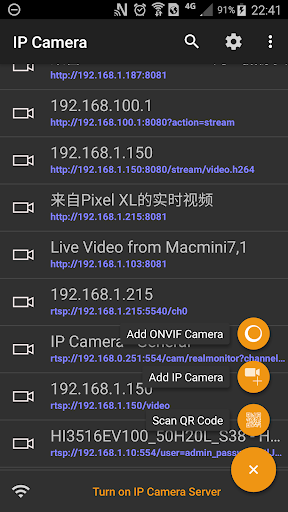
"IP Camera" is also a ONVIF and MJPEG viewer WITH video recording support! It also supports RTSP and SRT, RTMP protocols to playback!
Finally, you can add another device's IP Camera Server quickly with build-in QR Code!
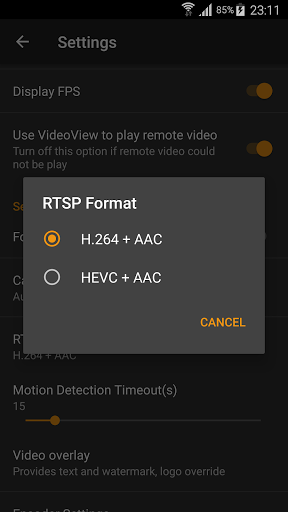
Using HEVC for video recording/streaming requires Android 5.0 or above, and the device must supports HEVC codec.
Using AV1 for video streaming requires Android 10 or above, and the device must supports AV1 codec.
IP Camera Bridge - A MJPEG video streaming and virtual microphone driver for PC which can make your PC applications using IP Camera as WebCam with audio input.
https://github.com/shenyaocn/IP-Camera-Bridge
もっと見る

1. MEmuインストーラーをダウンロードしてセットアップを完了する

2. MEmuを起動し、デスクトップでのPlayストアを開く

3. PlayストアでIP Cameraを検索する
Install
4. IP Cameraをダウンロードしてインストールする
5. インストールが完了したら、アイコンをクリックしてスタート

6. MEmuを使ってパソコンでIP Cameraを体験する
MEmu Playは現在、最高の無料Androidエミュレーターであり、5,000万人のユーザーが優れたAndroidアプリ体験を楽しんでいます。MEmuの仮想化テクノロジーにより、数千ものAndroidアプリをコンピューターでスムーズに実行できます。
大画面でより精細;無限の待機、電池とドラフィックの極限を超え
キーボード・マウス・コントローラーを全力でサポート、より快適
マルチインスタンスで複数のゲームを同時に実行
Use IP Camera on PC by following steps: