
JOB TODAY: Hire in 24 Hours
更新日
現在のバージョン
2
提供元

スマートフォンは不要!パソコンと同じようにキーボードとマウスで操作できます。MEmu Playは、あなたが待ち望んでいたすべての楽しみをお届けします。バッテリー残量や小さな画面を気にすることなく、JOB TODAY: Hire in 24 Hoursをご利用ください。最新のMEmu 9は、JOB TODAY: Hire in 24 HoursをPCで体験するのに最適です!完璧なキーマッピングシステムにより、PCのようなスムーズな操作性を実現します。マルチインスタンス機能により、複数のアプリケーションを同時に実行できます。独自の仮想化エンジンがPCのパフォーマンスを最大限に引き出します。アプリを使用するだけでなく、高品質な体験を得ることができます。
もっと見る
JOB TODAY: Hire in 24 HoursをPCでダウンロード!大画面でより楽しむ。電源が落ちてしまうとか通信料が足りないとかの問題を心配する必要がなく、PCの大画面でより快適にゲームを楽しましょう! Looking to hire?

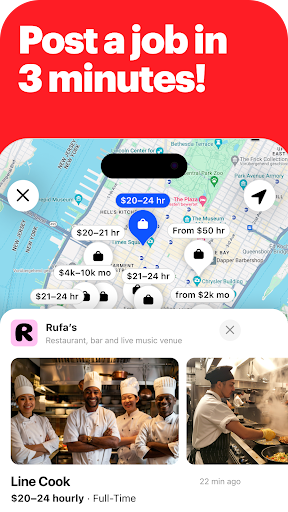


Looking to hire? Try New York’s #1 hiring app!
Tired of wading through resumes with no responses? With JOB TODAY, you can connect with local candidates ready to work in just a few taps!
Whether you’re looking for servers, cooks, shop assistants, or any other role, JOB TODAY helps you find the people your business needs — fast.
4 out of 5 employers who post on JOB TODAY start receiving applications within the first hour! And 63% of them run interviews the same or next day after posting!
Here’s how it works:
+ Create a job post in just 3 minutes.
+ Receive applications in under an hour.
+ Chat with as many candidates as you want.
+ Schedule interviews right in the app (we’ll handle reminders and confirmations!).
+ Chat with as many applicants as you want!
Designed for small and medium businesses with urgent hiring needs. Here’s what our customers say about us:
“Job Today has recommended great candidates who actually match the job description. Also, the recommended matches have mostly qualified. The system makes it easier for employers to find qualified candidates”, Cherrissa T. from C.D.I Group.
“Easy to find employees, it takes one click to find staff and shortlist them. Very convenient and easy to use application,” Jennifer Dsouza, from Pack Chinois.
**********************
Need help or have a question?
Email us at support.us@jobtoday.com
Love our app? Please leave a review!
もっと見る

1. MEmuインストーラーをダウンロードしてセットアップを完了する

2. MEmuを起動し、デスクトップでのPlayストアを開く

3. PlayストアでJOB TODAY: Hire in 24 Hoursを検索する
Install
4. JOB TODAY: Hire in 24 Hoursをダウンロードしてインストールする
5. インストールが完了したら、アイコンをクリックしてスタート

6. MEmuを使ってパソコンでJOB TODAY: Hire in 24 Hoursを体験する
MEmu Playは現在、最高の無料Androidエミュレーターであり、5,000万人のユーザーが優れたAndroidアプリ体験を楽しんでいます。MEmuの仮想化テクノロジーにより、数千ものAndroidアプリをコンピューターでスムーズに実行できます。
大画面でより精細;無限の待機、電池とドラフィックの極限を超え
キーボード・マウス・コントローラーを全力でサポート、より快適
マルチインスタンスで複数のゲームを同時に実行
Use JOB TODAY: Hire in 24 Hours on PC by following steps: