Live Wallpapers, 4K Wallpapers
更新日
現在のバージョン
5.1
提供元

スマートフォンは不要!パソコンと同じようにキーボードとマウスで操作できます。MEmu Playは、あなたが待ち望んでいたすべての楽しみをお届けします。バッテリー残量や小さな画面を気にすることなく、Live Wallpapers, 4K Wallpapersをご利用ください。最新のMEmu 9は、Live Wallpapers, 4K WallpapersをPCで体験するのに最適です!完璧なキーマッピングシステムにより、PCのようなスムーズな操作性を実現します。マルチインスタンス機能により、複数のアプリケーションを同時に実行できます。独自の仮想化エンジンがPCのパフォーマンスを最大限に引き出します。アプリを使用するだけでなく、高品質な体験を得ることができます。
もっと見る
Live Wallpapers, 4K WallpapersをPCでダウンロード!大画面でより楽しむ。電源が落ちてしまうとか通信料が足りないとかの問題を心配する必要がなく、PCの大画面でより快適にゲームを楽しましょう! Live Wallpapers | 4K Wallpapers app has large varieties of HD Live Backgrounds, Live Clock Wallpapers, Glitter Wallpapers along with static 4K (UHD | Ultra HD) as well as Full HD (High Definition | FHD+) Backgrounds.
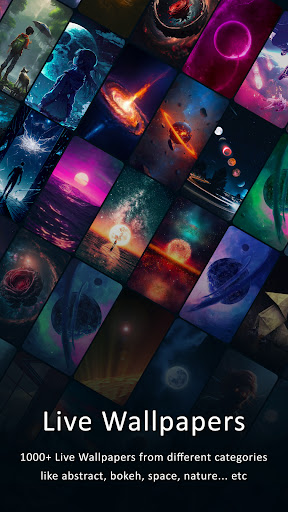
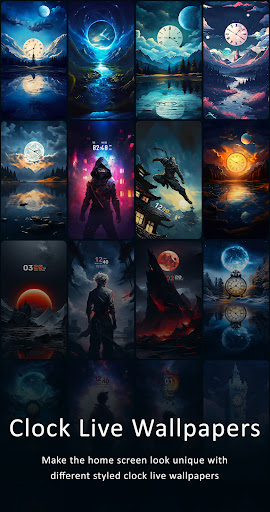
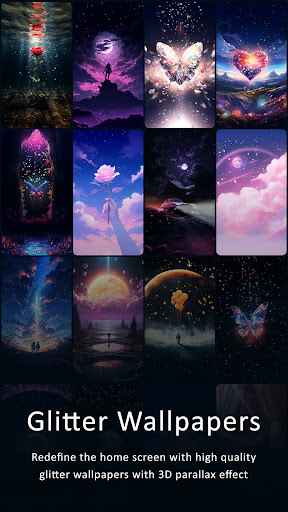
Live Wallpapers | 4K Wallpapers app has large varieties of HD Live Backgrounds, Live Clock Wallpapers, Glitter Wallpapers along with static 4K (UHD | Ultra HD) as well as Full HD (High Definition | FHD+) Backgrounds.
App contains Static Background of following Resolutions 1080x1920 px (Full HD 1080p) and 2160x3840 px (Ultra HD 4K). This app includes thousands of Live Wallpapers to choose from which can be used on Home Screen & Lock Screen giving it a Unique and Elegant look which also acts as screensaver. App also offers Live Clock Wallpapers with unique analog and digital clock wallpapers with parallax effect as well as the Glitter Wallpapers to redefine the home screen with glittery sparkling backgrounds with parallax effect.
Features of Live Wallpapers - 4K Wallpapers (Ultra HD Backgrounds) :
Live Wallpapers & Static 4K Wallpapers :
- App offers large number of Live Backgrounds as well as AMOLED Live Wallpapers organized across different Categories. App also offers Static 4K as well as Full HD Backgrounds which can be used in Auto Wallpaper Changer. App also offers AMOLED Wallpapers.
Auto Wallpaper Changer:
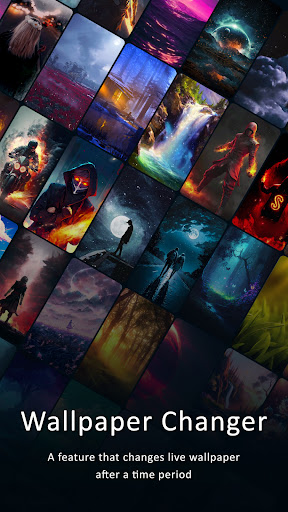
- There are two types of Wallpaper Changer, 1)Auto Live Wallpaper Changer which is used to change Live Wallpapers after certain period or action, 2)Static Wallpaper Changer which is used to change Static Wallpapers after certain period or action.
- App contains lots of Hand Crafted Live Backgrounds distributed across different Categories. Both Wallpaper Changer uses Android OS inbuilt Service called LiveWallpaper Service.
Time Frame:
- Time Frame can be set for both Wallpaper Changer in their respective Settings. This time define when to change Mobile Desktop Homescreen Background.
Double Tap to Change Wallpapers:
- This feature is available in both Wallpaper Changer i.e. Live Wallpaper Changer as well as Static Wallpaper Changer. This feature allows user to change Wallpaper after double tapping on HomeScreen.
Change Wallpaper when Device Screen is Locked:
- This feature is available in both Wallpaper Changer. Background will be changed when user locks the device. Although user must be on HomeScreen in order for this feature to trigger.
Save | Download:
- You can choose between 4K as well as Full HD version of Image to save in your phone. Although user may not able to download Live Wallpapers. It is done to protect our work.
Categories:
- We provide enormous amount of wallpapers and backgrounds sorted across 30+ categories in Live & Static Backgrounds may include Wallpapers such as:
- Abstract, Animals, Birds, Anime, Animated, AMOLED, Art, Celebrities, Fantasy, Aircrafts, Airplanes, Bokeh, Black, Video Games, Cars, Motorcycle, Supercars, Superbikes, Nature, Space, Galaxy (Planets, Sun, Earth, Moon, Galaxies, Black Holes), Architecture, City, Minimalist, Watercrafts, Ship, Moveable, Motion Loop, 3D, Parallax, Dark, Holographic, Endless Zoom, Music, Macro, Hi-Tech, Ocean, Universe, Sea, Flowers, Material Design, Food, Drinks, Photography, Rainy Day, Snow, Texture, Lake, Underwater, Sunsets and Sunrises, Sand, Forest, Trees, Women, Men, Boys, Girls, Technology, Sports, Holidays (Christmas, Santa Claus), Musical Instruments, Vector, CUTIE/KAWAII, Minimalist Wallpapers | Backgrounds, Quotes, MISC etc.
Disclaimer: All the wallpapers in this app are under common creative license and the credit goes to their respective owners. These images are not endorsed by any of the prospective owners, and the images are used simply for aesthetic purposes. No copyright infringement is intended, and any request to remove one of the images/logos/names will be honored.
もっと見る

1. MEmuインストーラーをダウンロードしてセットアップを完了する

2. MEmuを起動し、デスクトップでのPlayストアを開く

3. PlayストアでLive Wallpapers, 4K Wallpapersを検索する
Install
4. Live Wallpapers, 4K Wallpapersをダウンロードしてインストールする
5. インストールが完了したら、アイコンをクリックしてスタート

6. MEmuを使ってパソコンでLive Wallpapers, 4K Wallpapersを体験する
MEmu Playは現在、最高の無料Androidエミュレーターであり、5,000万人のユーザーが優れたAndroidアプリ体験を楽しんでいます。MEmuの仮想化テクノロジーにより、数千ものAndroidアプリをコンピューターでスムーズに実行できます。
大画面でより精細;無限の待機、電池とドラフィックの極限を超え
キーボード・マウス・コントローラーを全力でサポート、より快適
マルチインスタンスで複数のゲームを同時に実行
Use Live Wallpapers, 4K Wallpapers on PC by following steps: