
Map Pilot Pro
更新日
現在のバージョン
2.4.1a
提供元

スマートフォンは不要!パソコンと同じようにキーボードとマウスで操作できます。MEmu Playは、あなたが待ち望んでいたすべての楽しみをお届けします。バッテリー残量や小さな画面を気にすることなく、Map Pilot Proをご利用ください。最新のMEmu 9は、Map Pilot ProをPCで体験するのに最適です!完璧なキーマッピングシステムにより、PCのようなスムーズな操作性を実現します。マルチインスタンス機能により、複数のアプリケーションを同時に実行できます。独自の仮想化エンジンがPCのパフォーマンスを最大限に引き出します。アプリを使用するだけでなく、高品質な体験を得ることができます。
もっと見る
Map Pilot ProをPCでダウンロード!大画面でより楽しむ。電源が落ちてしまうとか通信料が足りないとかの問題を心配する必要がなく、PCの大画面でより快適にゲームを楽しましょう! Based on 8+ years of DJI flight app experience.
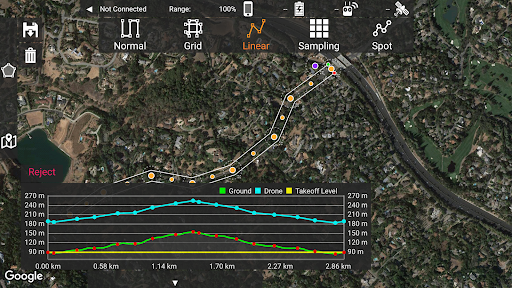
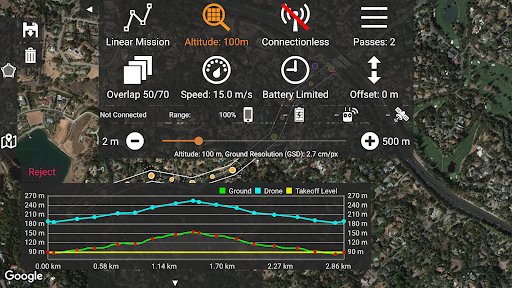
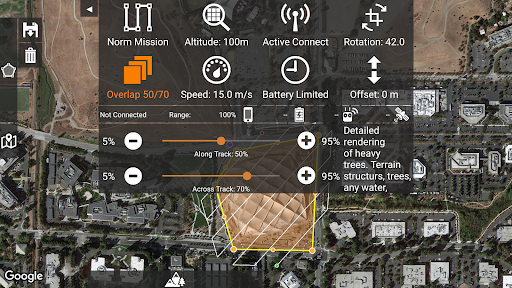
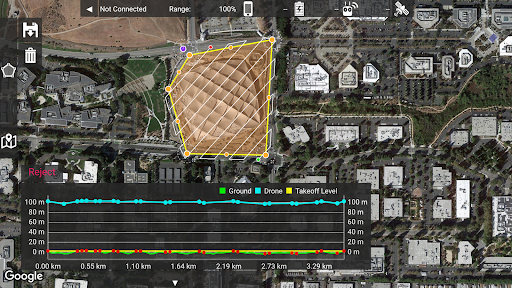
Based on 8+ years of DJI flight app experience. Map Pilot Pro helps you create and fly the optimal flight path to create great maps using the Maps Made Easy map processing service. Process into the final product using your own photogrammetry software or our Maps Made Easy online service. Mapping has never been easier.
All flight logs and mission planning can be synced with Maps Made Easy's FlightSync system for enhanced debugging and troubleshooting to help users create the best maps around.
Map Pilot Pro is a companion app intended for collecting data for the Maps Made Easy processing platform. Maps Made Easy's processing can be purchased by buying points on a pay-as-you-go basis or it can be subscribed to on a monthly basis.
Collect top notch aerial data using Map Pilot Pro and process unlimited jobs of up to 325 images (12 megapixels) for free with Maps Made Easy.
View Full Documentation: http://support.dronesmadeeasy.com
If it is not available for download from the Play Store you can download the APK from here: https://support.dronesmadeeasy.com/hc/en-us/articles/8160429529876-Installation
Mini 3 and Enterprise aircraft users need to use the APK too.
Define the area, select the level of detail, and go.
Features:
Multi-Battery Management
Manual Restart Point Selection
FlightSync to Maps Made Easy
Mission and Boundary Sync with Maps Made Easy
Flight Zone Management
Manual Restart Point definition
Automatic, Aperture/Shutter Priority and Manual Exposure Modes
Basemap Caching for Offline Operations
Connectionless Camera Triggering
Fully Offline Capable Terrain Awareness
Multi-Pass Linear Mission Planning
Custom Terrain Data Import
3D Grid Mission Planning
Multi-Flight Coordination
Movable Home Point to Track the Pilot
Save/Edit Missions
Re-fly Saved Missions
View 3D logs on-device with Google Earth
Import KML
Export KML, log files and Mission Plans
Flight Log review
Built-in Simulator for testing
AirData and DroneLogbook upload from Log File Manager
JPG, RAW and Video recording formats
Fullest Possible Use of Each Battery
Appropriate Camera Triggering
Overlap Management
Speed Management
Automatic Takeoff and Landing
Live Video Preview
Signal Quality Warning
Line of Sight Indicator
Automatically Captures Elevation Reference Image (Ground Image)
Natural Landing Assistance
Live Map View
Supported Aircraft:
See our site for the full list - https://support.dronesmadeeasy.com/hc/en-us/articles/205704366-Supported-Hardware
Mavic Pro
Mavic Air
Air 2 and Air 2S
Air 3 (Export Only)
Mini 2
Mavic 2 (Pro, Zoom, and Enterprise)
Mavic 3 (Export Only)
Mini 3 and Mini 3 Pro
Mini 4 Pro (Export Only)
Phantom 4
Phantom 4 Pro * (v2 included)
Phantom 4 Pro Plus
Phantom 4 RTK
Phantom 4 Advanced
Phantom 3 Professional
Phantom 3 Advanced
Phantom 3 Standard
Inspire 1
Inspire 1 Pro
Inspire 2
Matrice 100 (M100)
Matrice 200 (M200)
Matrice 210 (M210)
Matrice 210 RTK (M210RTK)
Matrice 600 (M600)
Matrice 600P (M600P)
Matrice 300 RTK (M300, M300RTK)
Supported External Cameras:
DJI X3
DJI X5
DJI X4S
DJI X5S
DJI X7
DJI XT2
DJI H20T
DJI H20
P1
もっと見る

1. MEmuインストーラーをダウンロードしてセットアップを完了する

2. MEmuを起動し、デスクトップでのPlayストアを開く

3. PlayストアでMap Pilot Proを検索する
Install
4. Map Pilot Proをダウンロードしてインストールする
5. インストールが完了したら、アイコンをクリックしてスタート

6. MEmuを使ってパソコンでMap Pilot Proを体験する
MEmu Playは現在、最高の無料Androidエミュレーターであり、5,000万人のユーザーが優れたAndroidアプリ体験を楽しんでいます。MEmuの仮想化テクノロジーにより、数千ものAndroidアプリをコンピューターでスムーズに実行できます。
大画面でより精細;無限の待機、電池とドラフィックの極限を超え
キーボード・マウス・コントローラーを全力でサポート、より快適
マルチインスタンスで複数のゲームを同時に実行
Use Map Pilot Pro on PC by following steps: