
Moka POS - Aplikasi Kasir
更新日
現在のバージョン
20.5.4
提供元

スマートフォンは不要!パソコンと同じようにキーボードとマウスで操作できます。MEmu Playは、あなたが待ち望んでいたすべての楽しみをお届けします。バッテリー残量や小さな画面を気にすることなく、Moka POS - Aplikasi Kasirをご利用ください。最新のMEmu 9は、Moka POS - Aplikasi KasirをPCで体験するのに最適です!完璧なキーマッピングシステムにより、PCのようなスムーズな操作性を実現します。マルチインスタンス機能により、複数のアプリケーションを同時に実行できます。独自の仮想化エンジンがPCのパフォーマンスを最大限に引き出します。アプリを使用するだけでなく、高品質な体験を得ることができます。
もっと見る
Moka POS - Aplikasi KasirをPCでダウンロード!大画面でより楽しむ。電源が落ちてしまうとか通信料が足りないとかの問題を心配する必要がなく、PCの大画面でより快適にゲームを楽しましょう! Start growing your offline and online business with Moka App!
Start growing your offline and online business with Moka App!
It takes a moment to set up your cashier app. Moka Point of Sales (POS) will help you easily monitor your daily transactions and inventory real-time any time and anywhere. Manage employee access and get all the reports at your fingertip, no more hassle consolidating your weekly or monthly report manually. One stop solution for your business, all in one cashier application Moka POS.
Enjoy various business solutions of each feature here:
Basic Point-Of-Sale:
- Access your sales data and transaction history in real-time
- Record all the payments type (cash, debit/credit card, e-wallets, or any other forms)
- Send and track the invoices right away for your mobile device
- Provide open tab/bills option
- Refund features for error input
- Customize your sales promotion program
- Send the receipts through email and sms
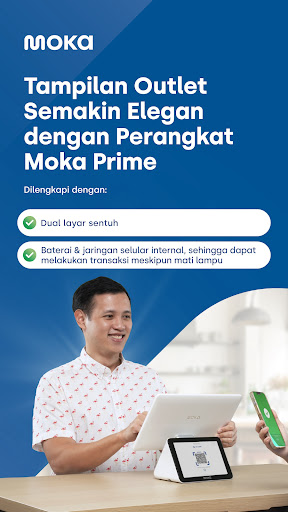
- Connect to other hardware seamlessly (receipt printer, kitchen ticket printer, barcode scanner, GoBiz PLUS EDC, and cash drawer)
Order Management:
- Receive and process online orders from multiple platforms in Moka dashboad (now available for GoFood & GrabFood)
- Manage your menu across all ordering platforms online via Moka inventory management system
-Receive integrated offline & online order reports in Moka Back Office
Employee Management:
- Manage the shift arrangement for your employees
- Manage employee's roles and access to prevent fraud
- Find out your employee’s best performance with the sales shift data
Inventory Management:
- Customize your product by adding on variants, modifier, prices, and photos
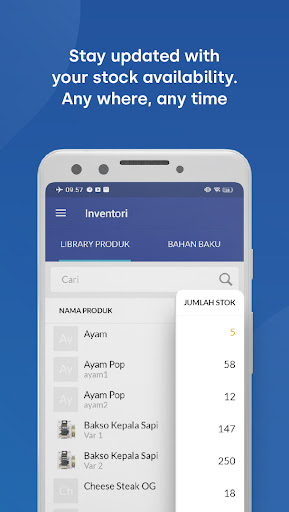
- Track real-time inventory management and get automated alert for low-stock availability
- Manage raw and semi-finished Ingredient with Recipe to be sold as product
Customer Relationship Management (CRM):
- Create loyalty program membership for customers
- Keep track of customer data, purchase history, and feedback
- Plan your marketing strategy by utilizing the customer behaviour data
Activate multiple digital payments from Moka, free!
- Accept GoPay, OVO, ShopeePay, DANA, LinkAja, Kredivo, and Akulaku payment without any additional device
- Accept Debit & Credit Card with GoBiz PLUS EDC (sold separately) integrated with Moka POS
- Featured with ECR Link to help total order nominal directly appears on the GoBiz PLUS EDC machine without manual input, to minimize errors at the outlet
- Receive consolidated funds with T+1 settlement
Online Selling:
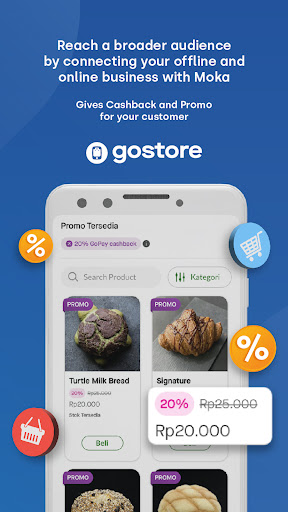
- Create your own store website and start selling online
- Process your GoStore orders in Moka POS
- Use and give the "Self Pick-up" option so customers don’t need to wait
Capital:
- Get access to capital loans with easy and fast application process
- Apply a custom fit loan to support your business needs
- Only cooperate with trusted partners that have been supervised by OJK
Sign in to Moka back office then set up your store, and products and add the suitable features. You can easily view the real-time dashboard report which comes up with powerful analytics that will help you improve your business. All starts from Moka POS.
Subscribe annually now and get a various promo from Moka!
For further info, please contact our team at 1500-970 or visit our website www.mokapos.com.
もっと見る

1. MEmuインストーラーをダウンロードしてセットアップを完了する

2. MEmuを起動し、デスクトップでのPlayストアを開く

3. PlayストアでMoka POS - Aplikasi Kasirを検索する
Install
4. Moka POS - Aplikasi Kasirをダウンロードしてインストールする
5. インストールが完了したら、アイコンをクリックしてスタート

6. MEmuを使ってパソコンでMoka POS - Aplikasi Kasirを体験する
MEmu Playは現在、最高の無料Androidエミュレーターであり、5,000万人のユーザーが優れたAndroidアプリ体験を楽しんでいます。MEmuの仮想化テクノロジーにより、数千ものAndroidアプリをコンピューターでスムーズに実行できます。
大画面でより精細;無限の待機、電池とドラフィックの極限を超え
キーボード・マウス・コントローラーを全力でサポート、より快適
マルチインスタンスで複数のゲームを同時に実行
Use Moka POS - Aplikasi Kasir on PC by following steps: