myNoise | Focus. Relax. Sleep.
更新日
現在のバージョン
3.12.3
提供元

スマートフォンは不要!パソコンと同じようにキーボードとマウスで操作できます。MEmu Playは、あなたが待ち望んでいたすべての楽しみをお届けします。バッテリー残量や小さな画面を気にすることなく、myNoise | Focus. Relax. Sleep.をご利用ください。最新のMEmu 9は、myNoise | Focus. Relax. Sleep.をPCで体験するのに最適です!完璧なキーマッピングシステムにより、PCのようなスムーズな操作性を実現します。マルチインスタンス機能により、複数のアプリケーションを同時に実行できます。独自の仮想化エンジンがPCのパフォーマンスを最大限に引き出します。アプリを使用するだけでなく、高品質な体験を得ることができます。
もっと見る
myNoise | Focus. Relax. Sleep.をPCでダウンロード!大画面でより楽しむ。電源が落ちてしまうとか通信料が足りないとかの問題を心配する必要がなく、PCの大画面でより快適にゲームを楽しましょう! myNoise offers expertly crafted soundscapes—customizable audio experiences blending 10 different individual sounds designed to help with specific needs like tinnitus relief, anxiety reduction, stress management, study sessions, and improved sleep.
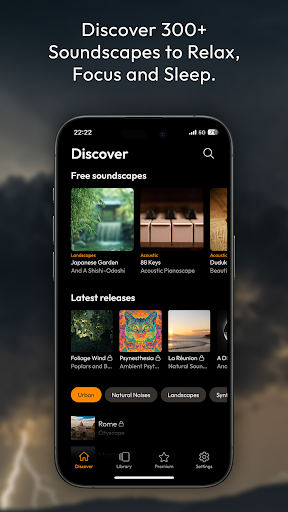
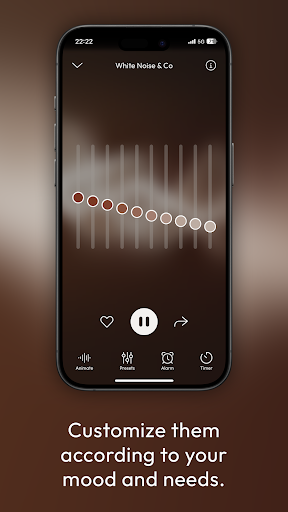
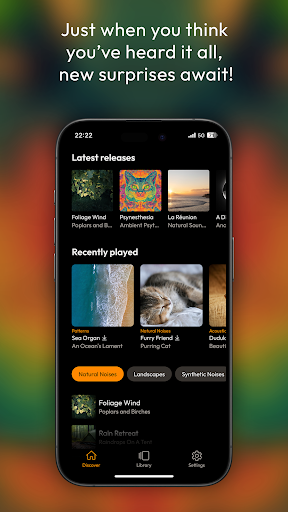
myNoise offers expertly crafted soundscapes—customizable audio experiences blending 10 different individual sounds designed to help with specific needs like tinnitus relief, anxiety reduction, stress management, study sessions, and improved sleep. Whether you're looking to block out distractions, calm your mind, or improve concentration, our soundscapes provide soothing and immersive audio experiences perfect for relaxation, meditation, study aid, and productivity. If you're seeking natural solutions through sound, myNoise is designed for you.
Our 300+ soundscapes offer a global solution for a wide range of uses such as tinnitus relief, anxiety reduction, stress management, noise blocking, and enhanced study focus. Through a user-friendly set of sliders, each of them can be customized to perfectly fit your needs.
Why Choose myNoise?
Mask Tinnitus & Noise: Alleviate ear ringing with specially designed soundscapes and noise masking features for effective tinnitus relief.
Relieve Anxiety & Stress: Let soothing nature sounds and calming white noise help you relax, unwind, and focus on your study sessions, promoting effective stress relief, anxiety relief, and noise blocking.
Improve Focus & Productivity: Create the ideal study environment with tailored focus sounds that enhance concentration, acting as a perfect study aid and supporting ADHD management.
Sleep Better: Drift into peaceful sleep with gentle, calming natural noises designed to block out distractions and soothe your mind, acting as a perfect sleep aid.
Join our global community and find out why myNoise is the top app for tinnitus relief, anxiety relief, noise blocking, study aid, and better sleep!
Features You'll Love:
✔️ 300+ Soundscapes: Explore a rich library of natural white noise, nature sounds, ambient tones, binaural beats, and urban ambiances. Our soundscapes cover a variety of categories, such as nature sounds, industrial sounds, and more—perfect for study, focus, or relaxation.
✔️ Advanced Customization: Personalize each soundscape with 10 adjustable sliders to suit your specific mood and environment, whether for study, sleep, or meditation.
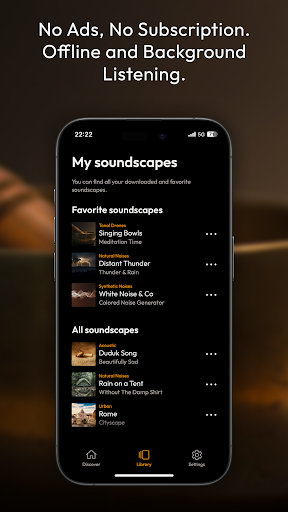
✔️ Offline Listening: Download your favorite soundscapes for offline use. Whether you're traveling, meditating, or studying in a quiet place, myNoise works perfectly without an internet connection.
✔️ No Subscriptions, No Ads: Relax with multiple free soundscapes, or unlock everything with a one-time purchase. No hidden fees or recurring charges!
✔️ New Soundscapes Added Regularly: Stay tuned for new releases, bringing you fresh sound experiences to keep your study sessions, relaxation, and tinnitus relief routine exciting.
Perfect for:
もっと見る

1. MEmuインストーラーをダウンロードしてセットアップを完了する

2. MEmuを起動し、デスクトップでのPlayストアを開く

3. PlayストアでmyNoise | Focus. Relax. Sleep.を検索する
Install
4. myNoise | Focus. Relax. Sleep.をダウンロードしてインストールする
5. インストールが完了したら、アイコンをクリックしてスタート

6. MEmuを使ってパソコンでmyNoise | Focus. Relax. Sleep.を体験する
MEmu Playは現在、最高の無料Androidエミュレーターであり、5,000万人のユーザーが優れたAndroidアプリ体験を楽しんでいます。MEmuの仮想化テクノロジーにより、数千ものAndroidアプリをコンピューターでスムーズに実行できます。
大画面でより精細;無限の待機、電池とドラフィックの極限を超え
キーボード・マウス・コントローラーを全力でサポート、より快適
マルチインスタンスで複数のゲームを同時に実行
Use myNoise | Focus. Relax. Sleep. on PC by following steps: