Nothing Icon Pack (Adaptive)
更新日
現在のバージョン
1.3.1
提供元

スマートフォンは不要!パソコンと同じようにキーボードとマウスで操作できます。MEmu Playは、あなたが待ち望んでいたすべての楽しみをお届けします。バッテリー残量や小さな画面を気にすることなく、Nothing Icon Pack (Adaptive)をご利用ください。最新のMEmu 9は、Nothing Icon Pack (Adaptive)をPCで体験するのに最適です!完璧なキーマッピングシステムにより、PCのようなスムーズな操作性を実現します。マルチインスタンス機能により、複数のアプリケーションを同時に実行できます。独自の仮想化エンジンがPCのパフォーマンスを最大限に引き出します。アプリを使用するだけでなく、高品質な体験を得ることができます。
もっと見る
Nothing Icon Pack (Adaptive)をPCでダウンロード!大画面でより楽しむ。電源が落ちてしまうとか通信料が足りないとかの問題を心配する必要がなく、PCの大画面でより快適にゲームを楽しましょう! Nothing Icon Pack: Colors Inspired by Nothing Brand.
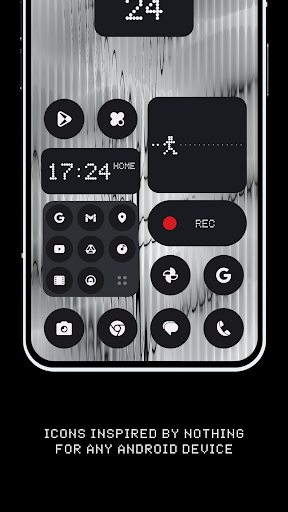
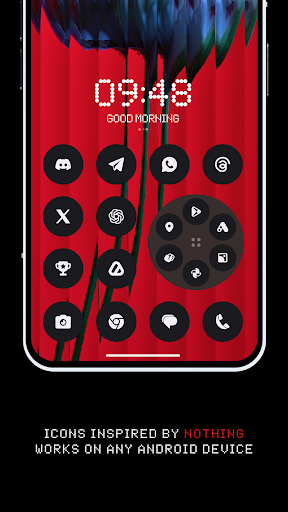
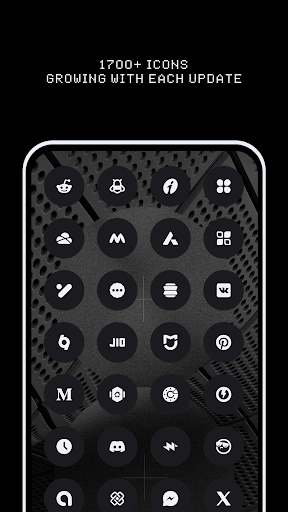
Nothing Icon Pack: Colors Inspired by Nothing Brand. Now Achieve a Monochromatic Look on Any Android Device.
One of the easiest ways to refresh your phone's interface is by giving it a new look with an amazing icon pack. While there are already thousands of icon packs on the market, Nothing Icon Pack stands out. It will transform your device's appearance from the mundane stock look to something truly awesome.
Nothing Icon Pack is relatively new, featuring 1710+ icons and 100+ exclusive wallpapers. I assure you that more icons will be added in every update.
Why Choose Nothing Icon Pack over Others?
• 1710+ ICONS OF TOP NOTCH QUALITY.
• Icon Masking for Unthemed Icons.
• Frequent Updates with new icons and updated activities.
• Alternative Icons for popular apps and system apps.
• Matching Wallpaper Collection.
• KWGT Widgets (Coming Soon).
• Server-Based Icon Request System.
• Custom folder icons and app drawer icons.
• Icon preview and search.
• Dynamic Calendar support.
• Slick Material Dashboard.
How to Use This Icon Pack?
Step 1: Install a supported theme launcher (Recommended: NOVA LAUNCHER or Lawnchair).
Step 2: Open Icon Pack and click on Apply.
Nothing Icon Pack is a very minimal, colorful linear icon pack that includes 1710+ icons and numerous cloud-based wallpapers. In this icon pack, we adhere to Google's Material Design guidelines for size and dimensions, adding our own creative touch! Each icon is a masterpiece crafted with great attention to the smallest details.
Download our Nothing Icon Pack in our monochrome color scheme. Match app icons to your Nothing widgets for a look that's unmistakably Nothing. Designed to reduce distractions and make interactions with your smartphone more intentional.
Extra Notes:
The icon pack requires a launcher to work. (Some devices support icon packs with their stock launcher like Oxygen OS, Mi Poco, etc.)
Google Now Launcher and ONE UI do not support any icon packs.
Missing an Icon? Feel free to send an icon request from the request section in the app. I will do my best to include it in the next updates.
Contact Me:
Twitter: https://twitter.com/justnewdesigns
Email: justnewdesigns@gmail.com
Website: JustNewDesigns.bio.link
もっと見る

1. MEmuインストーラーをダウンロードしてセットアップを完了する

2. MEmuを起動し、デスクトップでのPlayストアを開く

3. PlayストアでNothing Icon Pack (Adaptive)を検索する
Install
4. Nothing Icon Pack (Adaptive)をダウンロードしてインストールする
5. インストールが完了したら、アイコンをクリックしてスタート

6. MEmuを使ってパソコンでNothing Icon Pack (Adaptive)を体験する
MEmu Playは現在、最高の無料Androidエミュレーターであり、5,000万人のユーザーが優れたAndroidアプリ体験を楽しんでいます。MEmuの仮想化テクノロジーにより、数千ものAndroidアプリをコンピューターでスムーズに実行できます。
大画面でより精細;無限の待機、電池とドラフィックの極限を超え
キーボード・マウス・コントローラーを全力でサポート、より快適
マルチインスタンスで複数のゲームを同時に実行
Use Nothing Icon Pack (Adaptive) on PC by following steps: