Personalized thermal warnings
更新日
現在のバージョン
1.0.0
提供元

スマートフォンは不要!パソコンと同じようにキーボードとマウスで操作できます。MEmu Playは、あなたが待ち望んでいたすべての楽しみをお届けします。バッテリー残量や小さな画面を気にすることなく、Personalized thermal warningsをご利用ください。最新のMEmu 9は、Personalized thermal warningsをPCで体験するのに最適です!完璧なキーマッピングシステムにより、PCのようなスムーズな操作性を実現します。マルチインスタンス機能により、複数のアプリケーションを同時に実行できます。独自の仮想化エンジンがPCのパフォーマンスを最大限に引き出します。アプリを使用するだけでなく、高品質な体験を得ることができます。
もっと見る
Personalized thermal warningsをPCでダウンロード!大画面でより楽しむ。電源が落ちてしまうとか通信料が足りないとかの問題を心配する必要がなく、PCの大画面でより快適にゲームを楽しましょう! Thermal climate stress affects health and productivity for millions of European workers.
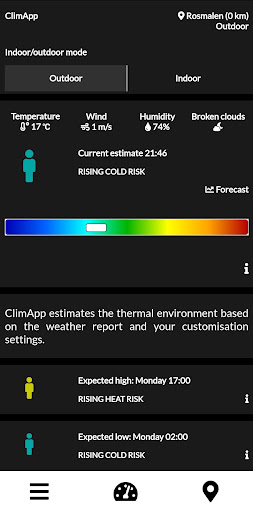
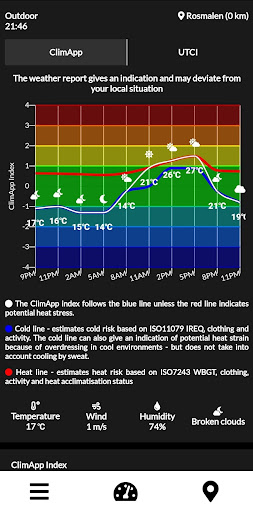
Thermal climate stress affects health and productivity for millions of European workers. Sudden changes in the thermal environment (heat waves or cold spells) are also major health challenges for the elderly and other vulnerable populations, increasing mortality and morbidity. The consequences of thermal stress are dependent not only on climate factors, but also on individual human physiology and thermo-regulation capacity. For warning and preparation purposes, climate services can provide information on current and upcoming environmental conditions, but such weather forecasts will be much more valuable for individuals facing adverse weather conditions if combined with individual characteristics and translated into optimized adaptation strategies that can be provided and implemented immediately.
The app uses your personal information (height, weight, age, gender) to calculate personalized coping strategies against thermal climate stress.
Within the next year the app will regularly be updated with new thermal models along with optimization of the current content.
To read more about the project and it's participants, visit: http://www.lth.se/climapp/
もっと見る

1. MEmuインストーラーをダウンロードしてセットアップを完了する

2. MEmuを起動し、デスクトップでのPlayストアを開く

3. PlayストアでPersonalized thermal warningsを検索する
Install
4. Personalized thermal warningsをダウンロードしてインストールする
5. インストールが完了したら、アイコンをクリックしてスタート

6. MEmuを使ってパソコンでPersonalized thermal warningsを体験する
MEmu Playは現在、最高の無料Androidエミュレーターであり、5,000万人のユーザーが優れたAndroidアプリ体験を楽しんでいます。MEmuの仮想化テクノロジーにより、数千ものAndroidアプリをコンピューターでスムーズに実行できます。
大画面でより精細;無限の待機、電池とドラフィックの極限を超え
キーボード・マウス・コントローラーを全力でサポート、より快適
マルチインスタンスで複数のゲームを同時に実行
Use Personalized thermal warnings on PC by following steps: