
Restaurant Order-Taking App
更新日
現在のバージョン
2.5.1
提供元

スマートフォンは不要!パソコンと同じようにキーボードとマウスで操作できます。MEmu Playは、あなたが待ち望んでいたすべての楽しみをお届けします。バッテリー残量や小さな画面を気にすることなく、Restaurant Order-Taking Appをご利用ください。最新のMEmu 9は、Restaurant Order-Taking AppをPCで体験するのに最適です!完璧なキーマッピングシステムにより、PCのようなスムーズな操作性を実現します。マルチインスタンス機能により、複数のアプリケーションを同時に実行できます。独自の仮想化エンジンがPCのパフォーマンスを最大限に引き出します。アプリを使用するだけでなく、高品質な体験を得ることができます。
もっと見る
Restaurant Order-Taking AppをPCでダウンロード!大画面でより楽しむ。電源が落ちてしまうとか通信料が足りないとかの問題を心配する必要がなく、PCの大画面でより快適にゲームを楽しましょう! Take online orders from your website, Facebook page or branded app, directly on your smartphone or tablet.
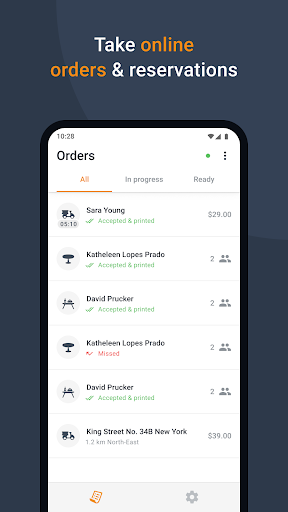
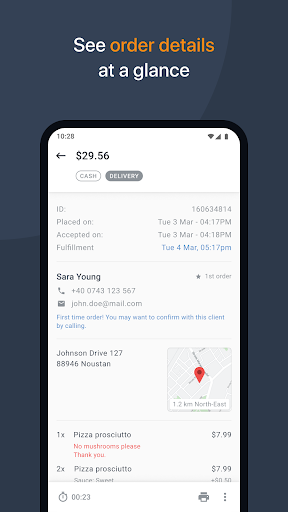
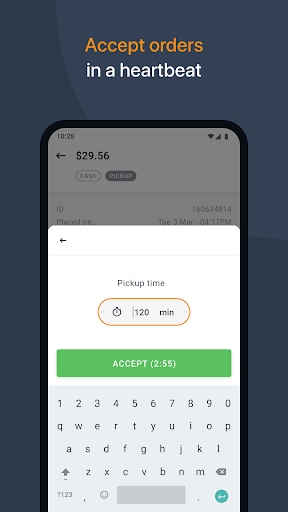
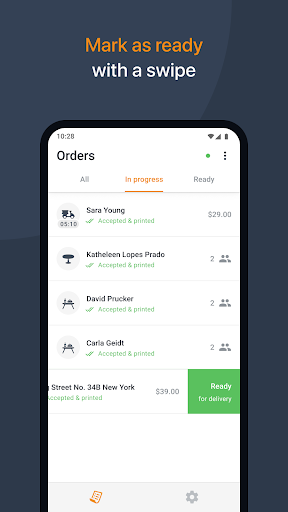
Take online orders from your website, Facebook page or branded app, directly on your smartphone or tablet. Each order placed is instantly pushed to your device, so you can easily review and confirm it.
**Your restaurant account**
To be able to use this app you need to login with your given restaurant’s username and password. Use the credentials obtained from your local partner or get them yourself from the admin area of your restaurant account.
If you don’t have an account yet, please contact your local partner or use the developer contact details below to get connected with the nearest relevant partner.
**How it works**
After setting up your restaurant profile and online menu, place the “See Menu & Order” button on your website. This way your clients can start ordering. Each order placed is directly pushed to this app. Your device rings, notifying you that there’s a new order.
Tap on the order and you can see all its details, from client’s contact information to payment method, ordered items and special instructions.
When you accept an asap order you are required to enter how long it will take to fulfill it. Your client will be notified immediately that the order has been accepted, together with the estimated time for pickup/delivery.
**With this app you can:**
*Receive orders (pickup/delivery/dine-in) and table reservations on your smartphone or tablet;
*View client details: name, phone, email, delivery address;
*View order details: items, quantity, price, payment method, special instructions;
*Accept/Reject new orders (confirmation is then sent to your client in an email);
*Manage your orders with 3 views: all, in progress, ready;
*Mark an order as ready with a simple swipe;
*Print orders automatically or on demand, on supported thermal printers.
もっと見る

1. MEmuインストーラーをダウンロードしてセットアップを完了する

2. MEmuを起動し、デスクトップでのPlayストアを開く

3. PlayストアでRestaurant Order-Taking Appを検索する
Install
4. Restaurant Order-Taking Appをダウンロードしてインストールする
5. インストールが完了したら、アイコンをクリックしてスタート

6. MEmuを使ってパソコンでRestaurant Order-Taking Appを体験する
MEmu Playは現在、最高の無料Androidエミュレーターであり、5,000万人のユーザーが優れたAndroidアプリ体験を楽しんでいます。MEmuの仮想化テクノロジーにより、数千ものAndroidアプリをコンピューターでスムーズに実行できます。
大画面でより精細;無限の待機、電池とドラフィックの極限を超え
キーボード・マウス・コントローラーを全力でサポート、より快適
マルチインスタンスで複数のゲームを同時に実行
Use Restaurant Order-Taking App on PC by following steps: