Samsung Music
更新日
現在のバージョン
16.2.42.0
提供元

スマートフォンは不要!パソコンと同じようにキーボードとマウスで操作できます。MEmu Playは、あなたが待ち望んでいたすべての楽しみをお届けします。バッテリー残量や小さな画面を気にすることなく、Samsung Musicをご利用ください。最新のMEmu 9は、Samsung MusicをPCで体験するのに最適です!完璧なキーマッピングシステムにより、PCのようなスムーズな操作性を実現します。マルチインスタンス機能により、複数のアプリケーションを同時に実行できます。独自の仮想化エンジンがPCのパフォーマンスを最大限に引き出します。アプリを使用するだけでなく、高品質な体験を得ることができます。
もっと見る
Samsung MusicをPCでダウンロード!大画面でより楽しむ。電源が落ちてしまうとか通信料が足りないとかの問題を心配する必要がなく、PCの大画面でより快適にゲームを楽しましょう! Samsung Music は Samsung Android デバイス用に最適化されており、強力な音楽再生機能と最高のユーザー インターフェイスを提供します。
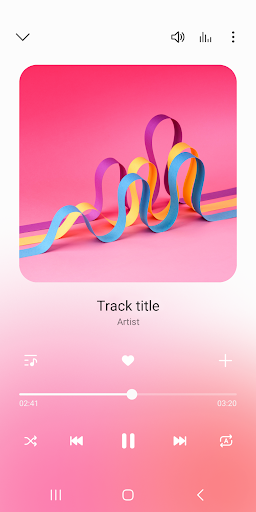
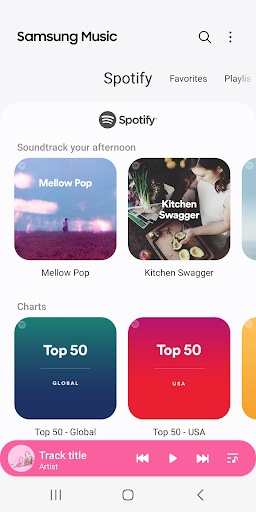
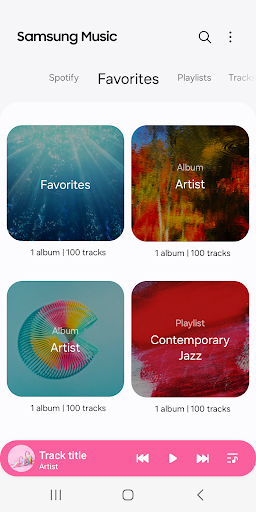
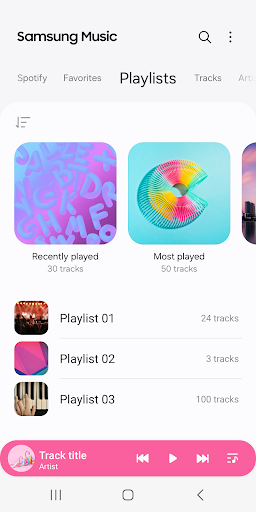
Samsung Music は Samsung Android デバイス用に最適化されており、強力な音楽再生機能と最高のユーザー インターフェイスを提供します。
主な特長
1. MP3、AAC、FLACなどのさまざまな音声フォーマットの再生をサポートします。
(対応するファイル形式は端末により異なります。)
2. カテゴリ別(トラック、アルバム、アーティスト、ジャンル、フォルダ、作曲者)の曲リストを効果的に管理するのに役立ちます。
3. すっきりとした直感的なユーザー インターフェイスを提供します。
4. Samsung ミュージックには、Spotify からのプレイリストの推奨が表示されます。 「Spotify」タブで Spotify のおすすめ音楽を見つけたり、お気に入りの Spotify 音楽を検索したりできます。
([Spotify] タブは、Spotify がサービスを提供している国でのみ使用できます。)
サムスンミュージックに関するその他のお問い合わせは、以下の方法でお問い合わせください。
* Samsung ミュージック アプリ > 詳細 (3 つのドット) > 設定 > お問い合わせ
(「お問い合わせ」機能を使用するには、Samsung Members アプリがデバイスにインストールされている必要があります。)
*** 必要なアプリ権限 ***
Samsung Music の基本機能には、以下の必須の許可が必要です。
オプションの権限が拒否されていても、基本的な機能は正常に動作する場合があります。
【必須の許可】
1. 音楽とオーディオ(ストレージ)
- 音楽やオーディオファイルの保存と再生が可能
- プレーヤーが SD カードからデータを読み取ることができます。
【任意の許可】
2. お知らせ
- Samsung Music に関連する通知を提供します。
3. 電話: 韓国のデバイスのみ。
- 音楽サービスを使用するときに携帯電話を認証します。
もっと見る

1. MEmuインストーラーをダウンロードしてセットアップを完了する

2. MEmuを起動し、デスクトップでのPlayストアを開く

3. PlayストアでSamsung Musicを検索する
Install
4. Samsung Musicをダウンロードしてインストールする
5. インストールが完了したら、アイコンをクリックしてスタート

6. MEmuを使ってパソコンでSamsung Musicを体験する
MEmu Playは現在、最高の無料Androidエミュレーターであり、5,000万人のユーザーが優れたAndroidアプリ体験を楽しんでいます。MEmuの仮想化テクノロジーにより、数千ものAndroidアプリをコンピューターでスムーズに実行できます。
大画面でより精細;無限の待機、電池とドラフィックの極限を超え
キーボード・マウス・コントローラーを全力でサポート、より快適
マルチインスタンスで複数のゲームを同時に実行
Use Samsung Music on PC by following steps: