Signals&Bot
更新日
現在のバージョン
6.1.3
提供元

スマートフォンは不要!パソコンと同じようにキーボードとマウスで操作できます。MEmu Playは、あなたが待ち望んでいたすべての楽しみをお届けします。バッテリー残量や小さな画面を気にすることなく、Signals&Botをご利用ください。最新のMEmu 9は、Signals&BotをPCで体験するのに最適です!完璧なキーマッピングシステムにより、PCのようなスムーズな操作性を実現します。マルチインスタンス機能により、複数のアプリケーションを同時に実行できます。独自の仮想化エンジンがPCのパフォーマンスを最大限に引き出します。アプリを使用するだけでなく、高品質な体験を得ることができます。
もっと見る
Signals&BotをPCでダウンロード!大画面でより楽しむ。電源が落ちてしまうとか通信料が足りないとかの問題を心配する必要がなく、PCの大画面でより快適にゲームを楽しましょう! Signals&Bot is your go-to app for expert trading signals and powerful auto-trading tools, designed to enhance your trading experience and help you make more informed investment decisions.
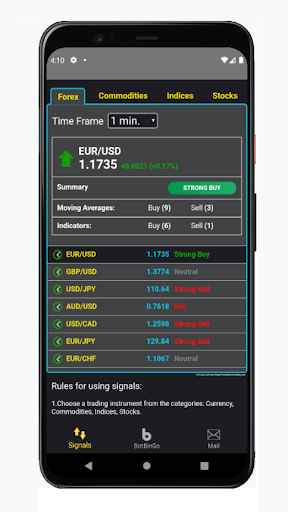
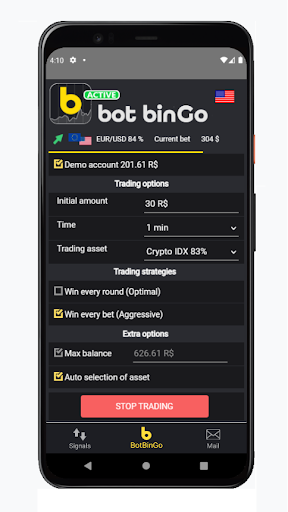
Signals&Bot is your go-to app for expert trading signals and powerful auto-trading tools, designed to enhance your trading experience and help you make more informed investment decisions.
Key Features:
Real-Time Forex Signals: Access live forex trading signals based on thorough market analysis. Our signals are generated using a combination of proven technical indicators, including RSI, CCI, Moving Averages, Fibonacci retracements, EMA, Stochastic oscillators, and key support and resistance levels.
Built-in Trading Robot: Take advantage of our user-friendly trading robot, which is designed for easy setup and execution. In just a few minutes, you can configure the robot to automatically place trades based on the signals provided, maximizing accuracy and efficiency in your trades.
Advanced Market Analysis: Stay ahead of the market with our in-depth analysis, utilizing a variety of technical indicators to identify potential trading opportunities. Whether you’re a seasoned trader or just starting out, our tools help you navigate the complexities of forex trading with greater confidence.
User-Friendly Interface: The intuitive design of Signals&Bot ensures that both novice and experienced traders can easily navigate the app and take full advantage of its features. Set up your trading strategies, monitor signals, and manage trades with ease.
Important Considerations:
Educational Tool, Not Financial Advice: Signals&Bot is designed as an educational tool to assist you in understanding market movements and potential trading opportunities. However, the app does not provide personalized investment advice. If you’re new to trading or lack experience in financial markets, we strongly recommend educating yourself or seeking advice from a financial advisor before engaging in trading activities.
Understand the Risks: Trading in forex, stocks, and other financial markets carries significant risks and may not be suitable for all investors. It’s important to assess your financial goals, risk tolerance, and experience level before making any investment decisions. Always remember to invest only what you can afford to lose.
Not for Everyone: The tools and strategies provided by Signals&Bot are powerful, but they also require a good understanding of the markets to be used effectively. If you’re unsure about the risks or how to use the app’s features, take the time to learn before diving in.
Why Choose Signals&Bot?
With Signals&Bot, you gain access to a comprehensive suite of trading tools that are designed to simplify the trading process and provide you with valuable insights into market trends. Whether you're looking to automate your trading with our built-in robot or want to analyze live signals to make more informed decisions, Signals&Bot is here to support your trading journey.
もっと見る

1. MEmuインストーラーをダウンロードしてセットアップを完了する

2. MEmuを起動し、デスクトップでのPlayストアを開く

3. PlayストアでSignals&Botを検索する
Install
4. Signals&Botをダウンロードしてインストールする
5. インストールが完了したら、アイコンをクリックしてスタート

6. MEmuを使ってパソコンでSignals&Botを体験する
MEmu Playは現在、最高の無料Androidエミュレーターであり、5,000万人のユーザーが優れたAndroidアプリ体験を楽しんでいます。MEmuの仮想化テクノロジーにより、数千ものAndroidアプリをコンピューターでスムーズに実行できます。
大画面でより精細;無限の待機、電池とドラフィックの極限を超え
キーボード・マウス・コントローラーを全力でサポート、より快適
マルチインスタンスで複数のゲームを同時に実行
Use Signals&Bot on PC by following steps: