SuperWalk-Step counter&Rewards
更新日
現在のバージョン
1.13.6
提供元

スマートフォンは不要!パソコンと同じようにキーボードとマウスで操作できます。MEmu Playは、あなたが待ち望んでいたすべての楽しみをお届けします。バッテリー残量や小さな画面を気にすることなく、SuperWalk-Step counter&Rewardsをご利用ください。最新のMEmu 9は、SuperWalk-Step counter&RewardsをPCで体験するのに最適です!完璧なキーマッピングシステムにより、PCのようなスムーズな操作性を実現します。マルチインスタンス機能により、複数のアプリケーションを同時に実行できます。独自の仮想化エンジンがPCのパフォーマンスを最大限に引き出します。アプリを使用するだけでなく、高品質な体験を得ることができます。
もっと見る
SuperWalk-Step counter&RewardsをPCでダウンロード!大画面でより楽しむ。電源が落ちてしまうとか通信料が足りないとかの問題を心配する必要がなく、PCの大画面でより快適にゲームを楽しましょう! ■ Earn Rewards by Exercising After Installation.
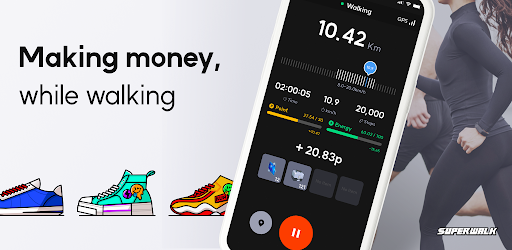
■ Earn Rewards by Exercising After Installation
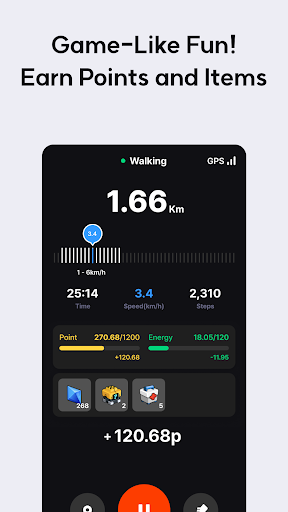
• Earn SuperMoney and SuperCash simply by walking a certain number of steps.
• Use SuperMoney to enter SuperDraw for a variety of prizes, from gift cards to home appliances. SuperCash can be used to purchase gift cards.
• Over 14,452 prizes were awarded to SuperWalk users just by walking during a 3-month period!
• Install SuperWalk now, take care of your health, and earn rewards through app-based earning.
(Tracking period: January 1, 2023 – March 31, 2023)
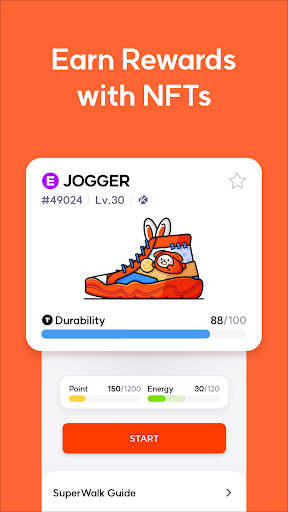
■ Earn Even More by Purchasing Shoe NFTs
• Level up your own Shoes and earn WALK Coins.
• For a true app-based earning experience, purchase a Shoe NFT and exercise in Pro Mode to see your WALK Coins accumulate in real time!
• Even with a low-cost NFT, you can earn an average of 1 USD in just 15 minutes of walking.
(Tracking period: January 1, 2023 – January 31, 2023)
■ Accurate Tracking of Your Workouts!
• When you walk in Pro Mode using a Shoe NFT, the SuperWalk app accurately tracks your workout with GPS and phone sensors, automatically saving your data.
• Check your records anytime to maintain a consistent exercise habit while earning money. SuperWalk is a smart healthcare app!
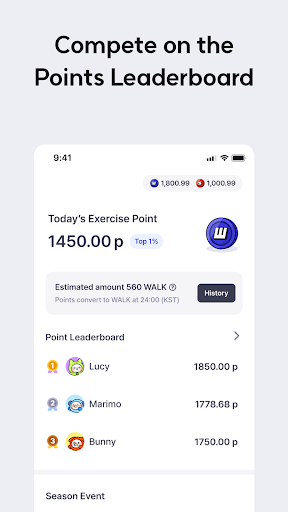
■ Enjoy Fun Competitions with Friends on the Leaderboard!
• View your friends’ workout records in real time.
• Get motivated by seeing how many points your friends have accumulated and enjoy healthy competition together!
• Exercising is more fun with friends!
■ Have Questions? Feel Free to Contact Us!
• SuperWalk Customer Support Team: Use the “Help” button at the bottom right of the app or website to submit an inquiry.
• For partnership inquiries, email us at contact@proground.co.kr
※ Required Permissions for Convenient Service Use
[Required Permissions]
• Physical Activity: Used to accurately measure your workout records.
• Notifications: Used for step count updates and important announcements.
[Optional Permissions]
• Photos and Videos: Used to access the gallery when sharing workout records.
• Location: Used for real-time location tracking in Pro Mode.
• Camera: Optional for recording workout results.
※ If the latest version update is not detected, go to your device settings, select the Play Store, and clear the cache and data before trying again.
もっと見る

1. MEmuインストーラーをダウンロードしてセットアップを完了する

2. MEmuを起動し、デスクトップでのPlayストアを開く

3. PlayストアでSuperWalk-Step counter&Rewardsを検索する
Install
4. SuperWalk-Step counter&Rewardsをダウンロードしてインストールする
5. インストールが完了したら、アイコンをクリックしてスタート

6. MEmuを使ってパソコンでSuperWalk-Step counter&Rewardsを体験する
MEmu Playは現在、最高の無料Androidエミュレーターであり、5,000万人のユーザーが優れたAndroidアプリ体験を楽しんでいます。MEmuの仮想化テクノロジーにより、数千ものAndroidアプリをコンピューターでスムーズに実行できます。
大画面でより精細;無限の待機、電池とドラフィックの極限を超え
キーボード・マウス・コントローラーを全力でサポート、より快適
マルチインスタンスで複数のゲームを同時に実行
Use SuperWalk-Step counter&Rewards on PC by following steps: