The Knot Wedding Planner
更新日
現在のバージョン
4.22.2
提供元

スマートフォンは不要!パソコンと同じようにキーボードとマウスで操作できます。MEmu Playは、あなたが待ち望んでいたすべての楽しみをお届けします。バッテリー残量や小さな画面を気にすることなく、The Knot Wedding Plannerをご利用ください。最新のMEmu 9は、The Knot Wedding PlannerをPCで体験するのに最適です!完璧なキーマッピングシステムにより、PCのようなスムーズな操作性を実現します。マルチインスタンス機能により、複数のアプリケーションを同時に実行できます。独自の仮想化エンジンがPCのパフォーマンスを最大限に引き出します。アプリを使用するだけでなく、高品質な体験を得ることができます。
もっと見る
The Knot Wedding PlannerをPCでダウンロード!大画面でより楽しむ。電源が落ちてしまうとか通信料が足りないとかの問題を心配する必要がなく、PCの大画面でより快適にゲームを楽しましょう! Planning a wedding?

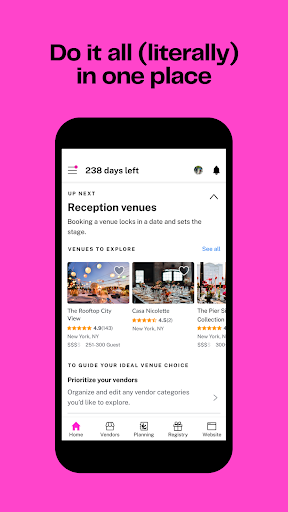
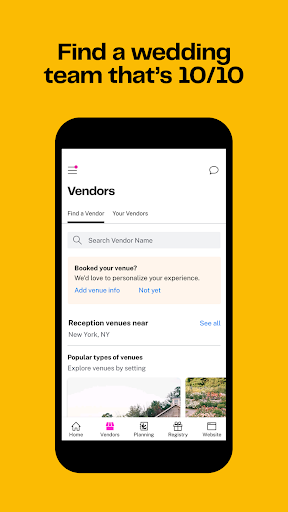
Planning a wedding? The Knot will walk you through it every step of the way with our totally free, #1 rated wedding planning app. It’s so easy (and fun!) to start and manage your:
Wedding Countdown: Celebrate getting closer to your wedding, day by day. (Yay!)
Wedding Checklist: Stay on track with a customizable wedding checklist so you’ll always know what to do and when.
Wedding Vendors: Find the best local vendors and wedding venues who can bring your day to life in The Knot Vendor Marketplace. Read reviews, see photos and contact vendors right from the app.
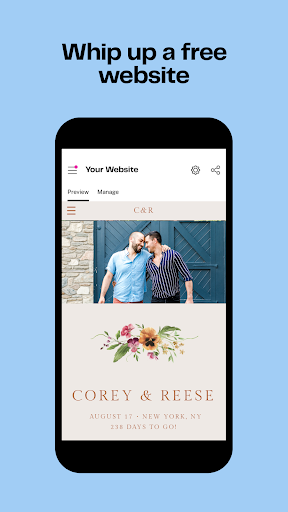
Wedding Websites: Give guests all your wedding details and keep them up to date with a free wedding website. Choose a design that fits your wedding style, then add ceremony and reception details, travel info, your registry and more. You can even use it to easily collect RSVPs.
Wedding Guest List & RSVPs: Keep your guest details organized in one place. Easily collect or upload guest addresses and track RSVP status for every wedding event.
Wedding Registry: The registry you and your guests will love. Easily add gifts from The Knot Registry Store (or anywhere else!), gift cards, experiences, cash funds and more. Plus, free shipping and returns from The Knot Registry Store and a post-wedding discount.
Wedding Invitations: Shop for beautiful, high-quality save the dates, wedding invitations and more that fit your budget and feel like you. Order free samples of your favorite designs to get started.
Wedding Budgeter: Set your wedding budget and easily track your expenses to stay organized.
Style Quiz: Get personalized inspiration with the wedding Style Quiz. Create an inspiration board and share your wedding vision with your vendors and your wedding inner circle.
Ready to start planning with the best wedding app out there? Download Wedding Planner by The Knot today.
The Knot Privacy Policy:
https://www.theknot.com/privacy-policy
The Knot Terms and Conditions:
https://www.theknot.com/terms-and-conditions
Do Not Sell My Info:
https://theknotww.zendesk.com/hc/en-us/requests/new?ticket_form_id=360000590371
CA Privacy:
https://www.theknotww.com/ca-collection-notice
もっと見る

1. MEmuインストーラーをダウンロードしてセットアップを完了する

2. MEmuを起動し、デスクトップでのPlayストアを開く

3. PlayストアでThe Knot Wedding Plannerを検索する
Install
4. The Knot Wedding Plannerをダウンロードしてインストールする
5. インストールが完了したら、アイコンをクリックしてスタート

6. MEmuを使ってパソコンでThe Knot Wedding Plannerを体験する
MEmu Playは現在、最高の無料Androidエミュレーターであり、5,000万人のユーザーが優れたAndroidアプリ体験を楽しんでいます。MEmuの仮想化テクノロジーにより、数千ものAndroidアプリをコンピューターでスムーズに実行できます。
大画面でより精細;無限の待機、電池とドラフィックの極限を超え
キーボード・マウス・コントローラーを全力でサポート、より快適
マルチインスタンスで複数のゲームを同時に実行
Use The Knot Wedding Planner on PC by following steps: