Top Widgets - Theme&Icon
更新日
現在のバージョン
3.3.7
提供元

スマートフォンは不要!パソコンと同じようにキーボードとマウスで操作できます。MEmu Playは、あなたが待ち望んでいたすべての楽しみをお届けします。バッテリー残量や小さな画面を気にすることなく、Top Widgets - Theme&Iconをご利用ください。最新のMEmu 9は、Top Widgets - Theme&IconをPCで体験するのに最適です!完璧なキーマッピングシステムにより、PCのようなスムーズな操作性を実現します。マルチインスタンス機能により、複数のアプリケーションを同時に実行できます。独自の仮想化エンジンがPCのパフォーマンスを最大限に引き出します。アプリを使用するだけでなく、高品質な体験を得ることができます。
もっと見る
Top Widgets - Theme&IconをPCでダウンロード!大画面でより楽しむ。電源が落ちてしまうとか通信料が足りないとかの問題を心配する必要がなく、PCの大画面でより快適にゲームを楽しましょう! The must-have app that has taken TikTok by storm!
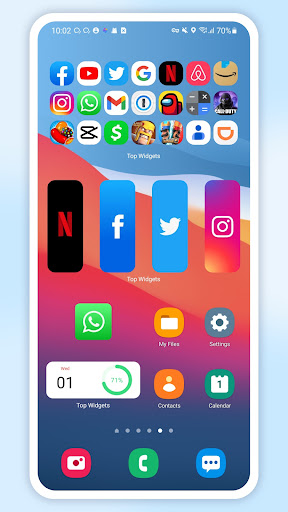
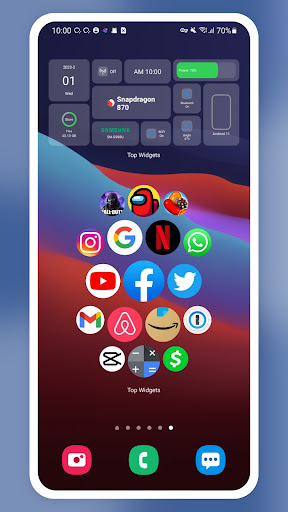
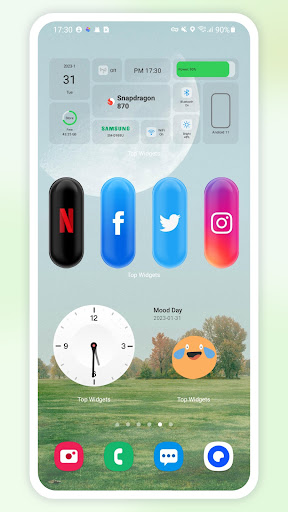
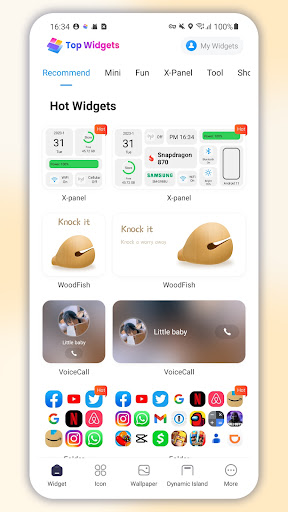
The must-have app that has taken TikTok by storm! With over 100 beautifully designed widgets to choose from, including the popular X-Panel and QuickStart 2.0, Top Widgets allows you to easily and quickly add cool and stylish widgets to your phone's home screen.
Our widgets are even more stunning than those available on iPhone's Color Widgets or Widgetsmith, and they are more convenient than KWGT. With just a few taps, you can customize your home screen and make it look more personalized and unique than ever before.
But Top Widgets isn't just about widgets. We also offer a vast collection of over 10,000 stunning wallpapers and more than 100 icon sets, all available for you to easily switch up with just a single click. Our app is the ultimate tool for customizing your phone's interface and making it truly your own.
So what are you waiting for? Download Top Widgets now and join the thousands of users who are already enjoying our app's amazing features. Whether you're looking to add a touch of personality to your home screen or completely overhaul your phone's look, Top Widgets has everything you need to make it happen.
With Top Widgets, you can choose from a variety of widget sizes and styles to suit your personal preferences. From sleek and minimalistic to bold and colorful, there's a widget for every style and taste.
Our X-Panel widget is particularly popular, as it allows you to quickly access your most frequently used apps and settings right from your home screen. And with Shortcut 2.0, you can easily create custom shortcuts to your favorite apps or actions, saving you time and making your phone even more convenient to use.
But what sets Top Widgets apart is its ease of use. Our app is designed with simplicity in mind, so even if you're not tech-savvy, you can still easily customize your phone's interface with our widgets and wallpapers.
And with regular updates and new widgets added to our collection, there's always something new to discover and enjoy with Top Widgets. So why settle for a boring, generic home screen when you can have one that truly reflects your personality and style? Download Top Widgets now and start customizing your phone today!
disclosure:
● This application uses the Accessibility Service API to display a floating pop-up window to enable the docking station function, or to provide assistance for other visual/cognitive disabilities. The Accessibility Service API will not collect or share any data!
● This application uses ACCESS_ FINE_ Location
)Location information is used to display weather information based on geographical location when using the weather widget.
● This application uses MANAGE_ EXTERNAL_ STORAGE (File Access Rights) is used to read or store images, files, and other content for a widget. It is mainly used to help you upload background images, cover images, and other images, audio, and download wallpaper functions.
● This application uses QUERY_ ALL_ The PACKAGES (application) view permission is intended to facilitate the selection of local applications for your phone when using custom icons or quick launch widgets.
もっと見る

1. MEmuインストーラーをダウンロードしてセットアップを完了する

2. MEmuを起動し、デスクトップでのPlayストアを開く

3. PlayストアでTop Widgets - Theme&Iconを検索する
Install
4. Top Widgets - Theme&Iconをダウンロードしてインストールする
5. インストールが完了したら、アイコンをクリックしてスタート

6. MEmuを使ってパソコンでTop Widgets - Theme&Iconを体験する
MEmu Playは現在、最高の無料Androidエミュレーターであり、5,000万人のユーザーが優れたAndroidアプリ体験を楽しんでいます。MEmuの仮想化テクノロジーにより、数千ものAndroidアプリをコンピューターでスムーズに実行できます。
大画面でより精細;無限の待機、電池とドラフィックの極限を超え
キーボード・マウス・コントローラーを全力でサポート、より快適
マルチインスタンスで複数のゲームを同時に実行
Use Top Widgets - Theme&Icon on PC by following steps: