TypeApp mail - email app
更新日
現在のバージョン
1.9.59
提供元

スマートフォンは不要!パソコンと同じようにキーボードとマウスで操作できます。MEmu Playは、あなたが待ち望んでいたすべての楽しみをお届けします。バッテリー残量や小さな画面を気にすることなく、TypeApp mail - email appをご利用ください。最新のMEmu 9は、TypeApp mail - email appをPCで体験するのに最適です!完璧なキーマッピングシステムにより、PCのようなスムーズな操作性を実現します。マルチインスタンス機能により、複数のアプリケーションを同時に実行できます。独自の仮想化エンジンがPCのパフォーマンスを最大限に引き出します。アプリを使用するだけでなく、高品質な体験を得ることができます。
もっと見る
TypeApp mail - email appをPCでダウンロード!大画面でより楽しむ。電源が落ちてしまうとか通信料が足りないとかの問題を心配する必要がなく、PCの大画面でより快適にゲームを楽しましょう! TypeApp is a beautifully designed email app providing a top-notch email experience while managing all your email accounts from one completely customizable mail app.
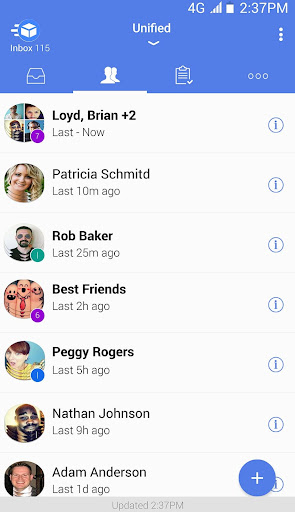
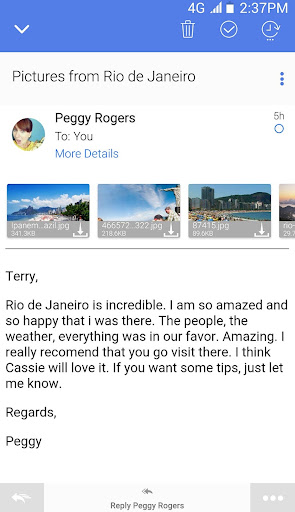
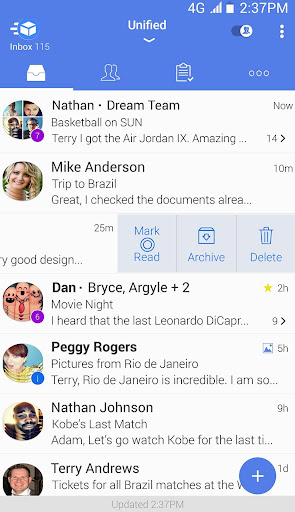
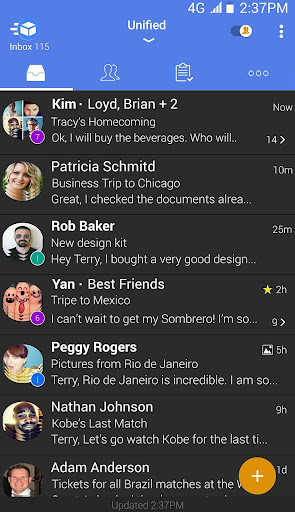
TypeApp is a beautifully designed email app providing a top-notch email experience while managing all your email accounts from one completely customizable mail app. With instant smart push notifications, packaged in an intuitive & easy to use design, TypeApp is the perfect replacement for your stock email client
Unified Inbox – All Your Mail Accounts in One Email App
Supporting IMAP, POP3 as well as Exchange protocols. Type App automatically configures them once you sign in. View & sync all your email accounts from one Unified Inbox, while enjoying lightning fast true push email.
People-Centric – Bringing People Together
Communicating with people is important and with TypeApp’s innovative people-centric features, it becomes even more simple. Focus on mail from people much faster with the People Switch, or be notified when specific VIP Notifications.
Group Mail – Quick & Easy Mailing
You can create a Shared Group with all your contacts at your work and personal accounts, which every member can view, to receive and send emails.
Simplifying Email with Clusters
Automatically combine relevant emails into a single expanding slot using Type App smart threading as well as set different notification sounds for specific services. With Clusters, you can control all emails from a specific sender and with multi-edit quickly moving, deleting, or marking clusters as spam is simple.
FEATURE RICH EXPERIENCE
● Instant, Smart Push Notifications - Quiet Hours, Custom Sounds, Vibrate, LED Light, Snooze Alerts and other preferences per each of your accounts
● Smart Conversations – Makes mail app convenient and easy
● Rich Text - Easily configure text styles and add your logo
● Calendar Sync and Contacts – Get your ActiveSync work account in sync
● Android Wear - Intelligent email on your wrist
● Configurable Menus – Customize your menus with actions that really matter to you
● Wireless Printing – Integrated with any supported printer
● Days to Sync – Saves memory for offline use
● Unread and Scrollable Widgets - Access your mails inbox at a glance
● Beautiful Dark Mode & Themes
● Account Color Coding - Know from which account a mail has been received
Getting Stuff Done
Quickly mark emails that you wish to be handled later & set yourself reminders. When you finish handling an email, you can simply mark it done and get it out of your way without having to delete the email. Use our Smart Filters to easily filter emails by unread/starred.
Visually Appealing – Beautifully Designed
Easily recognize popular services by their icons and give your friends and contacts an avatar photo to help you process your incoming mail faster. Quickly see how many unread emails are in your inbox with the TypeA pp icon (for supported devices) or with the 1x1 unread widget for any account of your accounts including the Unified Inbox. Set colors for your accounts to help them stand out or use TypeApp’s automatic Dark Theme which switches per the daylight hours in your area.
Security – Private & Secured
TypeApp takes your security and privacy seriously by utilizing industry leading encryption. You can rest easy knowing your data is always encrypted to protect all your email communications and keep your information secured. With passcode and lock screen, you can set a timed lock screen to protect your private emails, or use SMS verification to ensure your email app is safe.
We ❤ getting your feedback! Please email us anytime: support@typeapp.com with any questions or suggestions you may have!
For news, please follow us on Twitter & Facebook:
https://www.typeapp.com
https://www.twitter.com/typeapp (@TypeApp)
https://www.facebook.com/typeapp
もっと見る

1. MEmuインストーラーをダウンロードしてセットアップを完了する

2. MEmuを起動し、デスクトップでのPlayストアを開く

3. PlayストアでTypeApp mail - email appを検索する
Install
4. TypeApp mail - email appをダウンロードしてインストールする
5. インストールが完了したら、アイコンをクリックしてスタート

6. MEmuを使ってパソコンでTypeApp mail - email appを体験する
MEmu Playは現在、最高の無料Androidエミュレーターであり、5,000万人のユーザーが優れたAndroidアプリ体験を楽しんでいます。MEmuの仮想化テクノロジーにより、数千ものAndroidアプリをコンピューターでスムーズに実行できます。
大画面でより精細;無限の待機、電池とドラフィックの極限を超え
キーボード・マウス・コントローラーを全力でサポート、より快適
マルチインスタンスで複数のゲームを同時に実行
Use TypeApp mail - email app on PC by following steps: