
Vedu : Movies & Series
更新日
現在のバージョン
提供元

スマートフォンは不要!パソコンと同じようにキーボードとマウスで操作できます。MEmu Playは、あなたが待ち望んでいたすべての楽しみをお届けします。バッテリー残量や小さな画面を気にすることなく、Vedu : Movies & Seriesをご利用ください。最新のMEmu 9は、Vedu : Movies & SeriesをPCで体験するのに最適です!完璧なキーマッピングシステムにより、PCのようなスムーズな操作性を実現します。マルチインスタンス機能により、複数のアプリケーションを同時に実行できます。独自の仮想化エンジンがPCのパフォーマンスを最大限に引き出します。アプリを使用するだけでなく、高品質な体験を得ることができます。
もっと見る
MEmu Playを使えば、PCでVedu : Movies & Seriesを快適に楽しめます。何千ものAndroidアプリをデスクトップ版で利用できる、パワフルな無料Androidエミュレーターです。友達とつながり、より効率的に作品を磨き上げましょう! Vedu : Movies & Series is an independent entertainment discovery app that helps users explore movies, TV shows content available on public platforms — all in one organized place.
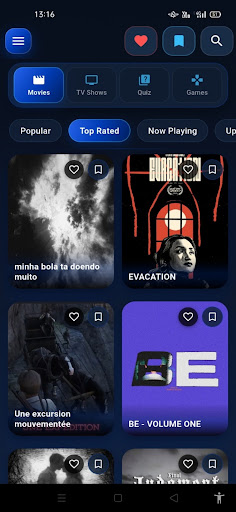

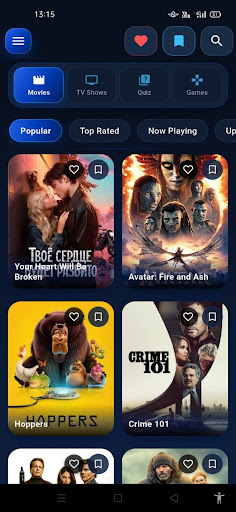
Vedu : Movies & Series is an independent entertainment discovery app that helps users explore movies, TV shows content available on public platforms — all in one organized place.
Our app is designed to provide a simple and user-friendly browsing experience for entertainment lovers. You can discover movies, TV series content through categorized listings and easy navigation.
Key Features:
Browse entertainment content with a clean and simple interface
Lightweight app with fast performance
Works on multiple Android devices
Important Information:
Our app, Vedu : Movies & Series is not associated with or related to the original Vedu in any way.
Vedu : Movies & Series is an independent application and is not affiliated with, endorsed by, or sponsored by any third-party app, brand, or streaming service.
もっと見る

1. MEmuインストーラーをダウンロードしてセットアップを完了する

2. MEmuを起動し、デスクトップでのPlayストアを開く

3. PlayストアでVedu : Movies & Seriesを検索する
Install
4. Vedu : Movies & Seriesをダウンロードしてインストールする
5. インストールが完了したら、アイコンをクリックしてスタート

6. MEmuを使ってパソコンでVedu : Movies & Seriesを体験する
MEmu Playは現在、最高の無料Androidエミュレーターであり、5,000万人のユーザーが優れたAndroidアプリ体験を楽しんでいます。MEmuの仮想化テクノロジーにより、数千ものAndroidアプリをコンピューターでスムーズに実行できます。
大画面でより精細;無限の待機、電池とドラフィックの極限を超え
キーボード・マウス・コントローラーを全力でサポート、より快適
マルチインスタンスで複数のゲームを同時に実行
Use Vedu : Movies & Series on PC by following steps: