
WePlay - Game and Party
更新日
現在のバージョン
6.7.2
提供元

スマートフォンは不要!パソコンと同じようにキーボードとマウスで操作できます。MEmu Playは、あなたが待ち望んでいたすべての楽しみをお届けします。バッテリー残量や小さな画面を気にすることなく、WePlay - Game and Partyをご利用ください。最新のMEmu 9は、WePlay - Game and PartyをPCで体験するのに最適です!完璧なキーマッピングシステムにより、PCのようなスムーズな操作性を実現します。マルチインスタンス機能により、複数のアプリケーションを同時に実行できます。独自の仮想化エンジンがPCのパフォーマンスを最大限に引き出します。アプリを使用するだけでなく、高品質な体験を得ることができます。
もっと見る
WePlay - Game & PartyをPCでダウンロード!大画面でより楽しむ。電源が落ちてしまうとか通信料が足りないとかの問題を心配する必要がなく、PCの大画面でより快適にゲームを楽しましょう! [WePlay - Fun Party Games].

[WePlay - Fun Party Games]
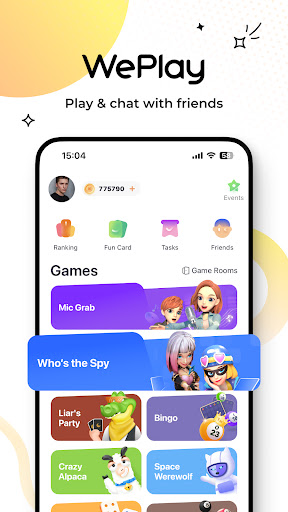
WePlay is a Party Game app that young people love to play. It offers the most popular casual party games and voice interaction. You will have more fun while playing games!
[Online Party Game Bar]
Space Werewolf: The most popular social deduction game where civilians pit their wits against killers
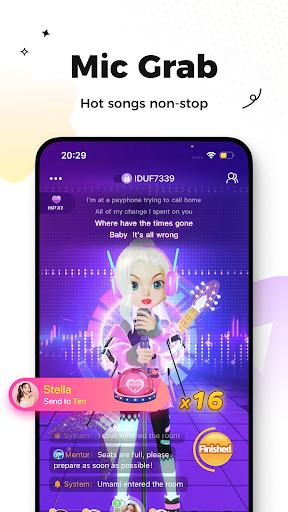
Mic Grab: New mode for Mic Grab, more hot songs, more fun! If you love singing, then you should not miss it!
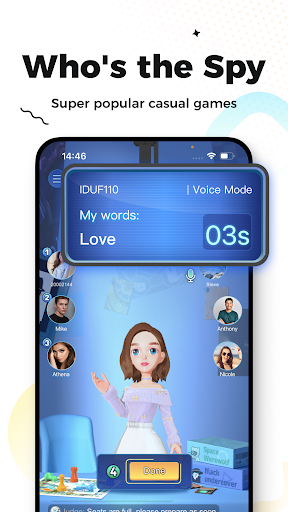
Who's the Spy: A classic game in variety shows. Come and battle against your friends!
Guess My Drawing: it not only tests your creativity but also teamwork and drawing skills!
[New Interactive Features]
3D Avatar & Cloth Changing: Create a 3D avatar , face pinching, model clothes, show your self-avatar!
Play games, sing, and have fun with new friends in WePlay!
In WePlay, there are always humorous and friendly people waiting for you.
———————————————————————————————————————————
All games available on WePlay are for entertainment purposes only. In-game currency and items are virtual and have no real-world value.
もっと見る

1. MEmuインストーラーをダウンロードしてセットアップを完了する

2. MEmuを起動し、デスクトップでのPlayストアを開く

3. PlayストアでWePlay - Game and Partyを検索する
Install
4. WePlay - Game and Partyをダウンロードしてインストールする
5. インストールが完了したら、アイコンをクリックしてスタート

6. MEmuを使ってパソコンでWePlay - Game and Partyを体験する
MEmu Playは現在、最高の無料Androidエミュレーターであり、5,000万人のユーザーが優れたAndroidアプリ体験を楽しんでいます。MEmuの仮想化テクノロジーにより、数千ものAndroidアプリをコンピューターでスムーズに実行できます。
大画面でより精細;無限の待機、電池とドラフィックの極限を超え
キーボード・マウス・コントローラーを全力でサポート、より快適
マルチインスタンスで複数のゲームを同時に実行
Use WePlay - Game and Party on PC by following steps: