WordBit Japanese (Alarm)
更新日
現在のバージョン
1.7.4.1
提供元

スマートフォンは不要!パソコンと同じようにキーボードとマウスで操作できます。MEmu Playは、あなたが待ち望んでいたすべての楽しみをお届けします。バッテリー残量や小さな画面を気にすることなく、WordBit Japanese (Alarm)をご利用ください。最新のMEmu 9は、WordBit Japanese (Alarm)をPCで体験するのに最適です!完璧なキーマッピングシステムにより、PCのようなスムーズな操作性を実現します。マルチインスタンス機能により、複数のアプリケーションを同時に実行できます。独自の仮想化エンジンがPCのパフォーマンスを最大限に引き出します。アプリを使用するだけでなく、高品質な体験を得ることができます。
もっと見る
MEmu Playを使えば、PCでWordBit Japanese (Alarm)を快適に楽しめます。何千ものAndroidアプリをデスクトップ版で利用できる、パワフルな無料Androidエミュレーターです。友達とつながり、より効率的に作品を磨き上げましょう! WordBit German http://bit.
WordBit German http://bit.ly/appgerman
WordBit Spanish http://bit.ly/appspanish
WordBit French http://bit.ly/wordbitfrench
WordBit Italian http://bit.ly/appitalian
WordBit Arabic http://bit.ly/apparabic
WordBit Hebrew http://bit.ly/apphebrew
WordBit Korean http://bit.ly/appkorean
WordBit Turkish https://bit.ly/appturkish
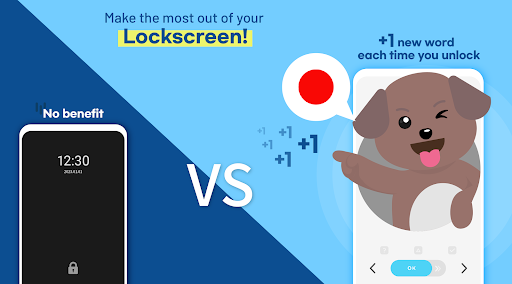
Why do you constantly miss the opportunity to study Japanese?
There is a way to increase your Japanese proficiency by using the time you didn’t know you had!
It’s just using a lock screen. How does this work?
The moment you check your cell phone, your attention is focused on the screen. You are free from what you’ve just been doing and ready to receive new information.
At this very moment, WordBit converts your attention for a little while to study Japanese.
Everytime you check your phone, you miss out on valuable time and attention. WordBit allows you to grab that.
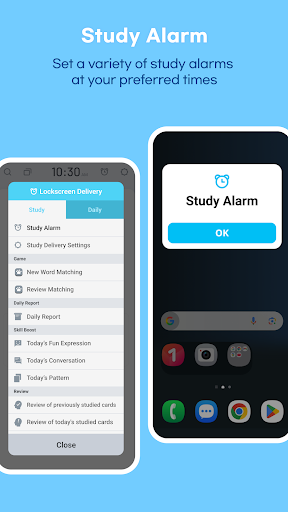
[Study Alarm]
You can receive various study alarms such as word matching, daily reports, and review of study cards at your preferred time
Features of this app
■ The innovative method of learning using lockscreen
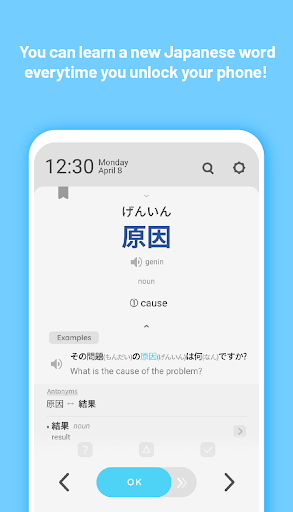
When you check messages, watch YouTube, or simply check the time, you can study dozens of words and sentences a day! This will accumulate to more than a thousand words per month, and you'll learn automatically and unconsciously.
■ Optimized content for lockscreen
WordBit provides content in a perfect size suitable for lockscreen and from now on learning will only take an instant. So there's no need to stop doing what you do!
■ Helpful examples
With example sentences, you can learn how words are used in real life and what words they are used with.
■ Vocabulary categories sorted by level
You can study words and phrases adapted to your level. (More than 10,000 words from basic to advanced)
■ Additional content
Synonyms
Kanji
Nouns: Articles are distinguished by color, plural forms
Verbs: short & long version of conjugation tables provided
Adjectives: comparative, superlative forms
Grammar tips: irregular verbs, irregular articles
Well organized, rich content
■ Sentences
- You can also learn commonly used sentences.
■ Various categories of Idioms, Proverbs, etc.
■ Images for total beginners
■ Pronunciation - Automatic pronunciation and display of stress marks.
Extremely useful features for learners
■ Quiz, cover mode
■ Daily Repeat Function
You can repeat as many words as you want for 24 hours.
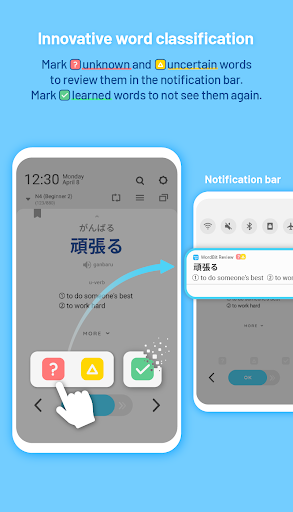
■ The personalized word classification function
You can check learned words and remove them from your study list.
■ Search function
■ 16 different color themes (dark themes available)
Special features of WordBit
You can automatically view learning content on your lock screen like an alarm,
WordBit randomly reminds you to study whenever the alarm rings!
Trust WordBit and easily improve your language skills with a variety of content
--------------------------------------------------------------
Privacy policy http://bit.ly/policywb
--------------------------------------------------------------
Contents
■ Vocabulary (for beginners) with images
Numbers, Time
Animals, Plants
Food
Relationships
Others
■ Vocabulary (by level)
N5
N4
N3
N2
N1
Advanced
■ Sentences
■ Kanji
■ Patterns
もっと見る

1. MEmuインストーラーをダウンロードしてセットアップを完了する

2. MEmuを起動し、デスクトップでのPlayストアを開く

3. PlayストアでWordBit Japanese (Alarm)を検索する
Install
4. WordBit Japanese (Alarm)をダウンロードしてインストールする
5. インストールが完了したら、アイコンをクリックしてスタート

6. MEmuを使ってパソコンでWordBit Japanese (Alarm)を体験する
MEmu Playは現在、最高の無料Androidエミュレーターであり、5,000万人のユーザーが優れたAndroidアプリ体験を楽しんでいます。MEmuの仮想化テクノロジーにより、数千ものAndroidアプリをコンピューターでスムーズに実行できます。
大画面でより精細;無限の待機、電池とドラフィックの極限を超え
キーボード・マウス・コントローラーを全力でサポート、より快適
マルチインスタンスで複数のゲームを同時に実行
Use WordBit Japanese (Alarm) on PC by following steps: