Zelus WBGT
更新日
現在のバージョン
11.1
提供元

スマートフォンは不要!パソコンと同じようにキーボードとマウスで操作できます。MEmu Playは、あなたが待ち望んでいたすべての楽しみをお届けします。バッテリー残量や小さな画面を気にすることなく、Zelus WBGTをご利用ください。最新のMEmu 9は、Zelus WBGTをPCで体験するのに最適です!完璧なキーマッピングシステムにより、PCのようなスムーズな操作性を実現します。マルチインスタンス機能により、複数のアプリケーションを同時に実行できます。独自の仮想化エンジンがPCのパフォーマンスを最大限に引き出します。アプリを使用するだけでなく、高品質な体験を得ることができます。
もっと見る
Zelus WBGTをPCでダウンロード!大画面でより楽しむ。電源が落ちてしまうとか通信料が足りないとかの問題を心配する必要がなく、PCの大画面でより快適にゲームを楽しましょう! Zelus: Environmental Safety Redefined.
Zelus: Environmental Safety Redefined
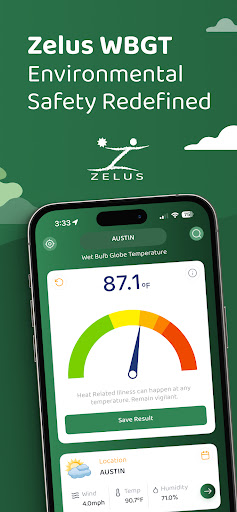
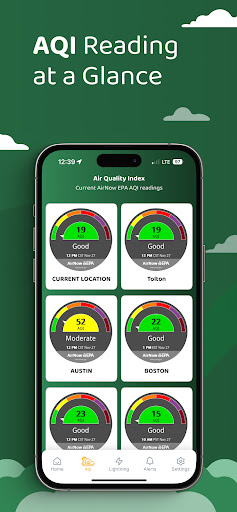
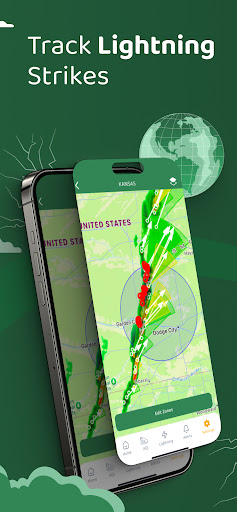
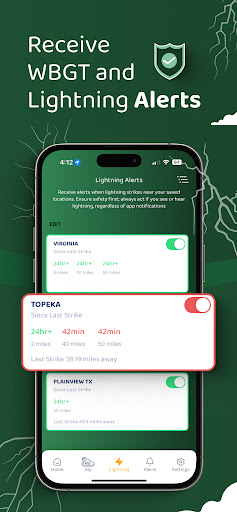
Zelus is one of the most advanced weather safety systems, revolutionizing how organizations manage outdoor environmental risks. With real-time WBGT monitoring, lightning detection, AQI reading, and risk management tools, Zelus equips you with the tools to safeguard your teams and ensure operational
safety—all without requiring costly hardware.
Trusted by Professionals Worldwide
From Fortune 500 companies to elite sports teams and the U.S. Military, organizations across the globe rely on Zelus for safety, compliance, and peace of mind.
Why Choose Zelus?
• Real-Time WBGT: Hyperlocal, accurate data for heat safety and compliance.
• Lightning Detection*: Timely alerts to reduce weather-related risks.
• AQI Monitoring**: Access real-time air quality data to protect your team from harmful pollution levels.
• Risk Management: Automatically save critical safety data with secure date, time, and signature stamps for streamlined compliance and accountability.
Download Zelus today and redefine your approach to outdoor safety!
Terms at: https://www.iubenda.com/terms-and-conditions/72489665
Warnings:
Heat Illness can happen at ANY temperature. Always be prepared and have a plan in place to manage heat illness.
Even though it is very rare, all measurement devices will occasionally give readings outside of expected range. The operator should always use
their best judgment on activity levels.
Zelus WBGT may give inaccurate readings in enclosed tennis courts or on large black surfaces such as parking lots.
Zelus WBGT uses the phones last known GPS location, this may not be the phone’s current location.
For most accurate results WBGT readings should be made with saved locations.
Over 99% of all lightning strikes will be reported, but it is not 100%. If you see or hear lightning take safety precautions as needed.
*Lightning detection is available in the United States.
**AQI monitoring is available where supported.
Signup does require a name and email address.
もっと見る

1. MEmuインストーラーをダウンロードしてセットアップを完了する

2. MEmuを起動し、デスクトップでのPlayストアを開く

3. PlayストアでZelus WBGTを検索する
Install
4. Zelus WBGTをダウンロードしてインストールする
5. インストールが完了したら、アイコンをクリックしてスタート

6. MEmuを使ってパソコンでZelus WBGTを体験する
MEmu Playは現在、最高の無料Androidエミュレーターであり、5,000万人のユーザーが優れたAndroidアプリ体験を楽しんでいます。MEmuの仮想化テクノロジーにより、数千ものAndroidアプリをコンピューターでスムーズに実行できます。
大画面でより精細;無限の待機、電池とドラフィックの極限を超え
キーボード・マウス・コントローラーを全力でサポート、より快適
マルチインスタンスで複数のゲームを同時に実行
Use Zelus WBGT on PC by following steps: