The Grinch 2: Saving Christmas
Dikemas kini
Versi Semasa
Ditawarkan Oleh

Dengan semangat anda untuk bermain The Grinch 2: Saving Christmas, tangan anda tidak seharusnya terhad pada skrin kecil telefon anda. Main seperti profesional dan kendalikan sepenuhnya permainan anda dengan papan kekunci dan tetikus. MEmu menawarkan semua perkara yang anda harapkan. Muat turun dan mainkan The Grinch 2: Saving Christmas di PC. Main selagi anda mahu, tidak ada batasan bateri, data mudah alih dan panggilan yang mengganggu. MEmu 9 yang baru adalah pilihan terbaik untuk bermain The Grinch 2: Saving Christmas di PC. Disiapkan dengan kepakaran kami, sistem pemetaan kunci pratetap yang indah menjadikan The Grinch 2: Saving Christmas permainan PC sebenar. Dikodkan dengan penyerapan kami, pengurus multi-instance menjadikan bermain 2 atau lebih akaun pada peranti yang sama mungkin. Dan yang paling penting, enjin emulasi eksklusif kami dapat melepaskan potensi penuh PC anda, menjadikan semuanya lancar.Kami tidak hanya peduli bagaimana anda bermain, tetapi juga keseluruhan proses menikmati kebahagiaan permainan.
Tunjukkan Lagi
Muat turun The Grinch 2: Saving Christmas pada PC dengan MEmu Android Emulator. Nikmati bermain di skrin besar Every Who down in Who-ville is jingling, singing and celebrating.
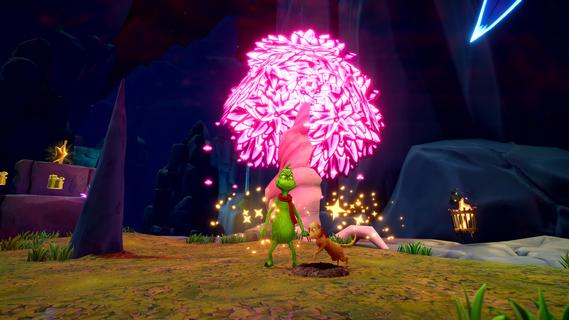
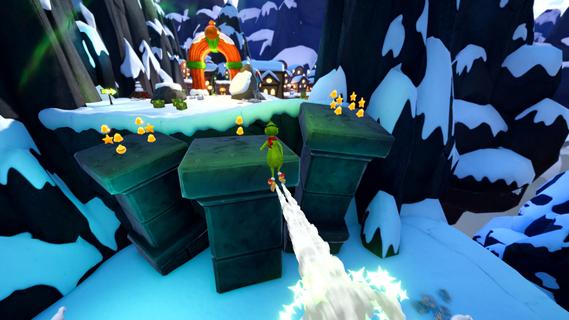
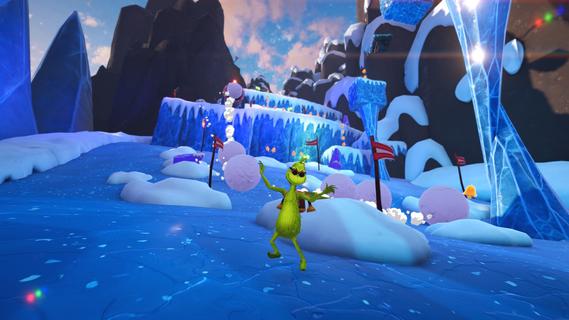
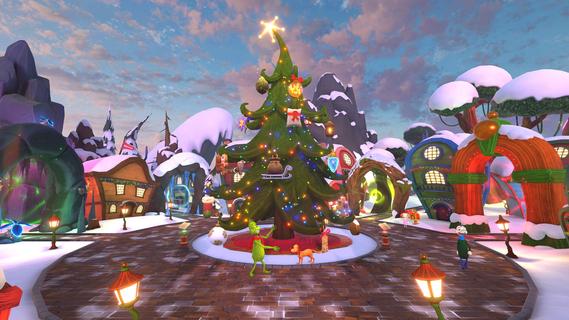
Every Who down in Who-ville is jingling, singing and celebrating. And guess who canât wait to join them⦠the Grinch! Now, with a heart three sizes bigger, and a wish to show the Whos heâs changed, could the Grinchâs prize-winning tree be the perfect way to prove it?Play as the Grinch and Jumbo-Jump through snowy 3D worlds, collecting ornaments to make your tree sparkle brighter with every step. Overcome platforming challenges, explore every nook and cranny, and use the clever gadgets you find to get through each level. Unleash the Snowball Maker to freeze mischievous adversaries, launch into action with the Rocket Skates, and reach new heights with the Jetpack.Each level is filled with festive adventures. Hop through the Grinchâs Cave, dodging falling stalactites and zipping down watery chutes. Conquer Mt. Crumpitâs slippery ice and giant rolling snowballs. Find your way through Who-woodâs towering trees and springy mushrooms. Then explore Who-ville, leaping across hovering platforms and sneaking into the Whosâ cozy homes. Use your candy canes to break objects and release dazzling ornaments to decorate the Grinchâs Christmas tree and Who-ville Square.Adventure solo or team up in local co-op mode. Together with Max, youâll have fun outsmarting pesky mice, wild forest bats and other curious creatures. Uncover hidden paths and collect every sparkly decoration you can find to make your tree shine.Make it a merry day in Who-ville, spread Christmas cheer, and create the most spectacular tree the Whos have ever seen!BRING CHEER TO THE WHOS: Embark on a festive journey to craft the most spectacular Christmas tree and decorate Who-ville Square.EXPLORE VIBRANT WORLDS: Swing, smash and Jumbo-Jump your way through the Grinchâs Cave, Mt. Crumpit, Who-wood and merry Who-ville.UNLEASH GRINCHY GADGETS: Take on every challenge with the help of the Rocket Skates, the Jetpack, the Snowball Maker, and moreâ¦CO-OP TO SAVE CHRISTMAS: Play solo as the Grinch, or team up with a friend as Max to help you.AN ADVENTURE FOR EVERYONE: Embark on a whimsical journey inspired by the original books, offering intuitive mechanics and challenges accessible to all.
Tunjukkan Lagi

1. Muat turun pemasang MEmu dan selesaikan persediaan

2. Mulakan MEnu kemudian buka Google Play di desktop

3. Cari The Grinch 2: Saving Christmas di Google Play
Install
4. Muat turun dan Pasang The Grinch 2: Saving Christmas
5. Apabila selesai pemasangan, menekan ikon itu untuk memulakan

6. Nikmati bermain The Grinch 2: Saving Christmas di komputer dengan MEmu
MEmu Play adalah emulator Android terbaik dan 100 juta orang sudah menikmati pengalaman permainan Androidnya yang luar biasa. Teknologi virtualisasi MEmu memberi kuasa kepada anda untuk bermain beribu-ribu permainan Android dengan lancar di komputar anda, malah yang paling intensif grafik.
Skrin lebih besar dengan grafik yang lebih baik; Tempoh yang panjang, tanpa had bateri atau data mudah alih.
Sokongan Keymapping penuh untuk kawalan tepat papan kekunci dan tetikus atau gamepad.
Pelbagai akaun permainan atau tugas pada satu PC sekaligus dengan pengurus pelbagai contoh.
Play The Grinch 2: Saving Christmas on PC by following steps: