
Île-de-France Mobilités
Dikemas kini
Versi Semasa
1733827984
Ditawarkan Oleh

Berhentilah bimbang dengan bayaran berlebihan semasa menggunakan Île-de-France Mobilités di telefon bimbit anda, bebaskan diri anda dari layar kecil dan nikmati penggunaan aplikasi pada paparan yang jauh lebih besar. Mulai sekarang, dapatkan pengalaman skrin penuh aplikasi anda dengan papan kekunci dan tetikus. MEmu Play semua ciri mengejutkan yang anda harapkan: pemasangan cepat dan penyediaan mudah, kawalan intuitif, tidak ada batasan bateri, data mudah alih, dan panggilan yang mengganggu. MEmu 9 yang baru adalah pilihan terbaik untuk menggunakan Île-de-France Mobilités di komputer anda. Dikodkan dengan penyerapan kami, pengurus multi-instance menjadikan pembukaan 2 atau lebih akaun pada masa yang sama mungkin. Dan yang paling penting, mesin emulasi eksklusif kami dapat melepaskan potensi penuh PC anda, menjadikan semuanya lancar dan menyeronokkan.
Tunjukkan Lagi
Download Île-de-France Mobilités on PC with MEmu Android Emulator. Enjoy playing on big screen. Île-de-France Mobilités is there to help you on a daily basis: train, RER, metro, tramway, bus, bicycle, Vélib', carpooling, carsharing.
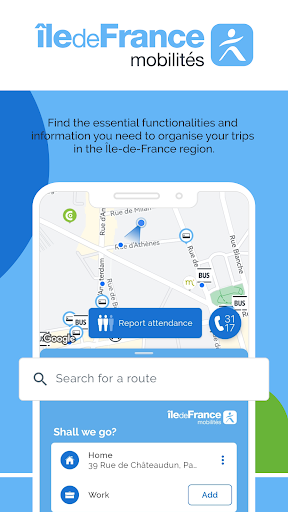
Île-de-France Mobilités is there to help you on a daily basis: train, RER, metro, tramway, bus, bicycle, Vélib', carpooling, carsharing... Find the tools and information you need to organize your travel in Île-de-France. Together, let's make traveling easier.
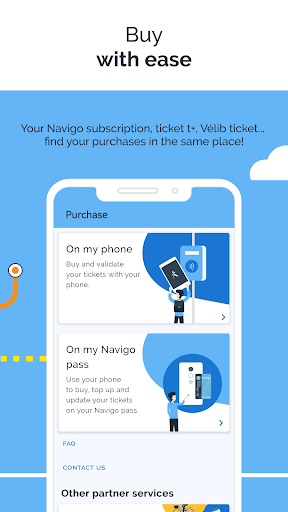
Avoid waiting in line at stations: buy your tickets from your phone!
You can buy the following tickets
- Booklets of t+ tickets
- Navigo day, week or month passes
- Special tickets (Navigo Jeunes Week-end, anti-pollution package...)
- Daily Vélib' tickets
Purchased titles can then be recharged on a pass, stored in your phone* or on your compatible connected watch** (giving you the option of validating directly with one of the two).
You can also save your dematerialised tracks from one Android phone and transfer them to another Android phone.
*Service available on all NFC-enabled smartphones from version Android 8 EXCEPT on the Google Pixel, Pixel 2, Pixel 2XL, Pixel 3, Pixel 3XL, Pixel 3a, Pixel 3a xl, Pixel 4, Pixel 4a, Pixel C, Pixel Slate, Nexus 5X, Nexus 6P and Nocturne. For more information, visit https://www.iledefrance-mobilites.fr/titres-et-tarifs/supports/smartphone
** Service available on Samsung Galaxy Watch Series 4 and above (Wear OS 4).
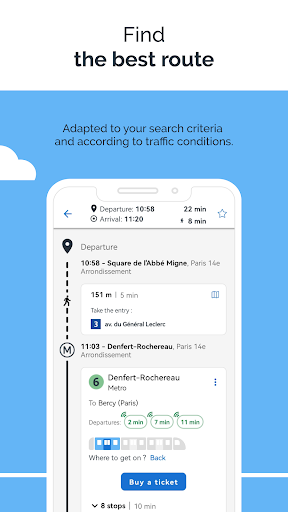
The application also allows you to prepare and plan your trips:
- Find bus stops, train stations and subway stations near you
- Search in real time for your public transport, carpooling and bicycle routes
- Consult the next passages of your lines in real time and all the timetables
- Save your upcoming trips on your phone's calendar
- View public transportation network maps (accessible even offline)
- Follow the pedestrian route for walking sections
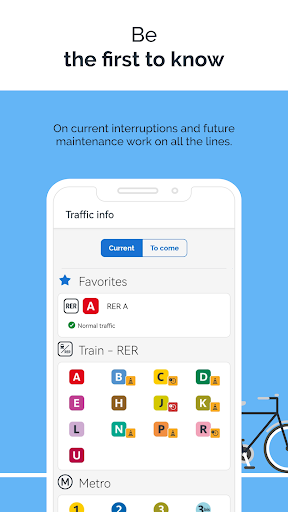
Be the first to know and anticipate disruptions:
- Check the Twitter feed of your lines for real-time traffic information
- Be alerted in case of disruptions on your favorite lines and routes
- Stay informed about the state of the elevators in the stations you use
- Check and report on the number of passengers on your route
Personalize your trips:
- Save your destinations (work, home, gym...), stations and train stations as favorites
- Personalize your profile (fast walker, with difficulties, reduced mobility...)
- Select lines or stations to avoid
Favour soft or alternative modes of transport:
- Prefer the proposed bike routes for all your trips
- Book your carpooling and/or carsharing trips, in partnership with the main French players
- Rent a car or a utility for a short period of time by choosing a Communauto car-sharing vehicle from a large choice of stations around you and reserve it without delay for the duration of your choice.
--You already use the Île-de-France Mobilités application and appreciate its services? Let us know with 5 stars!
Do you have any bugs or comments to share with us? Help us improve by sending us your suggestions using the contact form available via the menu.
Tunjukkan Lagi

1. Muat turun pemasang MEmu dan selesaikan persediaan

2. Mulakan MEnu kemudian buka Google Play di desktop

3. Cari Île-de-France Mobilités di Google Play
Install
4. Muat turun dan Pasang Île-de-France Mobilités
5. Apabila selesai pemasangan, menekan ikon itu untuk memulakan

6. Gunakan MENu untuk mengalami Île-de-France Mobilités pada komputer anda
MEmu Play ialah emulator Android terbaik, dengan lebih 100 juta pengguna mengalami pengalaman aplikasi Android yang unggul. Teknologi virtualisasi MEmu membolehkan anda menjalankan beribu-ribu aplikasi Android dengan lancar pada komputer anda, walaupun yang paling mencabar.
Skrin lebih besar dengan grafik yang lebih baik; Tempoh yang panjang, tanpa had bateri atau data mudah alih.
Sokongan Keymapping penuh untuk kawalan tepat papan kekunci dan tetikus atau gamepad.
Pelbagai akaun permainan atau tugas pada satu PC sekaligus dengan pengurus pelbagai contoh.
Use Île-de-France Mobilités on PC by following steps: