Île-de-France Mobilités
更新日
現在のバージョン
1733827984
提供元

スマートフォンは不要!パソコンと同じようにキーボードとマウスで操作できます。MEmu Playは、あなたが待ち望んでいたすべての楽しみをお届けします。バッテリー残量や小さな画面を気にすることなく、Île-de-France Mobilitésをご利用ください。最新のMEmu 9は、Île-de-France MobilitésをPCで体験するのに最適です!完璧なキーマッピングシステムにより、PCのようなスムーズな操作性を実現します。マルチインスタンス機能により、複数のアプリケーションを同時に実行できます。独自の仮想化エンジンがPCのパフォーマンスを最大限に引き出します。アプリを使用するだけでなく、高品質な体験を得ることができます。
もっと見る
Île-de-France MobilitésをPCでダウンロード!大画面でより楽しむ。電源が落ちてしまうとか通信料が足りないとかの問題を心配する必要がなく、PCの大画面でより快適にゲームを楽しましょう! Île-de-France Mobilités is there to help you on a daily basis: train, RER, metro, tramway, bus, bicycle, Vélib', carpooling, carsharing.
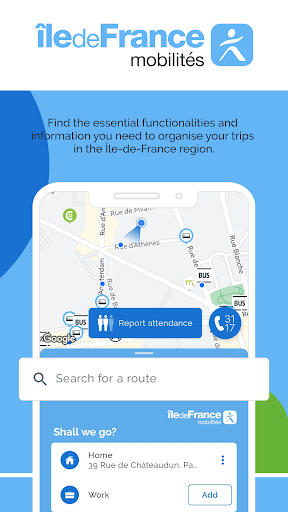
Île-de-France Mobilités is there to help you on a daily basis: train, RER, metro, tramway, bus, bicycle, Vélib', carpooling, carsharing... Find the tools and information you need to organize your travel in Île-de-France. Together, let's make traveling easier.
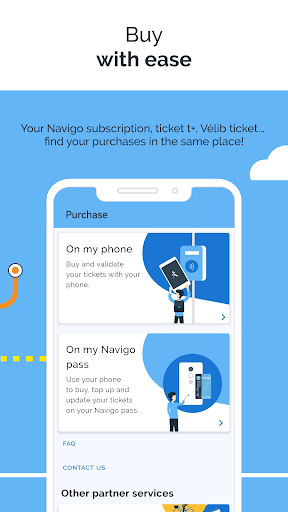
Avoid waiting in line at stations: buy your tickets from your phone!
You can buy the following tickets
- Booklets of t+ tickets
- Navigo day, week or month passes
- Special tickets (Navigo Jeunes Week-end, anti-pollution package...)
- Daily Vélib' tickets
Purchased titles can then be recharged on a pass, stored in your phone* or on your compatible connected watch** (giving you the option of validating directly with one of the two).
You can also save your dematerialised tracks from one Android phone and transfer them to another Android phone.
*Service available on all NFC-enabled smartphones from version Android 8 EXCEPT on the Google Pixel, Pixel 2, Pixel 2XL, Pixel 3, Pixel 3XL, Pixel 3a, Pixel 3a xl, Pixel 4, Pixel 4a, Pixel C, Pixel Slate, Nexus 5X, Nexus 6P and Nocturne. For more information, visit https://www.iledefrance-mobilites.fr/titres-et-tarifs/supports/smartphone
** Service available on Samsung Galaxy Watch Series 4 and above (Wear OS 4).
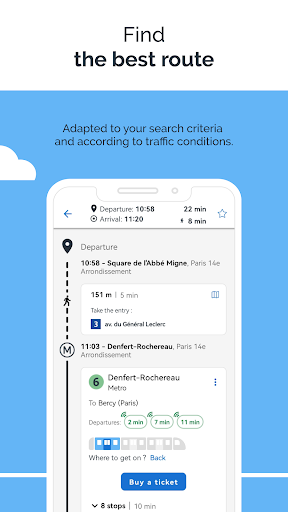
The application also allows you to prepare and plan your trips:
- Find bus stops, train stations and subway stations near you
- Search in real time for your public transport, carpooling and bicycle routes
- Consult the next passages of your lines in real time and all the timetables
- Save your upcoming trips on your phone's calendar
- View public transportation network maps (accessible even offline)
- Follow the pedestrian route for walking sections
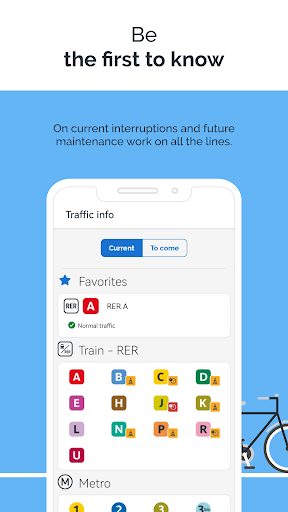
Be the first to know and anticipate disruptions:
- Check the Twitter feed of your lines for real-time traffic information
- Be alerted in case of disruptions on your favorite lines and routes
- Stay informed about the state of the elevators in the stations you use
- Check and report on the number of passengers on your route
Personalize your trips:
- Save your destinations (work, home, gym...), stations and train stations as favorites
- Personalize your profile (fast walker, with difficulties, reduced mobility...)
- Select lines or stations to avoid
Favour soft or alternative modes of transport:
- Prefer the proposed bike routes for all your trips
- Book your carpooling and/or carsharing trips, in partnership with the main French players
- Rent a car or a utility for a short period of time by choosing a Communauto car-sharing vehicle from a large choice of stations around you and reserve it without delay for the duration of your choice.
--You already use the Île-de-France Mobilités application and appreciate its services? Let us know with 5 stars!
Do you have any bugs or comments to share with us? Help us improve by sending us your suggestions using the contact form available via the menu.
もっと見る

1. MEmuインストーラーをダウンロードしてセットアップを完了する

2. MEmuを起動し、デスクトップでのPlayストアを開く

3. PlayストアでÎle-de-France Mobilitésを検索する
Install
4. Île-de-France Mobilitésをダウンロードしてインストールする
5. インストールが完了したら、アイコンをクリックしてスタート

6. MEmuを使ってパソコンでÎle-de-France Mobilitésを体験する
MEmu Playは現在、最高の無料Androidエミュレーターであり、5,000万人のユーザーが優れたAndroidアプリ体験を楽しんでいます。MEmuの仮想化テクノロジーにより、数千ものAndroidアプリをコンピューターでスムーズに実行できます。
大画面でより精細;無限の待機、電池とドラフィックの極限を超え
キーボード・マウス・コントローラーを全力でサポート、より快適
マルチインスタンスで複数のゲームを同時に実行
Use Île-de-France Mobilités on PC by following steps: