DreamMapper
Dikemas kini
Versi Semasa
2.36.0
Ditawarkan Oleh

Berhentilah bimbang dengan bayaran berlebihan semasa menggunakan DreamMapper di telefon bimbit anda, bebaskan diri anda dari layar kecil dan nikmati penggunaan aplikasi pada paparan yang jauh lebih besar. Mulai sekarang, dapatkan pengalaman skrin penuh aplikasi anda dengan papan kekunci dan tetikus. MEmu Play semua ciri mengejutkan yang anda harapkan: pemasangan cepat dan penyediaan mudah, kawalan intuitif, tidak ada batasan bateri, data mudah alih, dan panggilan yang mengganggu. MEmu 9 yang baru adalah pilihan terbaik untuk menggunakan DreamMapper di komputer anda. Dikodkan dengan penyerapan kami, pengurus multi-instance menjadikan pembukaan 2 atau lebih akaun pada masa yang sama mungkin. Dan yang paling penting, mesin emulasi eksklusif kami dapat melepaskan potensi penuh PC anda, menjadikan semuanya lancar dan menyeronokkan.
Tunjukkan Lagi
Download DreamMapper on PC with MEmu Android Emulator. Enjoy playing on big screen. Achieving a great night’s sleep with CPAP therapy happens when you take an active role in your own therapy.
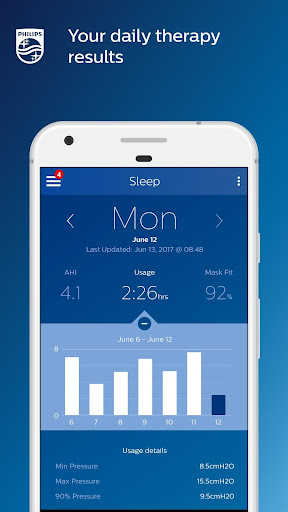
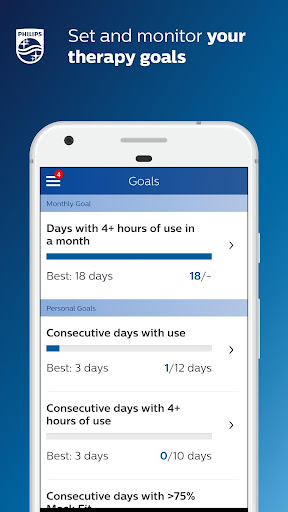
Achieving a great night’s sleep with CPAP therapy happens when you take an active role in your own therapy. That means being in tune with how your therapy and equipment are performing – and how they should be performing – from night to night. DreamMapper is a mobile and web application that keeps you actively informed about your previous night’s therapy – with information like mask fit and therapy hours – so you know you are getting what’s needed for the great night’s sleep you deserve.
DreamMapper provides all of the following:
• Bluetooth® data transfer from your Philips PAP;
• Daily feedback about your treatment and your therapy results;
• Personalize your treatment management by setting alerts and personal goals;
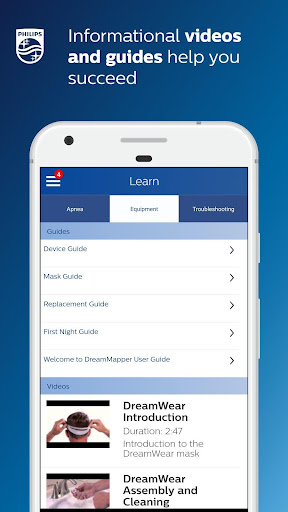
• Find the answers to your questions through a rich content including informational videos and guides;
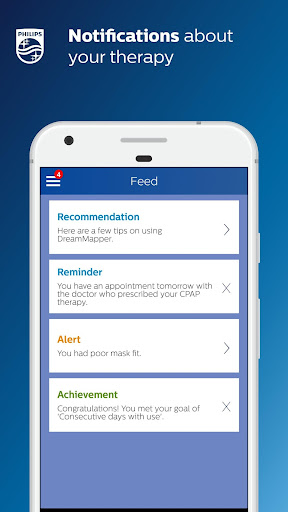
• Receive notifications about your therapy and your DreamMapper compatible equipment;
Learn more about DreamMapper and the Philips devices it supports at www.dreammapper.com.
Philips CPAP devices treat Obstructive Sleep Apnea (OSA) so that you can sleep better at night and be more active during the day.
Part of the Dream Family
DreamMapper is part of the Dream Family from Philips Respironics. The Dream Family offers innovative, comprehensive sleep therapy technology like:
• DreamWear: It looks different because it is different. The ingenious open-face design provides exceptional comfort with an optimal fit, easy freedom of movement and the ability to choose your most comfortable sleep position. DreamWear is User-friendly in every possible way.
• DreamStation: Embrace your care with confidence with our most innovative obstructive sleep apnea (OSA) technology. With easy-to-navigate menus, remote diagnostics, a sleek, compact profile and incredibly quiet operation, DreamStation helps make it simple to start, customize and continue your OSA therapy.
• DreamStation Go: Whether you’re traveling for business or venturing out on the vacation of a lifetime, DreamStation Go provides an easy, reliable and portable PAP experience for users who refuse to compromise.
Philips DreamMapper has access to the following permissions:
Location
Approximate location (network-based): This is to set up Bluetooth communication. A location is required to acquire the pair.
Photos/Media/Files
Read the contents of your USB storage: This is needed to access the scanned and stored image that the camera takes of the Device Serial Number (DSN).
Storage
Read the contents of your USB storage: This is a way to access the DSN image that might be stored on the SD card (some Androids devices store images to the SD card). This is the default behavior when you ask for the Photo/Media/Files access.
Camera
Take pictures and videos: Used to scan the DSN.
Other reasons
Receive data from Internet: DreamMapper needs to communicate with its Data Center.
View network connections: Wi-Fi setup as well as the need for DreamMapper to communicate with its Data Center.
Pair with Bluetooth devices: First-time connection to another Bluetooth device.
Access Bluetooth settings: First-time connection to another Bluetooth device.
Full network access: DreamMapper needs to communicate with its Data Center.
Prevent device from sleeping: Prevents the phone from “going to sleep” while playing videos.
Tunjukkan Lagi

1. Muat turun pemasang MEmu dan selesaikan persediaan

2. Mulakan MEnu kemudian buka Google Play di desktop

3. Cari DreamMapper di Google Play
Install
4. Muat turun dan Pasang DreamMapper
5. Apabila selesai pemasangan, menekan ikon itu untuk memulakan

6. Gunakan MENu untuk mengalami DreamMapper pada komputer anda
MEmu Play ialah emulator Android terbaik, dengan lebih 100 juta pengguna mengalami pengalaman aplikasi Android yang unggul. Teknologi virtualisasi MEmu membolehkan anda menjalankan beribu-ribu aplikasi Android dengan lancar pada komputer anda, walaupun yang paling mencabar.
Skrin lebih besar dengan grafik yang lebih baik; Tempoh yang panjang, tanpa had bateri atau data mudah alih.
Sokongan Keymapping penuh untuk kawalan tepat papan kekunci dan tetikus atau gamepad.
Pelbagai akaun permainan atau tugas pada satu PC sekaligus dengan pengurus pelbagai contoh.
Use DreamMapper on PC by following steps: