Dexcom G6
Dikemas kini
Versi Semasa
1730841099
Ditawarkan Oleh

Berhentilah bimbang dengan bayaran berlebihan semasa menggunakan Dexcom G6 di telefon bimbit anda, bebaskan diri anda dari layar kecil dan nikmati penggunaan aplikasi pada paparan yang jauh lebih besar. Mulai sekarang, dapatkan pengalaman skrin penuh aplikasi anda dengan papan kekunci dan tetikus. MEmu Play semua ciri mengejutkan yang anda harapkan: pemasangan cepat dan penyediaan mudah, kawalan intuitif, tidak ada batasan bateri, data mudah alih, dan panggilan yang mengganggu. MEmu 9 yang baru adalah pilihan terbaik untuk menggunakan Dexcom G6 di komputer anda. Dikodkan dengan penyerapan kami, pengurus multi-instance menjadikan pembukaan 2 atau lebih akaun pada masa yang sama mungkin. Dan yang paling penting, mesin emulasi eksklusif kami dapat melepaskan potensi penuh PC anda, menjadikan semuanya lancar dan menyeronokkan.
Tunjukkan Lagi
Download Dexcom G6 on PC with MEmu Android Emulator. Enjoy playing on big screen. Only use this app if you have the Dexcom G6 or G6 Pro CGM Systems.
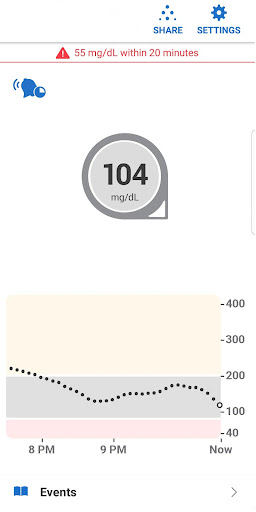
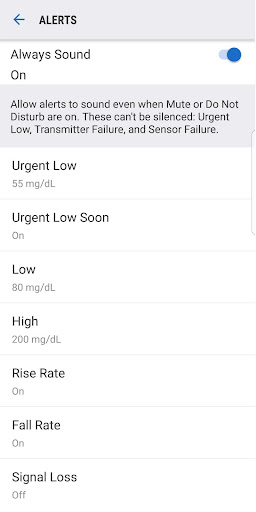
Only use this app if you have the Dexcom G6 or G6 Pro CGM Systems.
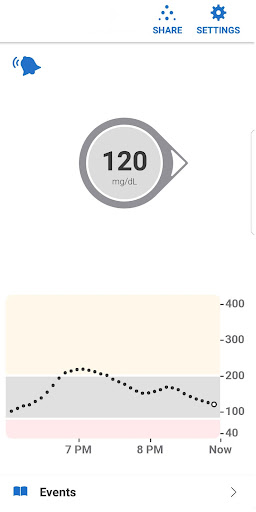
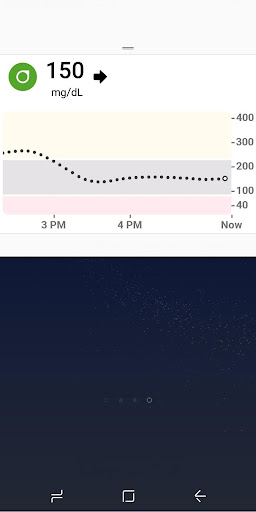
Always know your glucose number and where it’s heading with the Dexcom G6 and G6 Pro Continuous Glucose Monitoring (CGM) Systems –indicated for diabetes treatment decisions with zero fingersticks and no calibration.* A core feature of the Dexcom G6 and G6 Pro Systems is providing users with alarm/alerts based on their glucose level.
*Fingersticks required for diabetes management decisions if symptoms do not match readings.
Dexcom G6 and G6 Pro provide real-time glucose readings for patients with type 1 or type 2 diabetes every five minutes. Dexcom G6 and G6 Pro are indicated for children age 2 years and older.
The Dexcom G6 and G6 Pro Systems provide personalized trend alerts right on your smart device and lets you see when your glucose levels are going too low, or too high, so you can better manage your diabetes. The Alert Schedule** feature lets you schedule and customize a second set of alerts. For example, you can set the schedule to match your work hours and have different alert settings during the rest of the day. Custom alert sounds are available, including a Vibrate-Only option on the phone for glucose alerts. The only exception is the Urgent Low Alarm, which you can’t turn off.
The Always Sound** setting, which is on by default, allows you to receive certain Dexcom CGM Alerts even if your phone sound is off, set to vibrate, or in Do Not Disturb mode. This will allow you to silence calls or texts but still receive audible CGM Alarm and Alerts, including the Urgent Low Alarm, Low and High Glucose alerts, Urgent Low Soon Alert**, and Rise and Fall Rate alerts**. A Home screen icon shows you if your Alerts will sound or not. For safety, the Urgent Low Alarm and three alerts cannot be silenced: Transmitter Failed, Sensor Failed, and App Stopped.
Other features:
Share** your glucose data with up to ten followers in real time. Followers can monitor your glucose data and trends in real time on their compatible smart device with the Dexcom Follow** app. Share and Follow functions require an internet connection.
Health Connect access so you can share retrospective glucose data with third party apps
Quick Glance allows you to view your glucose data on the lock screen of your smart device
**Not available on Dexcom G6 Pro System
Wear OS Integration allows you to view glucose alerts and alarms from your Wear OS watch.
Tunjukkan Lagi

1. Muat turun pemasang MEmu dan selesaikan persediaan

2. Mulakan MEnu kemudian buka Google Play di desktop

3. Cari Dexcom G6 di Google Play
Install
4. Muat turun dan Pasang Dexcom G6
5. Apabila selesai pemasangan, menekan ikon itu untuk memulakan

6. Gunakan MENu untuk mengalami Dexcom G6 pada komputer anda
MEmu Play ialah emulator Android terbaik, dengan lebih 100 juta pengguna mengalami pengalaman aplikasi Android yang unggul. Teknologi virtualisasi MEmu membolehkan anda menjalankan beribu-ribu aplikasi Android dengan lancar pada komputer anda, walaupun yang paling mencabar.
Skrin lebih besar dengan grafik yang lebih baik; Tempoh yang panjang, tanpa had bateri atau data mudah alih.
Sokongan Keymapping penuh untuk kawalan tepat papan kekunci dan tetikus atau gamepad.
Pelbagai akaun permainan atau tugas pada satu PC sekaligus dengan pengurus pelbagai contoh.
Use Dexcom G6 on PC by following steps: